6.5 “New recipe” Icon
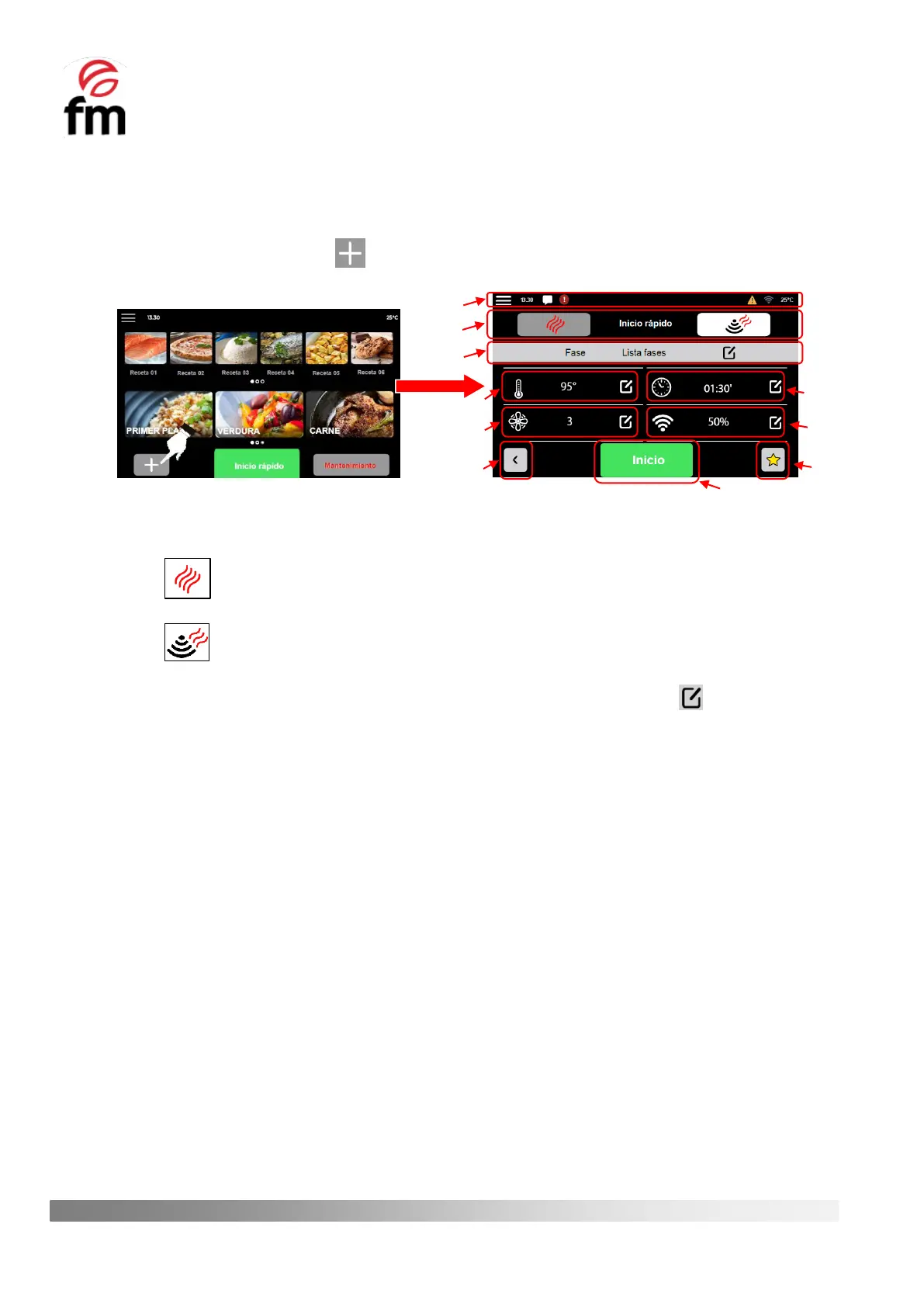
Through this icon you can access the main screen for configuring the parameters of a recipe for its subsequent start-
up. To do this, you must carry out the following steps:
1. Make sure that the device is switched on and no operation is in progress.
2. From the home screen, click the icon and you will get access to the parameter configuration screen of a
recipe.
The parameter configuration screen of a recipe is structured as follows:
1. Notification bar: contains the same information as the notificación bar on the home screen (see section 6.3)
2. Cooking mode selection group: allows you to select the desired cooking mode for each recipe, as follows:
“CONVECTION MODE”: in this mode, only the heating element of the appliance is activated to
cook the food.
“MICROWAVE + CONVECTION MODE”: in this mode, the microwaves are activated together with
the resistance of the device.
3. Phase editing group: allows you to edit the phases of a recipe by clicking on the icon . In addition, while a
firing cycle is running, it displays information on the phase being executed.
4. “TEMPERATURE” Icon: allows you to select the desired temperature value for the cooking cycle to be carried
out, this can be between 30ºC and 270ºC. This icon is active in both “convection mode” and “convection +
microwave mode".
5. “TURBINE SPEED” Icon: allows you to select the speed of rotation of the inner chamber turbine, with 1 being the
minimum speed and 6 the maximum speed. This icon is active in both “convection mode” and “convection +
microwave mode”.
6. “BACK” Icon: by clicking on this icon, we return to the initial screen of the device.
7. “TIME” Icon: icon allows you to select the desired cooking time for the recipe to be cooked. This icon is active in
both "convection mode" and "convection + microwave mode".
8. “MICROWAVE POWER” Icon: allows you to select the desired microwave power level between 4 percentage
values, these being 25%-50%-75%-100%. This icon is only active in "convection + microwave mode"
9. “FAVOURITES” Icon: allows you to classify a recipe within the group of favourite recipes if you click on this icon.
All recipes in which this icon is shaded in yellow will be recipes that take part of the favourites group.
10. “HOME” Icon: by clicking on this icon we start a recipe (see section 6.7) whose parameters have already been
pre-set.



 To Next Page