Ed.:21 - Ver.:01 - 01/01/2021 31
ST-F41/42 MODELS___________________________________________________________
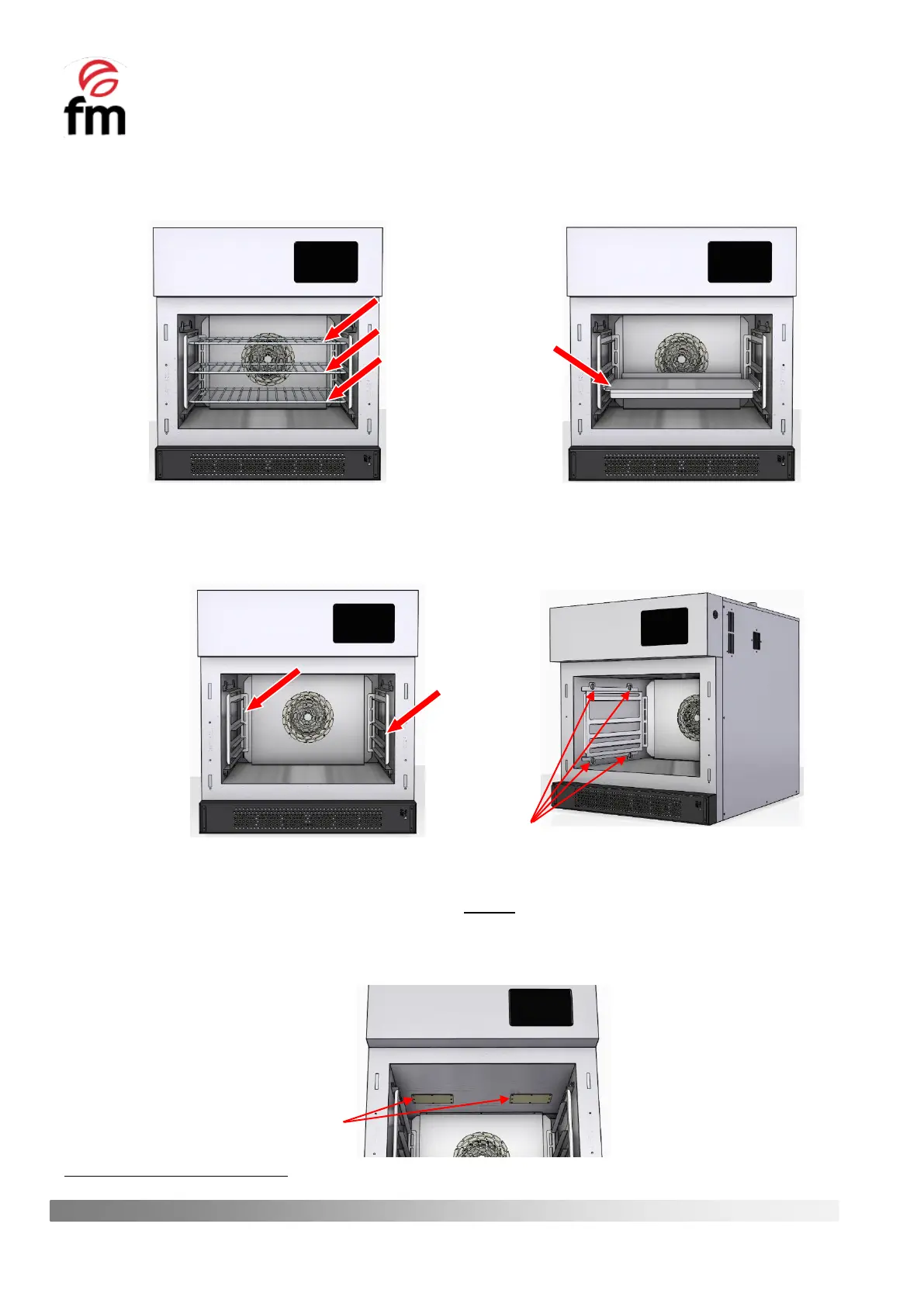
a. Remove the food support tray (or trays):
b. Remove the tray supports (optional) in order to facilitate the cleaning of the inner chamber side covers. To
do this, remove the 4 screws provided on each of the supports. If necessary, you can use a coin to make it
easier to remove them:
c. Clean the interior chamber of the oven, taking SPECIAL CARE with the PROTECTIVE CAPS of the
MAGNETRONS
outlet ducts. These caps should NEVER be cleaned with corrosive or aggressive products
not recommended by the manufacturer, as they may cause immediate deterioration of the caps and
malfunctioning of the appliance. If in doubt about the cleaning products to be used, ALWAYS USE WARM
WATER to clean the interior chamber:
If the oven has only one magnetrón, one of these covers shall be a blanking plate.



 To Next Page