focusrite.com Tell the world 20
Recording a phone
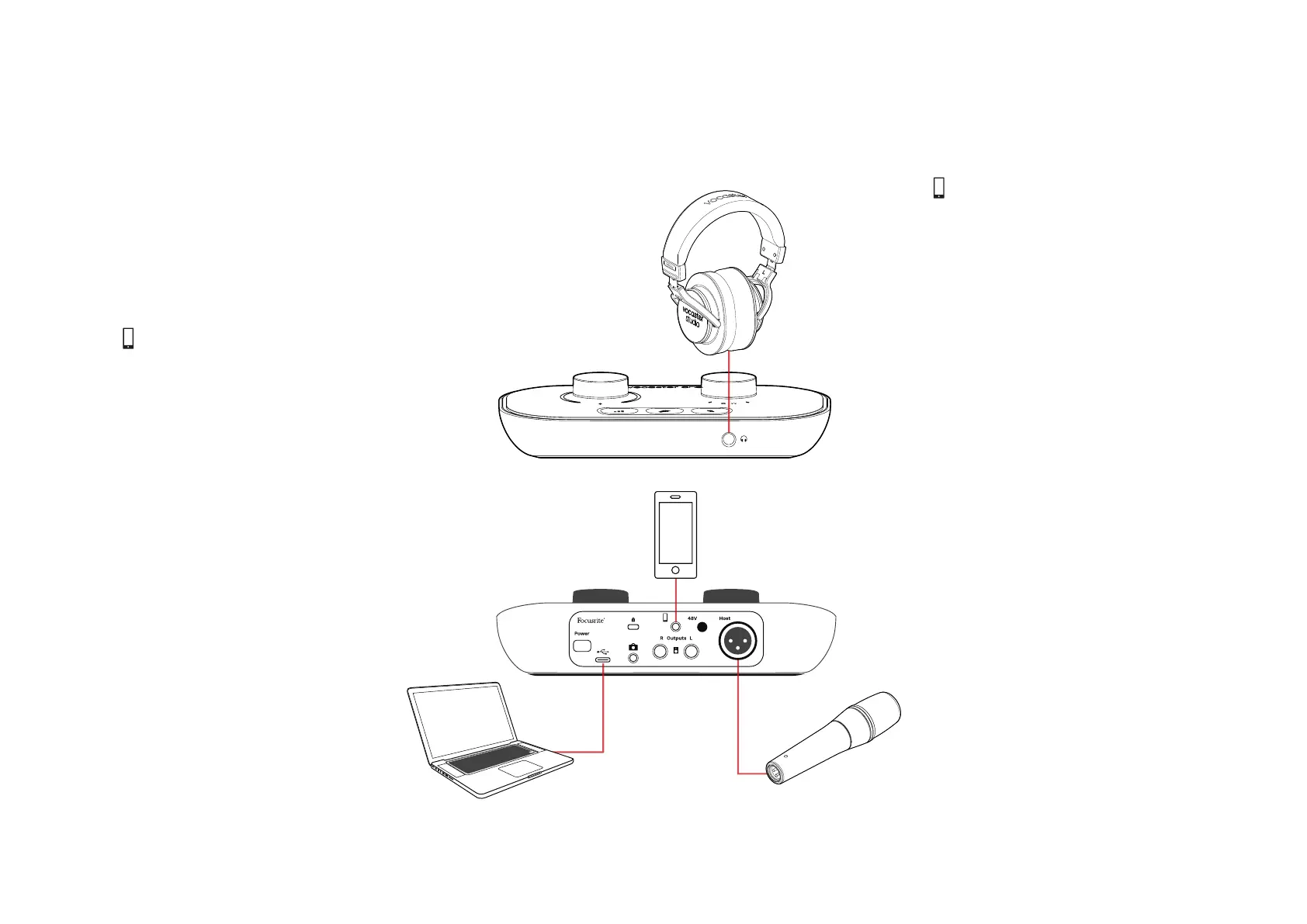
You can connect a phone to Vocaster One
to record a conversation, or to record music
from the phone.
The rear panel has a phone connector,
marked . This is a 3.5 mm TRRS jack socket,
use a 3.5mm TRRS jack cable to connect
to the phone’s headphone socket, which is
normally a 3.5 mm TRRS socket.
A 3.5mm TRS cable will work, but you may
not get two-way communication with your
phone guest.
If the phone does not have a 3.5 mm
headphone port, you can use a 3.5 mm TRRS
headphone adaptor.
Vocaster One records audio from a phone in
mono.
The connector also feeds Vocaster One’s
output back to the phone so the person on
the phone call can hear the whole podcast
mix, but without their own voice. This type
of mix is known as ‘mix-minus’: it ensures the
caller will not hear their voice delayed or with
echoes.
The signal level to the phone depends on the
setting of the input channel sliders in Vocaster
Hub’s mixer, but is unaffected by the master
output slider. The signal fed to the phone is a
mono version of the stereo mix, because the
phone’s input is a mono microphone.
VOCASTER HUB SOFTWARE


 To Next Page