
 Need help?
Do you have a question about the Focusrite Clarett 4 Pre USB and is the answer not in the manual?
Guide to downloading and installing the necessary Focusrite Control software and drivers.
Instructions for registering the Clarett 4Pre USB product online to access software and updates.
Details the connectors, controls, and indicators located on the front panel of the Clarett 4Pre USB.
Steps for selecting the Clarett 4Pre USB as the audio input/output device in your operating system.
Instructions for configuring the Clarett 4Pre USB as the audio device within your Digital Audio Workstation (DAW).
Illustrates a typical setup for multitrack recording a small band using the Clarett 4Pre USB.
Demonstrates recording drums using the optical connection for expanded input capability.
Explains how to create and route headphone mixes for musicians during recording sessions.
Detailed technical performance metrics for microphone, line, and instrument inputs/outputs.
Specifications on connectors, dimensions, weight, and power requirements of the Clarett 4Pre USB.
The Focusrite Clarett 4Pre USB is a professional USB audio interface designed for high-quality audio recording and routing to and from a computer recording system, offering super-low latency. It can also function as a standalone interface for live performances, leveraging its high-quality analog microphone preamps.
The Clarett 4Pre USB provides comprehensive connectivity for microphones, musical instruments, line-level audio signals, and digital audio signals, all routed through your computer's USB port. Signals from the physical inputs can be directed to your audio recording software or digital audio workstation (DAW), and similarly, outputs from the DAW can be configured to appear at the unit's physical outputs. This allows for recording various audio sources—mics, instruments, etc.—into your DAW and then playing them back through amplifiers, speakers, powered monitors, headphones, or other analog or digital audio equipment.
A key feature of the Clarett 4Pre USB is its analog preamplifier design. Beyond offering class-leading dynamic range and ample gain, the circuitry includes a unique AIR function. This function, individually selectable on each channel, subtly modifies the pre-amp's frequency response to emulate the impedance and resonance characteristics of Focusrite's classic transformer-based ISA mic preamps. When used with quality microphones, this results in enhanced clarity and definition in the mid-frequency range, particularly beneficial for vocals and acoustic instruments.
The Clarett 4Pre USB also functions as a MIDI interface, enabling your computer to connect with other MIDI equipment in your studio.
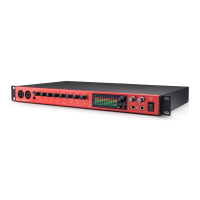
The front panel of the Clarett 4Pre USB features four combo XLR input sockets, allowing connections for microphones via XLR, or line-level and instrument signals (e.g., guitar) via 1/4" jacks. Inputs 1 and 2 support both TRS (balanced) and TS (unbalanced) jack plugs for instruments or line-level signals. Two 48V switches enable phantom power for mic inputs 1 & 2 and 3 & 4 respectively, indicated by red LEDs. Four rotary gain controls (Gain 1 to 4) adjust input levels, each with LED 'halos' that change color to indicate signal level: green for signal present (-42 dBFS), orange for -6 dBFS, and red for 0 dBFS. Two red INST LEDs illuminate when Instrument mode is selected for inputs 1 or 2 via Focusrite Control, converting the line input to a high-impedance unbalanced input suitable for 2-pole (TS) jack plugs. Four yellow AIR LEDs, one per input, light up when the AIR function is activated, indicating the input stage is modeling Focusrite ISA mic preamps.
A green USB active LED confirms communication with the computer, while a green Locked LED indicates clock synchronization (either to the Clarett 4Pre USB's internal clock or an external digital input). The main monitor output level is controlled by the MONITOR knob, which typically adjusts the level at the main monitor outputs on the rear panel but can be configured in Focusrite Control to adjust other analog outputs. Two headphone outputs (Headphones 1 and 2) are available, each with its own volume control. Headphone 1 typically mirrors the mix of Line Outputs 3 and 4, while Headphone 2 can provide an independent mix using Outputs 5 and 6 in the software. A green POWER LED confirms DC power is connected.
The rear panel offers additional connectivity. LINE INPUTS 5 to 8 are four balanced analog line inputs on 1/4" TRS jack sockets, suitable for further line-level signals. LINE OUTPUTS 1 to 4 are four balanced analog line outputs on 1/4" jack sockets, typically used for main L and R speakers (Outputs 1 and 2) and additional line-level equipment (Outputs 3 and 4). The routing for all outputs can be defined in Focusrite Control. An OPTICAL INPUT (TOSLINK connector) supports eight channels of digital audio in ADAT format at 44.1/48 kHz or four channels at 88.2/96 kHz, and can also accept a stereo optical S/PDIF source. A USB-C™ connector allows connection to your computer using the supplied USB-C to USB-C or USB-C to USB-A cable. MIDI IN and MIDI OUT (standard 5-pin DIN sockets) facilitate connection to external MIDI equipment. SPDIF IN and OUT (two RCA sockets) carry two-channel digital audio signals in S/PDIF format, appearing as Inputs 9 and 10 and Outputs 7 and 8 in Focusrite Control. An external 12 V DC power input connects to the supplied AC adaptor (PSU), and a Power On/Off switch is provided. A Kensington security slot allows securing the unit.
Connecting the Clarett 4Pre USB involves powering it with the supplied AC adaptor and connecting it to your computer via USB-C. For computer audio setup, Mac users select the Focusrite device in System Preferences > Sound, while Windows users right-click the Focusrite device in Control Panel > Sound and set it as the Default Device in Recording and Playback tabs. Within your DAW, you must manually select "Focusrite 4Pre USB" (Mac) or "Focusrite USB ASIO" (Windows) as the I/O device.
For connecting loudspeakers, LINE OUTPUTS 1 and 2 typically drive monitoring speakers. Self-powered monitors connect directly, while passive loudspeakers require a separate stereo amplifier. Professional power amplifiers usually have balanced inputs, requiring 3-pole (TRS) 1/4" jacks. All line output connectors are electronically balanced 3-pole (TRS) 1/4" jack sockets. Consumer amplifiers and small powered monitors with unbalanced RCA inputs can also be used. For mixing, additional speakers can be connected to LINE OUTPUTS 3 and 4, with routing configured in Focusrite Control.
The Clarett 4Pre USB supports "low latency monitoring" through Focusrite Control, allowing musicians to hear their input signals directly at the Clarett 4Pre's headphone and line outputs with minimal delay, alongside computer playback. This is crucial for performers recording overdubs, as it bypasses the latency introduced by software processing.
The device's input capability can be expanded using the ADAT input port (OPTICAL IN). For example, connecting an 8-channel microphone preamplifier like the Clarett OctoPre via a TOSLINK optical cable provides an additional 8 audio inputs at 44.1/48 kHz or four channels at 88.2/96 kHz. Both devices must be synchronized to the same sample rate, typically by selecting ADAT as the clock source in Focusrite Control's Device Settings tab. These additional inputs can be routed and included in musician's headphone mixes as needed.
For foldback while recording, Focusrite Control allows defining multiple custom mixes (mono or stereo) that can be routed to any of the Clarett 4Pre USB's outputs. This enables individual musicians to receive tailored foldback mixes, comprising their own input, live contributions from other performers, and recorded DAW tracks. Headphone 1's mix typically mirrors Line Outputs 3 and 4, while Headphone 2 can have an independent mix using Outputs 5 and 6 in the software. For additional headphone pairs, an external headphone amplifier can be integrated into the setup. When sourcing monitor mixes from input signals, it is important to mute the DAW channels being recorded to avoid hearing a delayed echo.
The accompanying software application, Focusrite Control, is designed for minimal user interaction, facilitating easy configuration of signal routings for common recording tasks. For more complex scenarios, it offers extensive routing and monitoring options, along with control over global hardware settings like sample rate and synchronization. Focusrite Control and its dedicated User Guide can be downloaded from the Focusrite website. An iOS app, Focusrite iOS Control, is also available from the App Store, allowing WiFi control of Focusrite Control from an iOS device.
The Clarett 4Pre USB's LINE OUTPUTS 1 and 2 incorporate "anti-thump" circuitry to protect speakers if the unit is turned on while speakers (and amplifiers) are connected and active. However, LINE OUTPUTS 3 and 4 do not have this circuitry. When using additional speakers connected to outputs 3 and 4, it is recommended to power on the Clarett 4Pre USB first, then the speakers or power amplifier. Generally, it is good audio practice to turn on any speaker system after turning on the equipment feeding it.
For troubleshooting queries, users are directed to the Focusrite Help Centre online. The device is designed to be class-compliant on Macs, meaning no additional drivers are required. For Windows users, the necessary driver is included within the Focusrite Control download. Up-to-date information on computer and operating system compatibility for all Clarett products is available on the Focusrite support website.
 General
| AD/DA Conversion | 24-bit/192kHz |
|---|---|
| USB Compatibility | USB 2.0 |
| Number of Preamps | 4 |
| Instrument Inputs | 2 |
| Line Inputs | 4 |
| Line Outputs | 4 |
| MIDI I/O | Yes |
| Form Factor | Desktop |
| Headphone Outputs | 2 |
| Phantom Power | +48V |
| Software Bundle | Ableton Live Lite, Focusrite's Red Plug-in Suite |
| Digital Inputs | ADAT |
| Digital Outputs | ADAT (8 channels at 44.1/48kHz, 4 channels at 88.2/96kHz) |
| OS Compatibility | Windows, macOS |
| Audio Inputs | 4 x XLR/TRS combo inputs |
| Simultaneous I/O | 18 inputs / 8 outputs |













 To Next Page