
 Need help?
Do you have a question about the Focusrite Clarett+ 4Pre and is the answer not in the manual?
Describes the purpose and core benefits of the Clarett+ 4Pre audio interface.
Details the key capabilities, advanced preamps, converters, and connectivity options.
Lists all accessories and components provided in the product packaging.
Outlines the necessary computer hardware and operating system for compatibility.
Guide to downloading and installing the necessary software and drivers.
Steps for registering the device to access updates and bundled software.
Details on input jacks, gain controls, and indicators on the front panel.
Description of all input/output ports and power connections on the rear panel.
Setting the device as the default audio input/output in macOS or Windows.
Configuring the interface's audio settings within your Digital Audio Workstation software.
Instructions for connecting self-powered monitors directly to the line outputs.
Guidance for connecting passive speakers via a separate stereo amplifier.
Example setup for recording multiple instruments and vocals live.
Explanation of audio delay and techniques for low-latency monitoring.
Setup for drum recording, including ADAT expansion options.
How to create and route independent headphone mixes for musicians.
Introduction to the software for managing interface settings and routing.
Detailed technical data on frequency response, dynamic range, THD+N, and gain.
Information on connectors, dimensions, weight, and electrical properties.
Information and resources for resolving common operational issues.
Information on trademarks, copyright, and legal disclaimers.
The Clarett+ 4Pre is a studio-grade audio interface designed for music makers who prioritize high-quality recording and mixing. It offers a comprehensive set of features for capturing clear and powerful audio, suitable for both PC and Mac environments.
At its core, the Clarett+ 4Pre boasts four next-generation, high-performance Clarett+ preamps. These preamps are engineered to deliver immense headroom, low distortion, and low noise, ensuring that every nuance of vocals, drums, and acoustic instruments is captured with exceptional clarity. A key feature of these preamps is the "All-analogue Air" function, which modifies the input stage's frequency response to emulate the sound of classic, transformer-based Focusrite ISA mic preamps. This allows users to achieve a rich, vintage tone for their recordings. The device also includes two JFET instrument inputs, specifically designed to preserve the natural character and tone of guitars when plugged in directly.
The Clarett+ 4Pre is equipped with new and improved, extremely high-performance A-D and D-A converters. These converters are crucial for achieving tighter mixes, delivering extremely low noise, and providing a high dynamic range, all of which contribute to more accurate and professional-sounding recordings. For monitoring, the interface features two true-to-life headphone outputs, designed to inspire artists by allowing them to hear every detail of their performance, which can lead to better vocal and instrumental takes.
Beyond its audio capabilities, the Clarett+ 4Pre also functions as a MIDI interface, enabling seamless connection between your computer and other MIDI equipment in your studio. This expands its utility for producers and musicians working with synthesizers, drum machines, and other MIDI-controlled devices.
The interface is designed to facilitate collaboration, offering the ability to record up to 18 input channels simultaneously. This expandability is achieved through its ADAT input, which allows for the connection of additional devices like the Clarett OctoPre. This provides eight channels of digital expandability, making the Clarett+ 4Pre a versatile hub for various stages of the creative process, from tracking a full band to intricate overdubs.
The accompanying software application, Focusrite Control, is integral to the Clarett+ 4Pre's operation. This software provides an intuitive way to configure signal routings for common recording tasks and offers extensive routing and monitoring options for more complex setups. It also allows users to control global hardware settings such as sample rate and synchronization. Focusrite Control can be downloaded from the Focusrite website, and a dedicated iOS app, Focusrite iOS Control, is also available. This app communicates via WiFi with Focusrite Control running on your computer, allowing users to adjust monitor mixes and input settings remotely from their iOS devices, adding a layer of convenience and flexibility to the recording workflow.
For connecting to a computer, the Clarett+ 4Pre features a USB-C™ port and comes with both USB-C to USB-C and USB-C to USB-A cables, ensuring compatibility with a wide range of systems. On Windows, Focusrite Control installs the necessary drivers, while Mac users benefit from class-compliant operation, requiring no additional drivers.
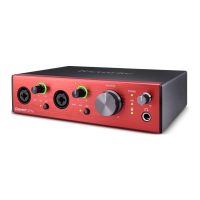
The front panel of the Clarett+ 4Pre provides easy access to input gain controls and connectors for Mic, Line, and Instrument signals. Inputs 1-4 are combo XLR sockets, accommodating microphones via XLR or line-level signals via ¼" jacks. Inputs 1 and 2 also accept instruments via ¼" jacks. Each of these inputs has a dedicated gain control with LED 'halos' that indicate signal level: green for signal present, orange for -6 dBFS, and red for 0 dBFS. Two 48V switches enable phantom power for mic inputs 1 & 2 and 3 & 4, with red LEDs indicating activation. The "INST" LEDs illuminate when Instrument mode is selected for inputs 1 or 2 via Focusrite Control, converting the line input to a high-impedance unbalanced input. The "AIR" LEDs indicate when the AIR function is active for each input, enhancing the sound with the ISA mic preamp emulation.
Monitoring controls on the front panel include a main monitor output level control, typically adjusting the level at the rear panel's main monitor outputs, but configurable via Focusrite Control to adjust both pairs of analogue outputs. Two headphone outputs, each with its own volume control, allow for independent monitoring mixes. Headphone 1 typically mirrors Line Outputs 3 and 4, while Headphone 2 can provide a separate mix using Outputs 5 and 6 in software. A green LED indicates USB connection, and another green LED confirms clock synchronization. A "POWER" LED confirms DC power is connected.
The rear panel offers additional connectivity: LINE INPUTS 5-8 are four balanced analogue line inputs on ¼" TRS jack sockets. LINE OUTPUTS 1-4 are four balanced analogue line outputs on ¼" jack sockets, typically used for main L/R speakers and additional line-level equipment. An OPTICAL INPUT (TOSLINK connector) provides eight channels of ADAT digital audio at 44.1/48 kHz or four channels at 88.2/96 kHz, also capable of accepting a stereo optical S/PDIF source. MIDI IN and MIDI OUT 5-pin DIN sockets allow connection to external MIDI equipment. SPDIF IN and OUT RCA sockets carry two-channel digital audio signals. An external DC power input (12 V DC, 2 A) and a power On/Off switch are also located on the rear panel, along with a Kensington security slot for physical security.
For optimal monitoring, the Clarett+ 4Pre incorporates "anti-thump" circuitry on LINE OUTPUTS 1 and 2, protecting speakers when the interface is turned on while speakers (and amplifiers) are active. However, this circuitry is not present on LINE OUTPUTS 3 and 4, so it's recommended to power on the Clarett+ 4Pre first, then the speakers or power amplifier, as a general good audio practice.
The Clarett+ 4Pre addresses latency concerns with its "low latency monitoring" feature, facilitated by Focusrite Control. This allows input signals to be routed directly to the headphone and line outputs with near-zero latency, enabling musicians to hear themselves in "real time" alongside computer playback, even with high DAW buffer sizes. This is particularly useful when recording overdubs on large projects with many DAW tracks, software instruments, and FX plug-ins, where high buffer settings might otherwise introduce noticeable delay. While software plug-in effects on live instruments won't be heard in the headphones in this scenario, they will still be present in the recording.
Maintenance of the Clarett+ 4Pre primarily involves ensuring proper software installation and configuration through Focusrite Control. Users are encouraged to consult the Focusrite Control Software Guide for detailed operating instructions and to visit support.focusrite.com for troubleshooting queries, articles, and tutorials. Regular checks for software, driver, and firmware updates are also recommended to ensure optimal performance and compatibility.
 General
| Mic Preamps | 4 |
|---|---|
| Line Inputs | 4 |
| Instrument Inputs | 2 |
| Line Outputs | 4 |
| Headphone Outputs | 2 |
| ADAT Input | Yes |
| ADAT Output | Yes |
| S/PDIF Input | Yes |
| S/PDIF Output | Yes |
| MIDI I/O | Yes |
| USB Type | USB-C |
| Sample Rate | Up to 192 kHz |
| Bit Depth | 24-bit |
| Type | USB Audio Interface |
| Connectivity | USB |
| Phantom Power | Yes |
| Digital Inputs | ADAT, S/PDIF |
| Digital Outputs | ADAT, S/PDIF |
| Headphones | 2 |
| Software Included | Focusrite Control, Softube Time & Tone Bundle |
| Analog Inputs | 4 x XLR/TRS Combo, 2 x 1/4" Instrument |













 To Next Page