10
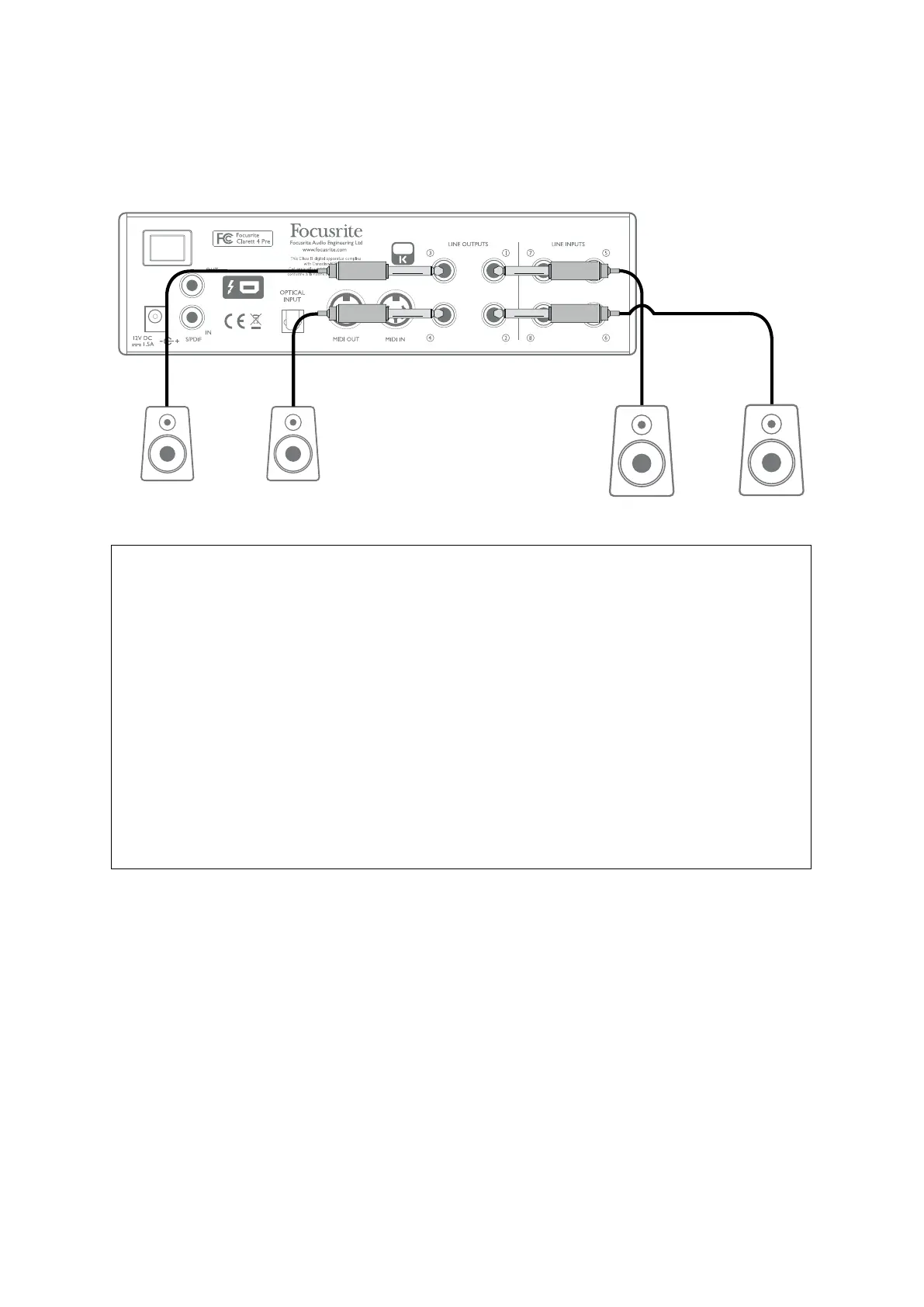
When mixing, you can connect an additional pair of speakers (mid-eld. near-eld, etc.) to
LINE OUTPUTS 3 and 4 to check your mix on different types of speaker. You can congure Focusrite
Control to route the mix to these outputs as well as Outputs 1 and 2.
Main
Monitor
Speakers
Additional
Monitor
Speakers
IMPORTANT:
LINE OUTPUTS 1 and 2 incorporate “anti-thump” circuitry that protects your speakers
if the Clarett 4Pre is turned on while the speakers (and amplier if used) are connected
and active.
LINE OUTPUTS 3 and 4 do not have this circuitry.
If you’re using additional speakers connected to these outputs, we recommend you
power your Clarett 4Pre on rst,
then
turn on the speakers or power amplier. But get
into the habit of following the general rule in any case - it is
always
good audio practice
to turn on a speaker system of any kind
after
turning on the equipment feeding it.














 To Next Page