11
Examples of Usage
The Clarett 4Pre is an excellent choice for numerous recording and monitoring applications. Some
typical congurations are shown below.
1. Recording a solo artist
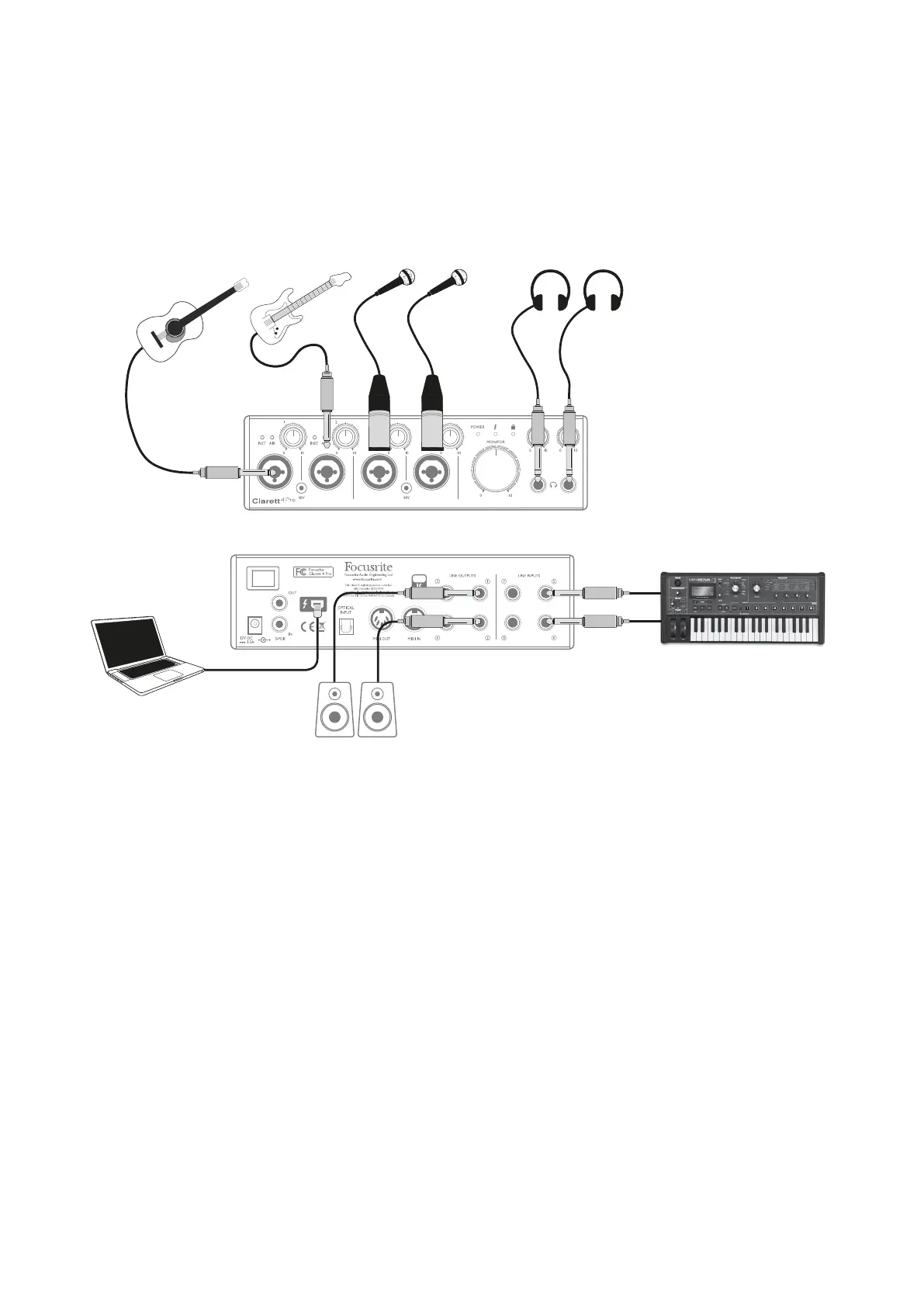
This setup shows a typical conguration for multitrack recording with DAW software on your
computer.
In this example we are making a live recording of a small band consisting of electro-acoustic
guitar, bass guitar, synthesiser and two vocalists. Two microphones and the two guitars are shown
connected to the Clarett 4Pre’s front panel inputs.
Note that only Inputs 1 and 2 can be congured to accept instruments directly, so we have used these
two inputs for the two guitars.
Ensure INST mode is selected for Inputs 1 and 2 from Focusrite Control, and the INST LEDs are
illuminated. The two mics for vocals are plugged into Inputs 3 and 4; if they are condenser mics, press
the 48V button to enable phantom power. The stereo line output from the synthesiser is connected to
LINE INPUTS 5 and 6 on the rear panel.
You can monitor the recording via Headphone Output 1, using Focusrite Control to set up your
monitoring mix. A second, different mix can be created if and can be routed to Headphone Output 2.














 To Next Page