16
EXAMPLES OF USAGE
The Clarett+ 8Pre is an excellent choice for many recording and monitoring applications. Some
typical congurations are shown below.
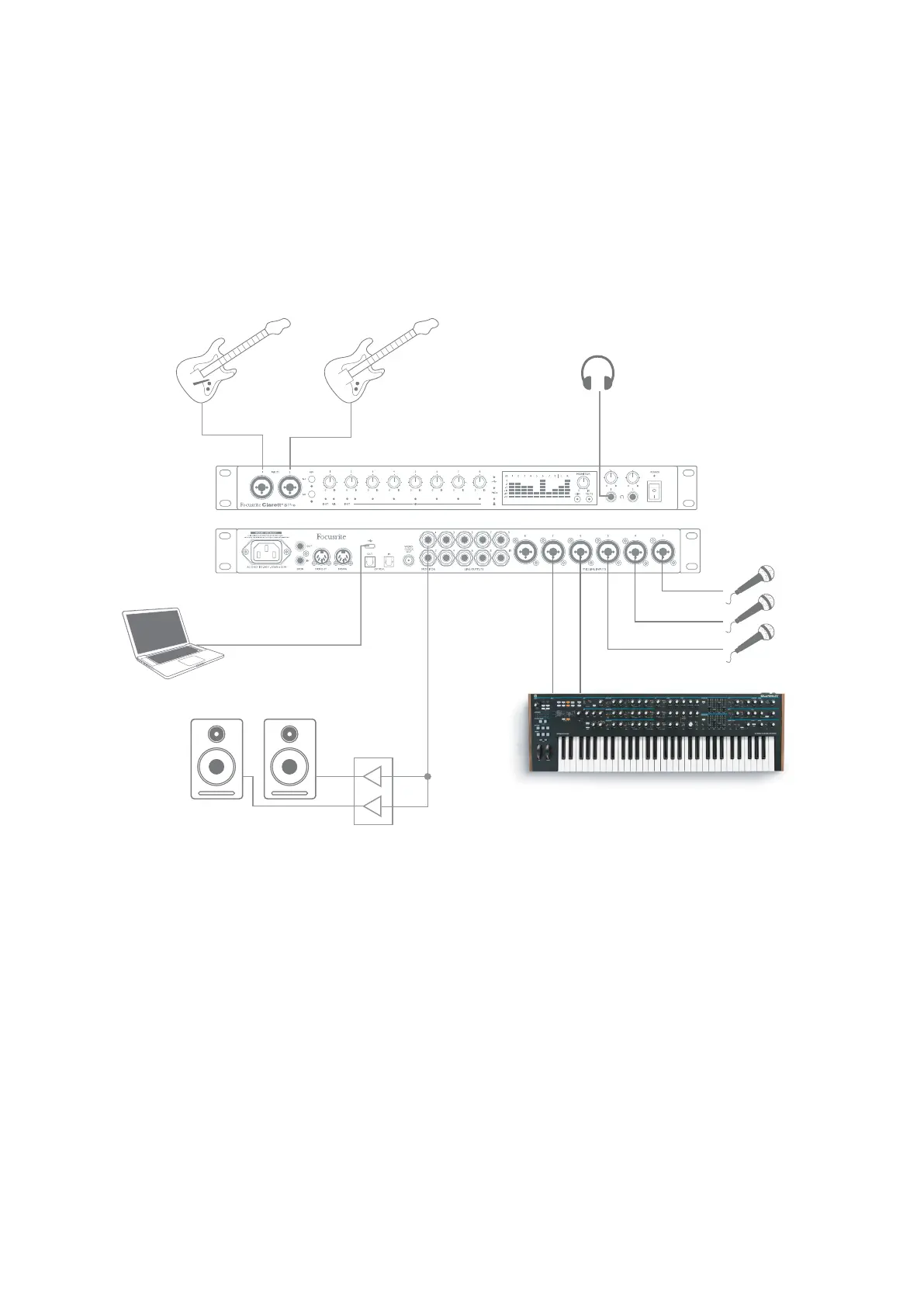
1. Recording a band
Bass GuitarGuitar
(Front Panel)
(Rear Panel)
USB
Engineer’s Headphones
Stereo Keys
This setup illustrates a typical conguration for multitrack recording with DAW software on your
computer.
A selection of sources – microphones, guitars and a keyboard – are shown connected to Clarett+
8Pre’s inputs. Note that only Inputs 1 and 2 can be congured to accept instruments directly, so we
have chosen to plug the guitars into these. Ensure Instrument mode is selected for Inputs 1 and 2
from Focusrite Control, and the INST LEDs are illuminated.
The connection to the computer running DAW software is via a USB cable. This will carry all input and
output signals between the DAW and the Clarett+ 8Pre. Once the audio setup is correctly congured
in the DAW, each input source will be automatically routed to its own DAW track for recording.













 To Next Page