EasyManua.ls Logo

Focusrite Scarlett Studio - User Manual

Focusrite Scarlett Studio
20 pages
Print Icon
To Next Page IconTo Next Page
Loading...
User Guide
www.focusrite.com
FA0807-01
Question and Answer IconNeed help?

Do you have a question about the Focusrite Scarlett Studio and is the answer not in the manual?

Summary

IMPORTANT SAFETY INSTRUCTIONS

ENVIRONMENTAL DECLARATION

For USA

Details FCC compliance and user instructions for US users.

For Canada

Details Canadian ICES-003 compliance for Canadian users.

RoHS Notice

Information on hazardous substance restrictions for EU and California.

OVERVIEW

Introduction

Welcome and purpose of the Scarlett Studio user guide.

Features

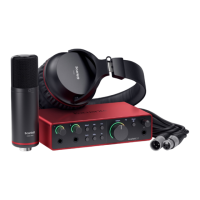
Overview of the Scarlett Studio package components and their function.

Box Contents

Lists all items included in the Scarlett Studio package.

System Requirements

Specifies the necessary hardware and OS for Mac and Windows.

GETTING STARTED

Software Installation

Instructions for installing the Scarlett 2i2 drivers and software on Mac/Windows.

Connecting your Scarlett 2 i2

Steps to connect the Scarlett 2i2 hardware to a computer via USB.

Audio Setup in Cubase LE (or your other DAW)

Guide on configuring audio inputs/outputs in Cubase LE or other DAWs.

Example of Usage

Connecting a microphone or instrument

Illustrates connecting mics and instruments to the Scarlett 2i2 inputs.

Recording with a microphone

Details on using the CM25 condenser microphone with the Scarlett 2i2, including phantom power.

Microphone Dos and Donts

Advice on microphone placement, handling, and room acoustics for recording.

Using Direct Monitoring

Explanation of how to use the direct monitoring feature for zero-latency monitoring.

Connecting Scarlett 2 i2 to headphones

How to connect headphones to the Scarlett 2i2 for monitoring audio playback.

Connecting Scarlett 2 i2 to loudspeakers

Instructions for connecting powered monitors or amplifiers to the Scarlett 2i2 line outputs.

HARDWARE FEATURES

Front Panel

Description of the Scarlett 2i2's front panel controls and connectors.

Back Panel

Description of the Scarlett 2i2's back panel connectors and security lock.

SPECIFICATIONS

Performance Specifications

Technical performance details for microphone, line, and instrument inputs, and line outputs.

Physical and Electrical Characteristics

Details on connectors, switching, phantom power, indicators, dimensions, and weight.

Scarlett Studio CM25 Microphone Specifications

Technical specifications for the included CM25 condenser microphone.

Scarlett HP60 Headphones Specifications

Technical specifications for the included HP60 headphones.

TROUBLESHOOTING

COPYRIGHT AND LEGAL NOTICES

Summary

IMPORTANT SAFETY INSTRUCTIONS

ENVIRONMENTAL DECLARATION

For USA

Details FCC compliance and user instructions for US users.

For Canada

Details Canadian ICES-003 compliance for Canadian users.

RoHS Notice

Information on hazardous substance restrictions for EU and California.

OVERVIEW

Introduction

Welcome and purpose of the Scarlett Studio user guide.

Features

Overview of the Scarlett Studio package components and their function.

Box Contents

Lists all items included in the Scarlett Studio package.

System Requirements

Specifies the necessary hardware and OS for Mac and Windows.

GETTING STARTED

Software Installation

Instructions for installing the Scarlett 2i2 drivers and software on Mac/Windows.

Connecting your Scarlett 2 i2

Steps to connect the Scarlett 2i2 hardware to a computer via USB.

Audio Setup in Cubase LE (or your other DAW)

Guide on configuring audio inputs/outputs in Cubase LE or other DAWs.

Example of Usage

Connecting a microphone or instrument

Illustrates connecting mics and instruments to the Scarlett 2i2 inputs.

Recording with a microphone

Details on using the CM25 condenser microphone with the Scarlett 2i2, including phantom power.

Microphone Dos and Donts

Advice on microphone placement, handling, and room acoustics for recording.

Using Direct Monitoring

Explanation of how to use the direct monitoring feature for zero-latency monitoring.

Connecting Scarlett 2 i2 to headphones

How to connect headphones to the Scarlett 2i2 for monitoring audio playback.

Connecting Scarlett 2 i2 to loudspeakers

Instructions for connecting powered monitors or amplifiers to the Scarlett 2i2 line outputs.

HARDWARE FEATURES

Front Panel

Description of the Scarlett 2i2's front panel controls and connectors.

Back Panel

Description of the Scarlett 2i2's back panel connectors and security lock.

SPECIFICATIONS

Performance Specifications

Technical performance details for microphone, line, and instrument inputs, and line outputs.

Physical and Electrical Characteristics

Details on connectors, switching, phantom power, indicators, dimensions, and weight.

Scarlett Studio CM25 Microphone Specifications

Technical specifications for the included CM25 condenser microphone.

Scarlett HP60 Headphones Specifications

Technical specifications for the included HP60 headphones.

TROUBLESHOOTING

COPYRIGHT AND LEGAL NOTICES

Focusrite Scarlett Studio Specifications

General IconGeneral
Interface TypeUSB Audio Interface
Phantom Power48V
Sample RateUp to 192 kHz
Bit Depth24-bit
USBUSB 2.0
Microphone TypeCondenser
Outputs2
Headphone Output1
Included SoftwareAbleton Live Lite

Related product manuals