13
Connecting Scarlett 2i2 to headphones
The Scarlett Studio package includes a pair of high quality headphones, the Scarlett Studio HP60.
They are lightweight and durable, and should prove comfortable to wear for extended periods. The
headband is adjustable.
The HP60 headphones have a low noise, oxygen-free copper cable, fitted with a ¼” (6.35 mm) 3-pole
(TRS) jack plug. This should be connected to the socket at the right hand side of the Scarlett 2i2 front
panel (indicated by a
symbol). The Scarlett 2i2’s headphone output is, of course, suitable for use
with other models of headphones.
The volume in the headphones can be adjusted by the rotary control immediately above the socket.
Please be aware that headphones are capable of generating very high sound pressure levels
at the ear; prolonged exposure to high sound levels may impair your hearing. Never turn
headphones volume up any further than necessary.
Connecting Scarlett 2i2 to loudspeakers
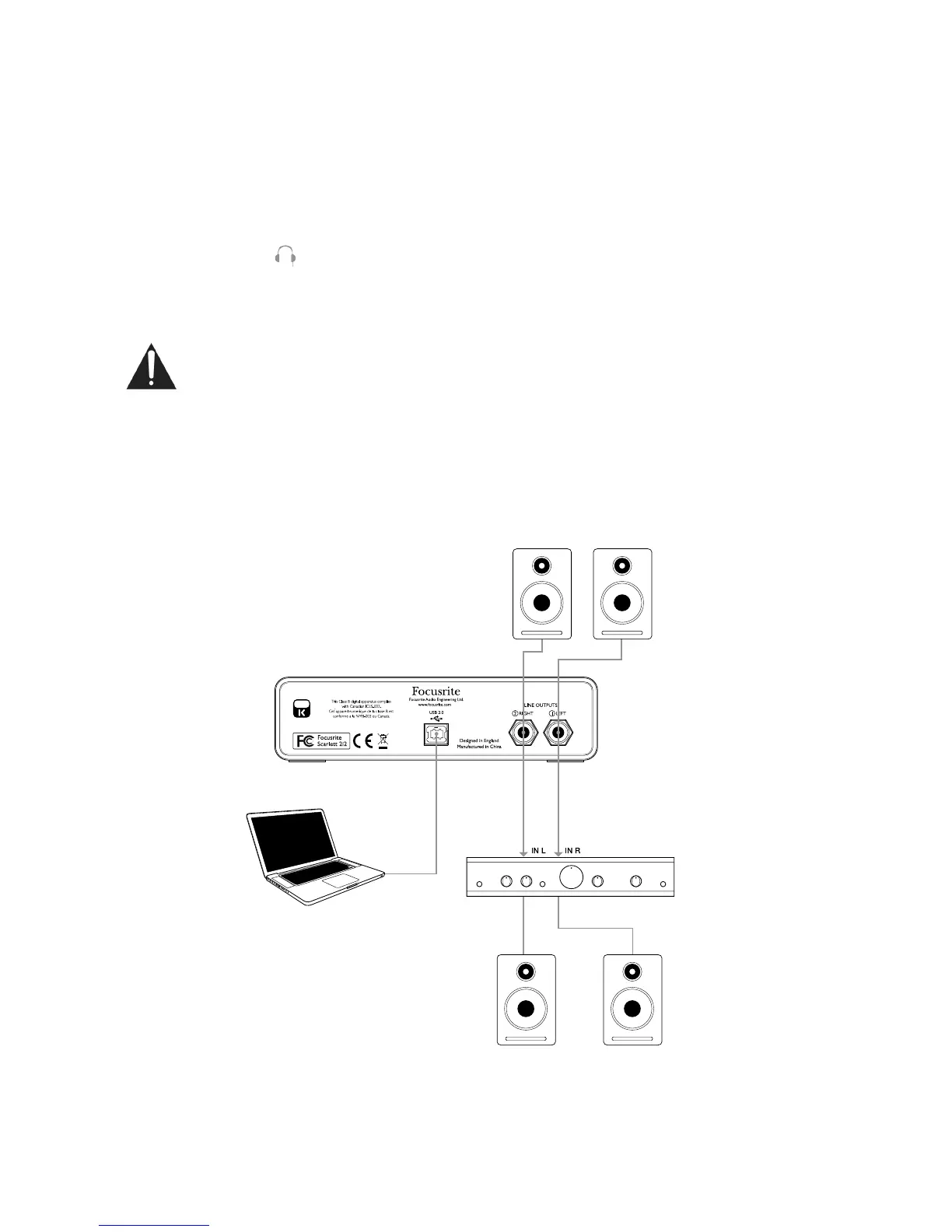
The 1/4” jack outputs on the rear panel can be used to connect monitoring speakers. Self-powered
monitors (i.e., typical computer speakers) incorporate internal amplifiers, and may be connected
directly. Larger, passive loudspeakers will require a separate stereo amplifier; in this case, the rear
panel outputs should be connected to the amplifier’s inputs.









 To Next Page