FoMaKo Focus Your Streaming www.fomako.net
2.
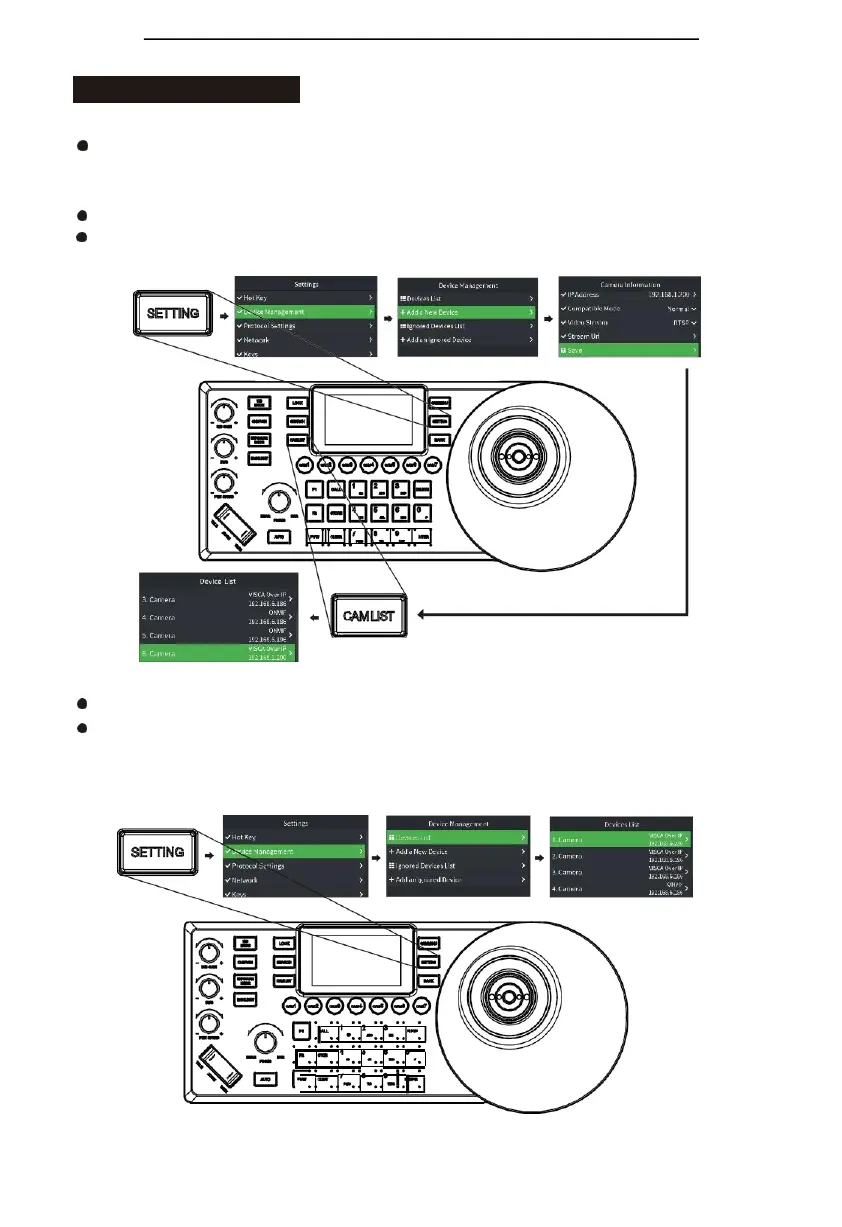
Manually add VISCA_IP, VISCA_TCP cameras to the keyboard:
Click "SETTING" to open the keyboard menu, select the "Device List" column, select the "Add
Device"column,modifythecorrespondingcameraparameters and click"Save" (whenthe IP address
needs to fill in an odd number, add 00 before the odd number, such as 005);
Exit keyboard menu;
Short press the "CAM LIST" button to open the camera list, use the joystick to select the added
custom camera (IP control).
3.
Edit camera list
Click "SETTING" to enter the menu, select "Device Management" column, select "Device List"
It can edit the devices added to the camera list from the "search list" and "add list"; (You can
edit camera name, protocol (ONVIF and NDI device list does not allow manual selection), IP
address, compatibility mode, video stream address, delete device, ONVIF device settings can
also edit user name and password)


 To Next Page