FoMaKo Focus Your Streaming www.fomako.net
Add IP camera to keyboard
1.
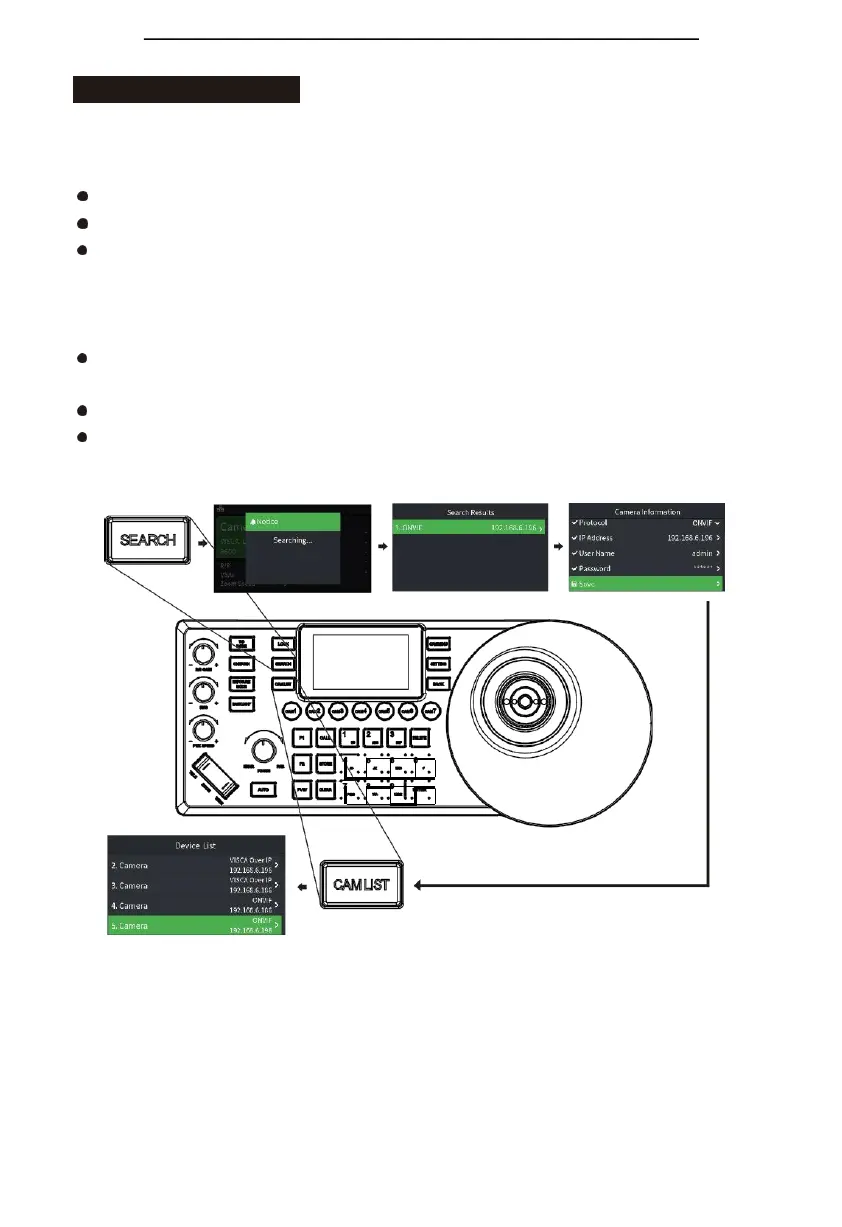
Search the local network and add the IP camera to the keyboard;
Press "SEARCH" button to search IP camera;
The keyboard screen displays "Searching for devices, please wait";
Display the discovered ONVIF / VISCA_IP cameras, use the joystick or "FOCUS" knob to browse
the discovered cameras;
(For discovered cameras, camera parameters can be modified, added to the camera list, and
added to the ignore list);
Edit discovered cameras and add cameras to the camera list (device that has been added to the
camera list will no longer be displayed in the search list);
Exit the search list;
Press the "CAME LIST" button to open the camera list, use the joystick or the "FOCUS" knob to
select the corresponding camera.


 To Next Page