FoMaKo Focus Your Streaming www.fomako.net
3.
Set, recall and delete preset position
set preset position
a.
.Move the camera to the desired position;
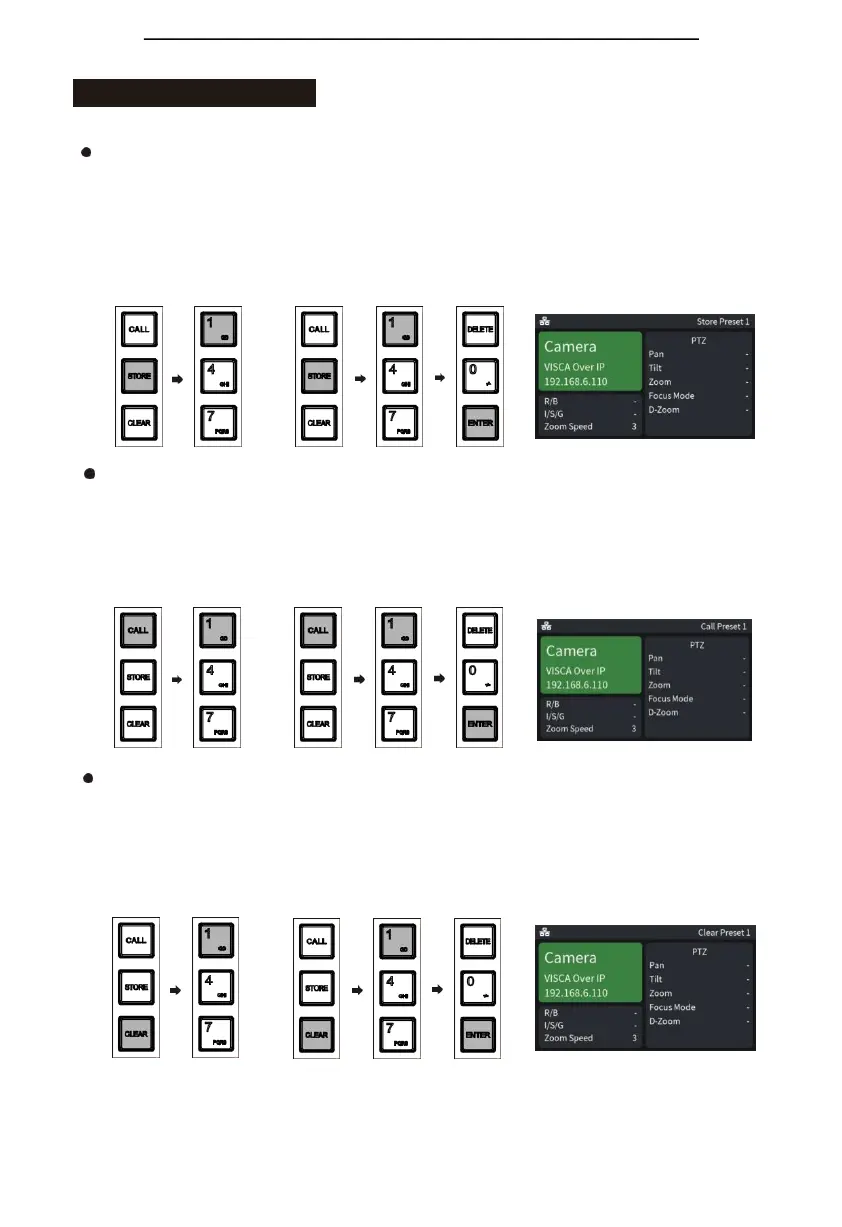
b.①Thepreset position mode is 10: first press the "STORE" key, and then press the number "1"
key to set the No. 1 preset position;
②The preset position mode is 255: first press the "STORE" key, and then press the number
"1" key, and then press the "ENTER" key to set the No. 1 preset position;
c.The upper right corner of the keyboard screen displays "Save Preset 1";
①
②
Call preset
a.①Thepreset position modeis 10:first press the"CALL" key,andthenpress the number "1" key
to call the No. 1 preset position;
②The preset position mode is 255: first press the "CALL" key, then press the number "1" key,
and then press the "ENTER" key to call the No. 1 preset position;
b.The upper right corner of the keyboard screen displays "Recall Preset 1";
①
②
Delete preset
a.①Thepreset position mode is 10: first press the "CLEAR" key,and thenpress the number "1" key
to delete the No. 1 preset position;
②The preset position mode is 255: first press the "CLEAR" key,thenpress the number "1" key,
and then press the "ENTER" key to delete the No. 1 preset position;
b.The upper right corner of the keyboard screen displays "Delete Preset 1".
①
②


 To Next Page