FoMaKo Focus Your Streaming www.fomako.net
4.
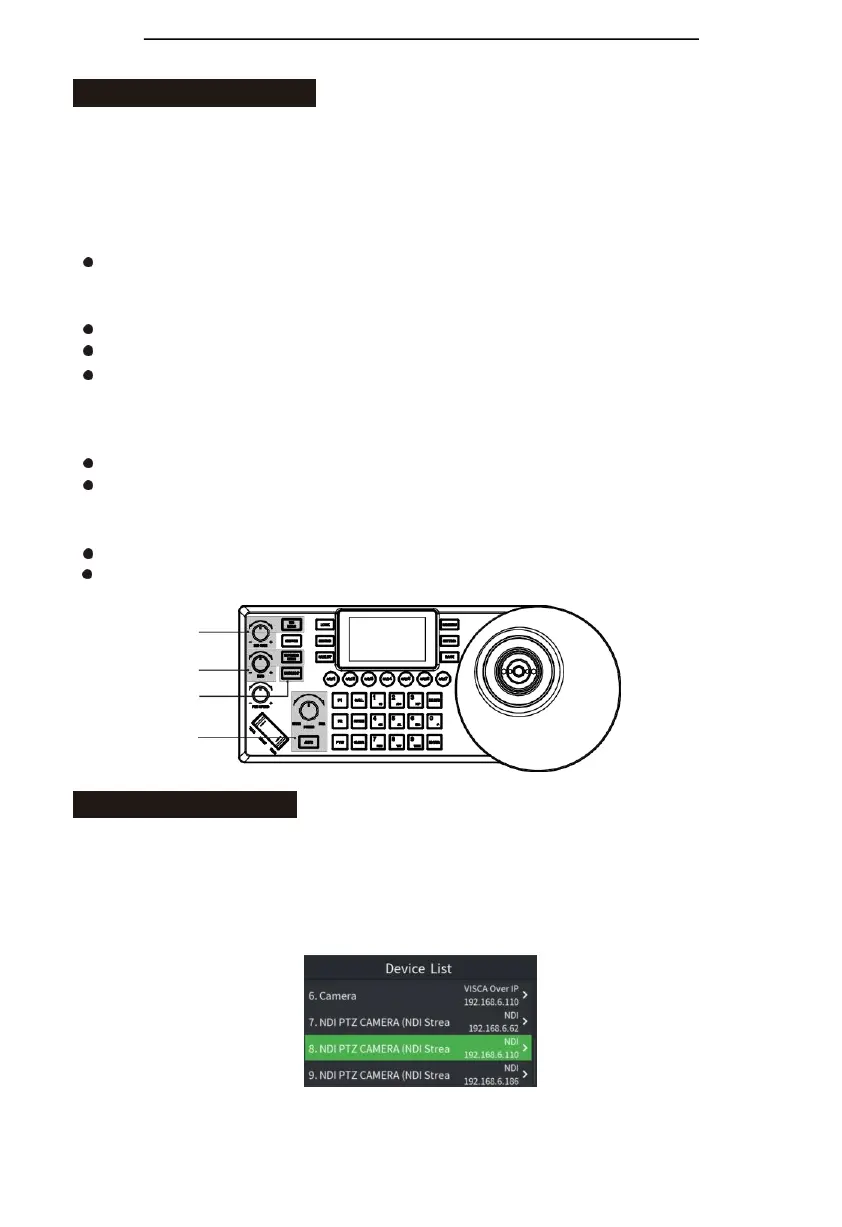
Adjust imageparameters
Use the image adjustment panel to set or adjust image parameters (only applicable to VISCA
and VISCA_IP protocols, PELCO /ONVIF/NDI protocol image adjustment function isincomplete);
Backlight compensation
Turn on/off the camera's backlight compensation via the "BACK LIGHT" button;
Exposure
The exposure mode can be switched through the "EXPOSURE MODE" button; Adjust the
parameter value in each mode by rotating the "I/S/G +/-" knob; Parameter switching in the
same mode, click the "I/S/G +/-" knob to switch (aperture,
shutter, gain);
White balance
Switch the white balance mode by using the "WB MODE" button;
By clicking the "R/B GAIN +/-" knob, switch the red/blue gain value parameter adjustment;
Focus
Manually adjust the focus (near/far) through the FOCUS knob "NERA/FAR" knob; Automatic
adjustment by using the AUTO button.
White balance
Exposure
Backlight
compensation
Focus
NDI protocol control
Connect the camera and keyboard in the same LAN;
Press "CAM LIST" to open the camera list, use the joystick or the "FOCUS" knob to select the
corresponding NDI protocol camera (for cameras that support NDI protocol, the IP will be
automatically added to the camera list when the network is connected, no need to search and add);
(Visca Over IP, Onvif protocols need to search for devices first and then manually add IP to the
camera list.)


 To Next Page