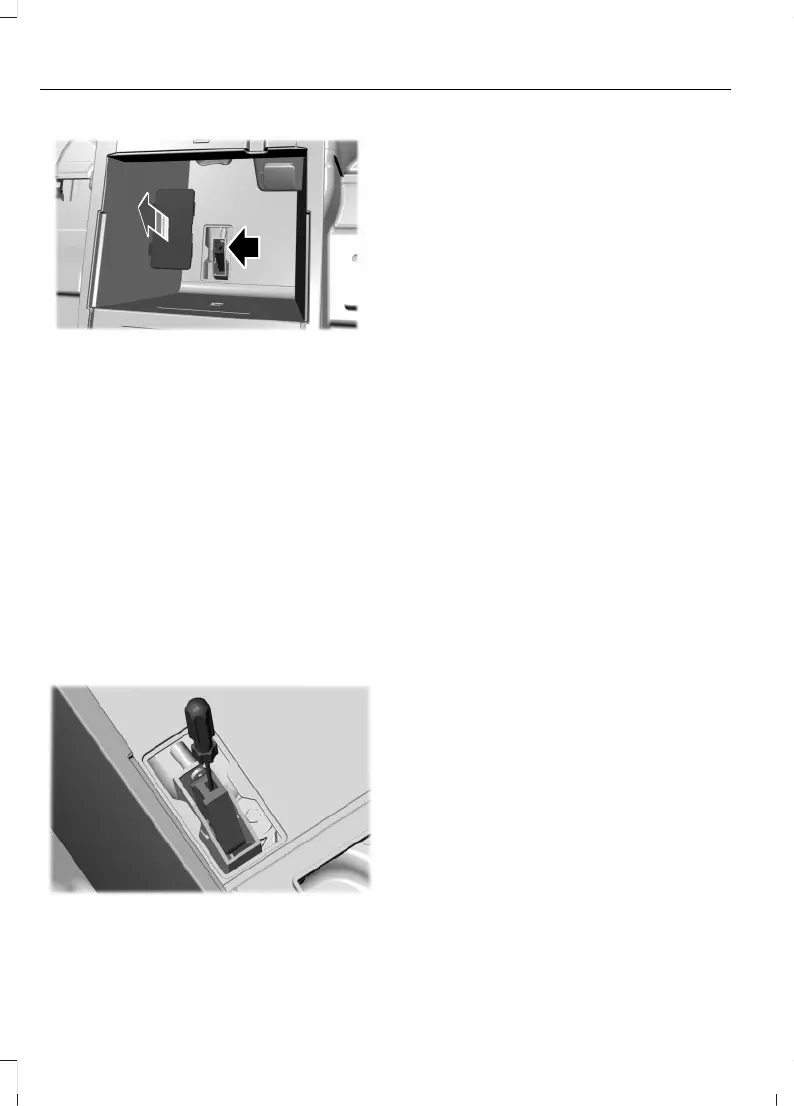
3. Sit in the driver seat.
4. Power your vehicle on without your
foot on the brake pedal.
Note: Do not attempt this procedure when
the engine is running. Failure to follow this
instruction could result in vehicle damage
not covered by the vehicle warranty.
5. Press and hold the brake pedal.
6. Insert the tool into the lever slot. Pull
the lever towards the rear of the vehicle
until it engages.
Note: The lever clicks as it engages.
Note: A tool longer than 5 in
(120 mm)could hit the underside of the
armrest console before the lever engages.
Note: Do not use excessive force. Failure to
follow this instruction could result in vehicle
damage not covered by the vehicle
warranty.
Note: A message appears when your
vehicle is out of park (P). If you do not
receive a message attempt the procedure
again.
Note: A warning lamp could illuminate.
7. Release the parking brake.
8. Switch your vehicle off.
9. Release the brake pedal.
Note: Your vehicle is free to roll.
10. Disconnect the negative battery cable
from the 12V battery as soon as it is
safe to do so.
Note: If your vehicle detects wheel speed
when the 12V battery is connected, the
electronic parking brake could apply.
Returning Your Vehicle to Normal
Mode
1. Connect the negative battery cable to
the 12V battery as soon as it is safe to
do so.
Note: If your vehicle detects wheel speed
when the 12V battery is connected, the
electronic parking brake could apply.
2. Apply the parking brake.
Note: If the 12V battery has run out of
charge, use an external power source to
apply the parking brake.
3. Sit in the driver seat.
4. Press and hold the brake pedal.
Note: Do not start your vehicle.
5. Insert the tool into the lever slot. Push
the tool down and pull towards the rear
of the vehicle to release the lever.
Remove the tool. The lever returns to
the stowed position automatically.
6. Start your vehicle.
206
Explorer (CTW) Canada/Mexico/United States of America, enUSA, Edition date: 202401, DOM
Automatic Transmission











 To Next Page