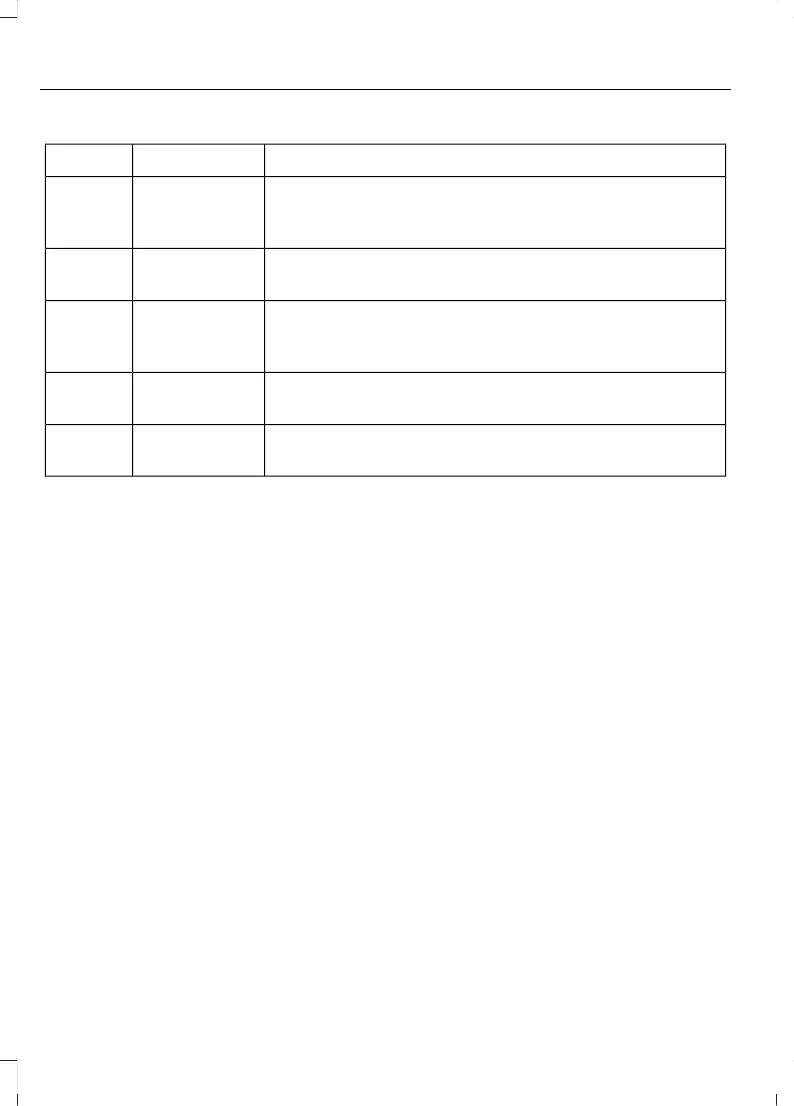
Action and DescriptionMenu ItemItem
This bar displays icons and messages pertaining to current
system activities including climate settings, voice
commands and phone functions such as text messages.
Status BarA
This button is available on the main screens. Pressing it
takes you to the home screen view.
HomeB
This shows the current time. You can set the clock manually
or have it controlled by the vehicle's GPS location. See
Settings (page 85).
ClockC
This displays the current outside temperature.Outside
Temperature
D
You can touch any of the buttons on this bar to select a
feature.
Feature BarE
The touchscreen allows you quick access
to all of your comfort, navigation,
communication and entertainment options.
Using the status and feature bar you can
quickly select the feature you want to use.
Note: Your system is equipped with a
feature that allows you to access and
control audio features for 10 minutes after
you switch the ignition off (and no doors
open).
The Status Bar
Additional icons also display in the status
bar depending on market, vehicle options
and current operation. If a feature is not
active, the icon does not display. Certain
icons may move to the left or right
depending on what options are active.
4
MKC (TME) , enUSA, Edition date: 01/2016, Second Printing
SYNC™ 3



 To Next Page