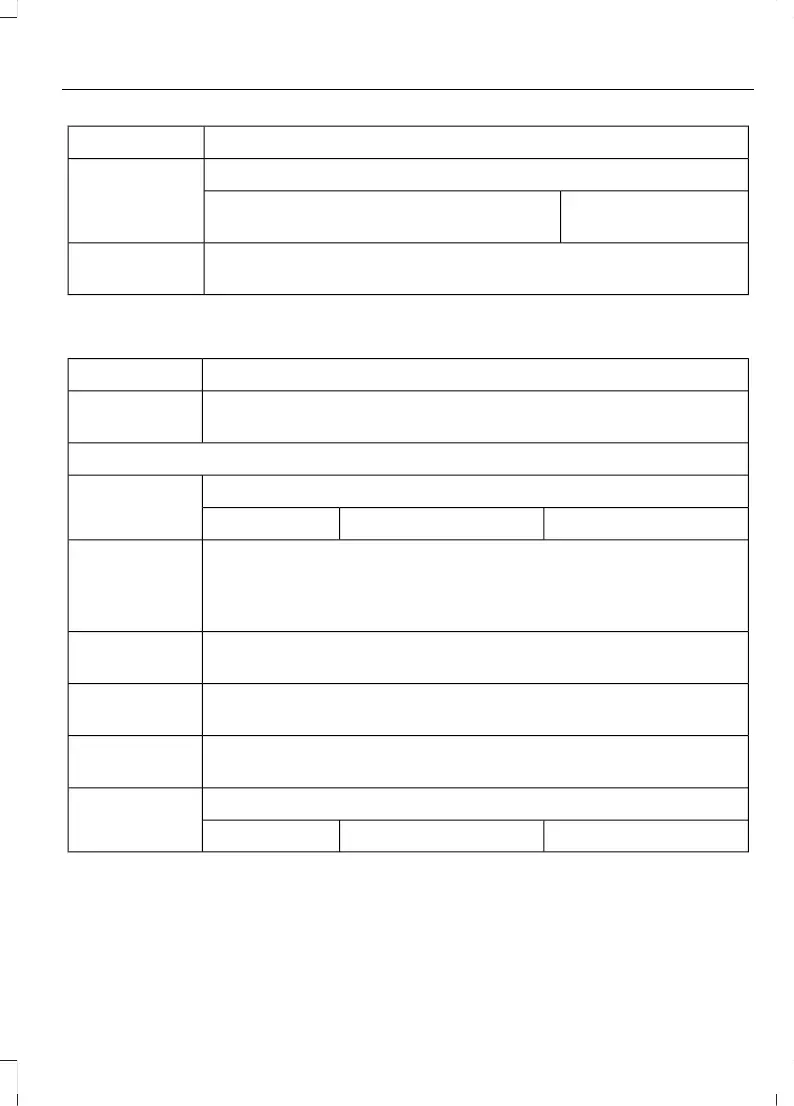
Action and DescriptionMenu Item
Enable this feature to display up to 3 POI icons on the navigation map.POI Icons
Select POIsOnce this feature is activated you can select
the icons you want displayed by selecting:
This menu allows you to choose which incident icons you would like
to have displayed on the navigation map.
Incident Map
Icons
Route Preferences
Second Level Messages, Actions and DescriptionsMenu Item
Route Prefer-
ences
Then select any of the following:
Choose to have the system display your chosen route type.Preferred Route
EcoFastestShortest
Bypass route selection in destination programming. The system only
calculates one route based on your preferred route setting.
Always Use ___
Route
When activated, the system uses your selected route type to calculate
only one route to the desired destination.
The system selects High Occupancy Vehicle or car pool lanes when
providing route guidance.
Use HOV Lanes
The system searches for and displays available parking locations as
you approach your destination.
Automatically
Find Parking
Select a level of cost for the calculated Eco Route. The higher the
setting, the longer the time allotment is for the route.
Eco Time
Penalty
You can select the following to have the system:Avoid Traffic
Problems
Avoid Ferries/Car TrainsAvoid Toll RoadsAvoid Freeways
93
MKC (TME) , enUSA, Edition date: 01/2016, Second Printing
SYNC™ 3



 To Next Page