14
Managing the FortiExtender device with FortiGate
FortiExtender requires no user configuration in most networks. Once linked, FortiGate can
automatically control the FortiExtender device and its modem via a CAPWAP tunnel.
To manage the FortiExtender device with FortiGate:
1. By default, configuration options for FortiExtender are hidden in the FortiGate web UI.
Use the following commands to enable it:
cong system global
set fortiextender enable
set wireless-controller enable
end
2. Use the following commands to allow CAPWAP on the port to which the FortExtender
unit is connected:
cong system interface
edit [port]
set allowaccess capwap
end
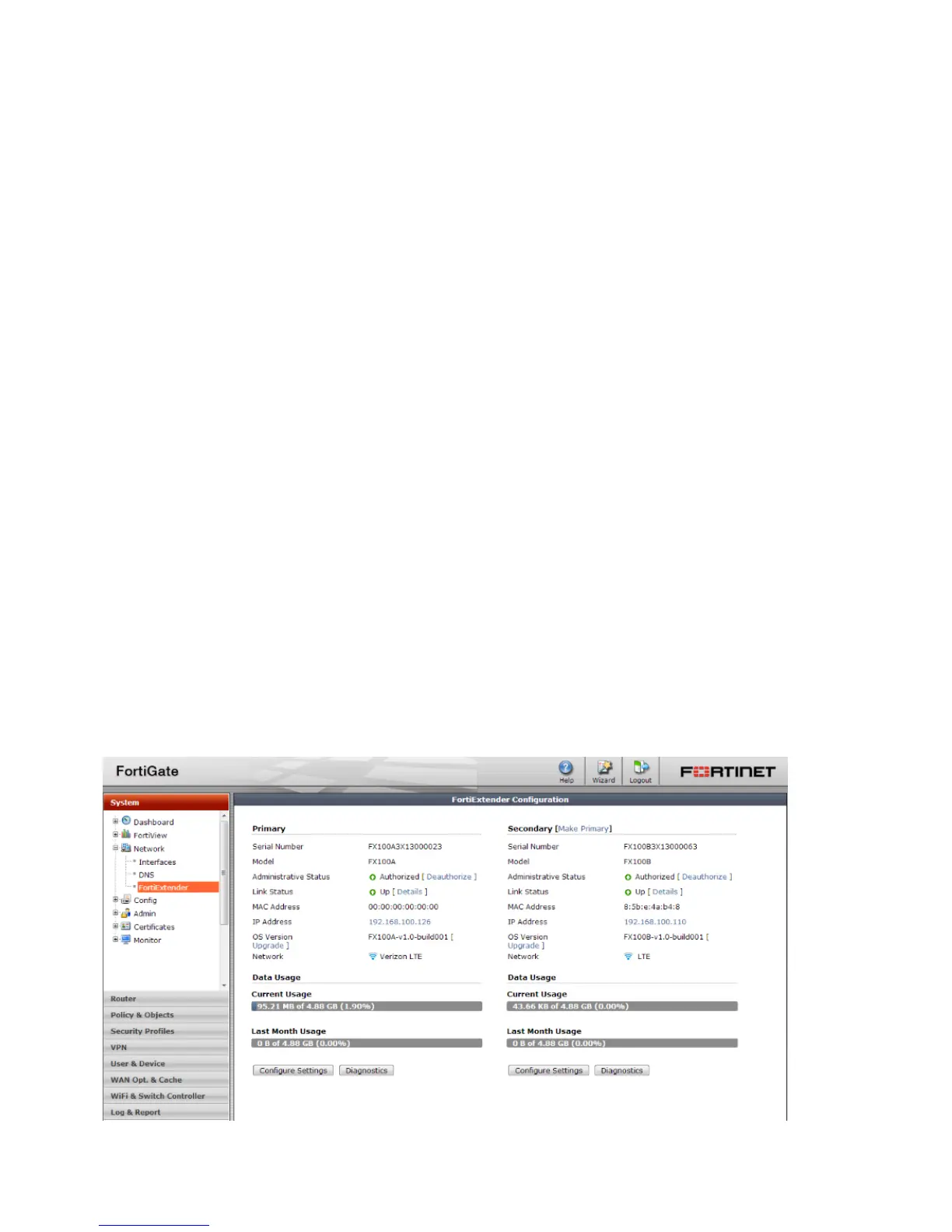
3. In the FortiGate web UI, go to System > Network > FortiExtender to display the status
and configuration page.
4. In the Administrative Status row, click Authorize.
5. After the device has been authorized, you can use FortiGate to monitor its status and
configure its settings. For details, see the FortiOS Handbook.


 To Next Page