EasyManua.ls Logo

Foscam FI8905E - FTP Service Settings

Foscam FI8905E
71 pages
Print Icon
To Next Page IconTo Next Page
To Previous Page IconTo Previous Page
Loading...
38
w
w
w
w
w
w
w
w
.
.
f
f
o
o
s
s
c
c
a
a
m
m
.
.
c
c
o
o
m
m
S
S
h
h
e
e
n
n
z
z
h
h
e
e
n
n
F
F
o
o
s
s
c
c
a
a
m
m
I
I
n
n
t
t
e
e
l
l
l
l
i
i
g
g
e
e
n
n
t
t
T
T
e
e
c
c
h
h
n
n
o
o
l
l
o
o
g
g
y
y
C
C
o
o
.
.
,
,
L
L
i
i
m
m
i
i
t
t
e
e
d
d
T
T
e
e
l
l
:
:
8
8
6
6
7
7
5
5
5
5
2
2
6
6
7
7
4
4
5
5
6
6
6
6
8
8
F
F
a
a
x
x
:
:
8
8
6
6
7
7
5
5
5
5
2
2
6
6
7
7
4
4
5
5
1
1
6
6
8
8
38
3.13 FTP Service Settings
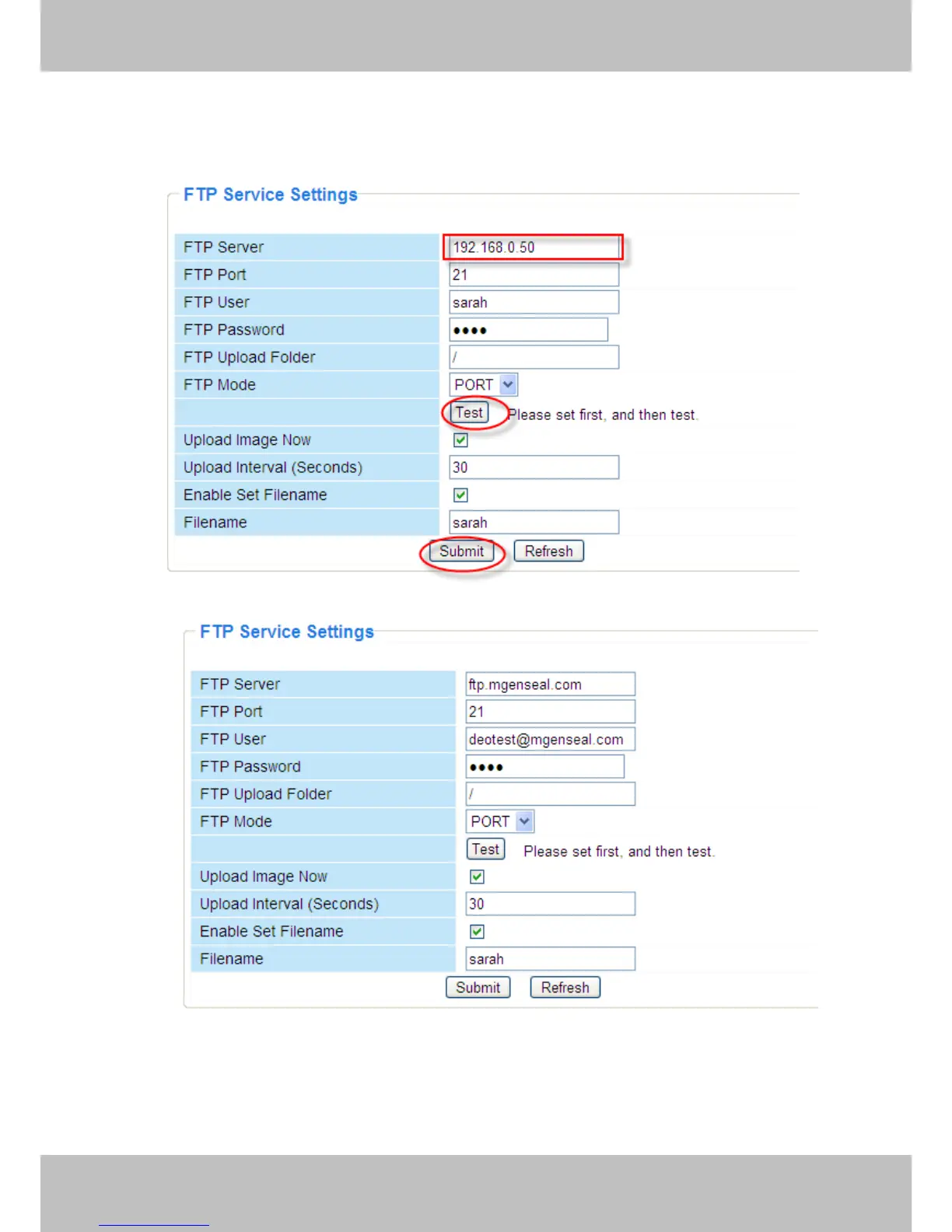
If you want to upload images to your FTP serveryou can set FTP Service Settings.
Figure 3.32
Figure 3.33
FTP server: If your FTP server is located on the LAN, you can set as Figure 3.32.
If you have an FTP server which you can access on the internet, you can set as Figure 3.33.
FTP Port: Usually the port is 21.


Other manuals for Foscam FI8905E

Related product manuals