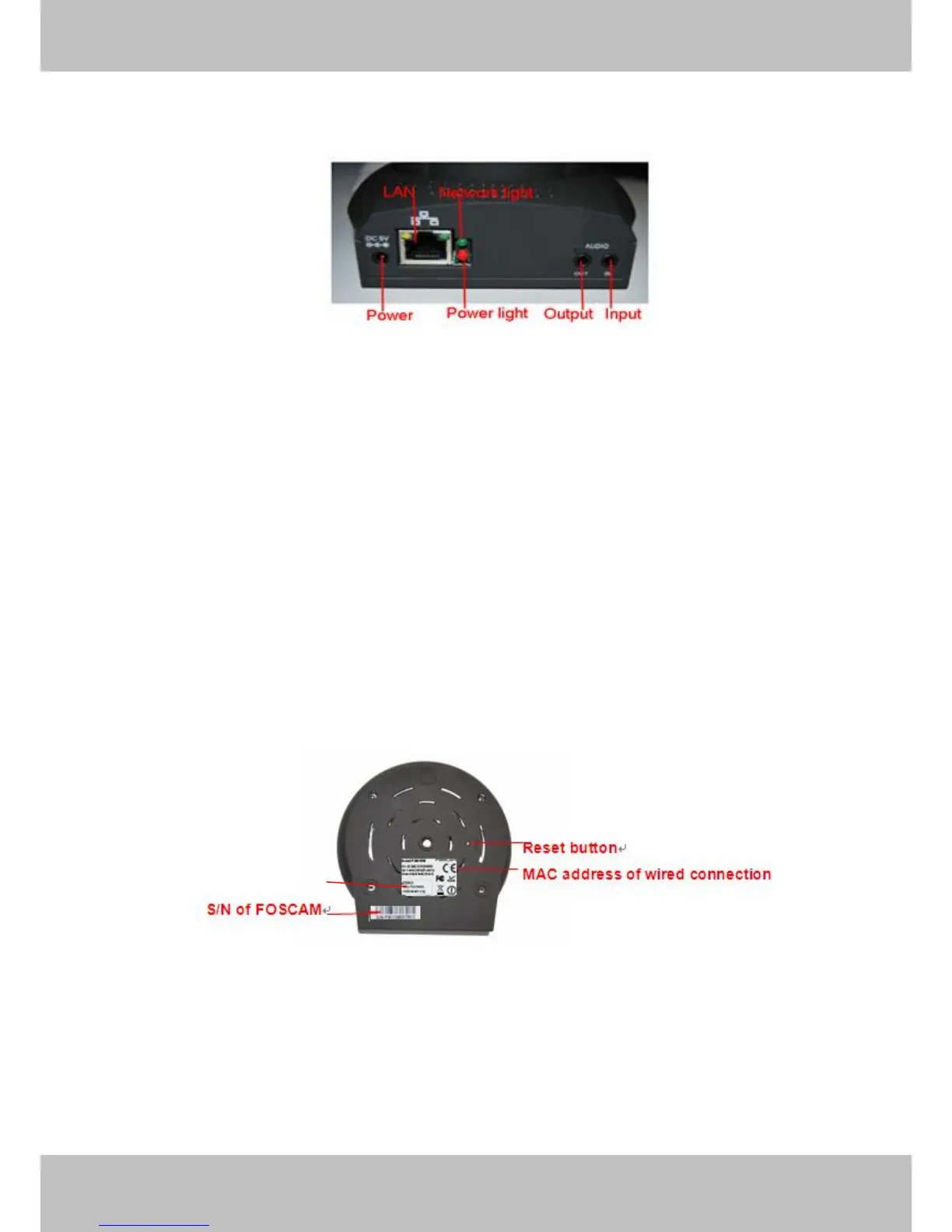
Back View
Figure 1.2
LAN: RJ-45/10-100 Base T
Power: DC 5V/2A Power supply
Network Light: The LED will blink when power and network cable are plugged in
Power Light: If the power adapter works well, the light will turn on
Audio Input: This jack is used to plug an external microphone
Audio Output: This jack is used to plug an external speaker
Bottom View
There are up to two labels located on the body of the camera; this is an important feature of
original Foscam cameras. If your camera does not have labels as shown in Figure 1.3 ,it may be
a clone one. Cloned Foscam cameras can not use original firmware and are not eligible for
warranty or technical services.
Figure 1.3
Reset button: Press and hold down the RESET BUTTON for 10 seconds. when released the IP
camera will be reset back to factory default settings. You must power on the camera before
reset.



 To Next Page