3 Surveillance Software GUI
Please refer to the Quick Installation Guide if you install the camera at first time. After finishing quick
installation, you can take time to learn the operation of the software.
3.1 Login Window
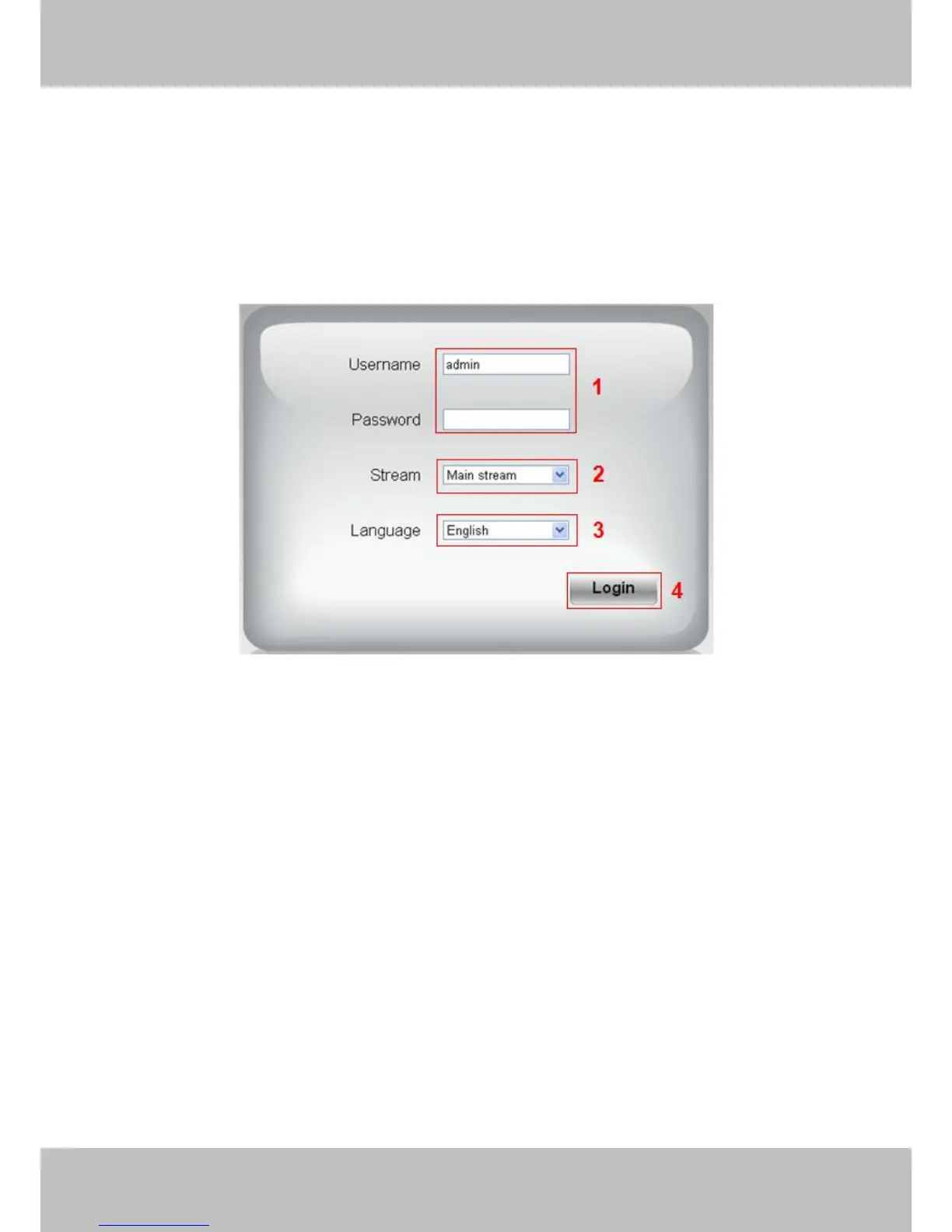
Figure 3.1
Section1 Enter the User name and password
The default administrator username is admin with no password, please reset the password at first using and
prevent unauthorized users login the camera (read chapter 3.2.4 about how to change).
Section2 Stream
The camera supports two stream modes: Main stream and Sub stream. If you want to access the camera form
LAN, here you can select Main stream. If you want to access the camera from Internet, here we recommend
Sub stream.
NOTE:
When the network bandwidth is badly you’d better select Sub Stream and the video will be more fluency.
Section3 Select the language
You can select the language you need via click on the language drop-down list to switch.
Section4 Login the camera
Click Login button and you will see the surveillance windows.(If login the camera for the first time, the page that
modify the username and password will appears.)
NOTE:
When setting up your camera for the first time, it will request that you modify the default username and/or



 To Next Page