Need help?
Do you have a question about the Fosi Audio M04 and is the answer not in the manual?
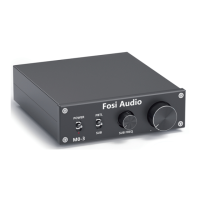
Details the controls and indicators on the front of the amplifier.
Details the input and output ports on the rear of the amplifier for connectivity.
Illustrates how to connect speaker wires using bare wire terminals.
Demonstrates connecting speaker wires with banana plugs.
Addresses issues when no sound is produced despite connected cables.
Explains causes and solutions for electrical noise from loudspeakers.
Clarifies the SUB FREQ knob's operation and dependency on the SUB/PBTL switch.
Discusses causes of sound distortion or breakage due to excessive power.
Investigates causes of interference when using RCA line input without playing music.
Explains potential overheating protection causing the amplifier to stop working.
Addresses why perceived volume differs across various audio source devices.
Discusses whether the amplifier can be safely left on continuously.
Explains why sound quality may improve after extended operation.
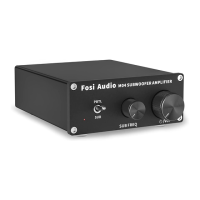
The Fosi Audio M04 is a compact yet powerful 100W mono-channel Class D subwoofer amplifier designed to enhance your audio experience, particularly for low-frequency impact in movies and music. This versatile amplifier offers the flexibility to function either as a dedicated subwoofer bass amplifier or as a full-frequency mono amplifier, making it suitable for a variety of audio setups. Its small footprint belies its capability to deliver significant power, ensuring that both in-wall and stand-alone subwoofers receive the necessary drive to produce room-shaking bass.
At its core, the Fosi Audio M04 serves as a power amplifier for audio systems, specifically optimized for driving subwoofers or single passive speakers. The primary function is to amplify an incoming audio signal to a level sufficient to power a speaker, thereby producing sound. The device features a crucial SUB/PBTL switch on its front panel, which dictates its operational mode. When set to "SUB," the amplifier acts as a subwoofer bass amplifier, focusing on reproducing low frequencies. This mode is ideal for connecting to a passive subwoofer, allowing users to fine-tune the bass output. When switched to "PBTL" (Parallel Bridge-Tied Load), the amplifier operates as a full-frequency mono amplifier, capable of driving a single passive speaker across its entire frequency range. This dual-mode functionality provides users with the flexibility to adapt the M04 to different audio needs, whether it's for dedicated bass enhancement or general mono sound reproduction.
The M04 is designed to be compatible with both active and passive subwoofers, as well as passive speakers. For active subwoofers, the M04's output can be connected to the active subwoofer's input, leveraging the M04's amplification capabilities to drive the active unit. For passive subwoofers and passive speakers, the M04 directly supplies the amplified power to the speaker terminals. The input interface is an RCA input, a common standard for connecting audio sources such as preamplifiers, receivers, or other devices with RCA line-level outputs. The output interface consists of speaker terminals, which can accommodate either bare speaker wires or banana plugs, offering convenience and secure connections.
A key feature of the M04 is its integrated power switch within the volume control knob. This design choice contributes to the device's compact nature and streamlined user interface. Turning the volume knob clockwise not only increases the audio level but also powers on the unit, indicated by a power indicator light. Conversely, turning it counter-clockwise to its minimum position will power off the amplifier. This intuitive control scheme simplifies operation, making it easy for users to manage both power and volume from a single point.
Furthermore, when operating in "SUB" mode, the M04 provides a "SUB FREQ" (Subwoofer Frequency) control knob. This knob allows users to adjust the frequency output of the subwoofer, enabling precise tuning of the bass response to match their preferences and the acoustic characteristics of their listening environment. This level of control over the bass frequency is essential for achieving optimal integration of the subwoofer with other speakers in an audio system, ensuring a balanced and impactful sound.
The Fosi Audio M04 is designed for straightforward setup and operation, making it accessible to both audio enthusiasts and casual users. The quick setup guide outlines a simple seven-step process to get the amplifier up and running.
The "SUB FREQ" knob is a critical usage feature when the M04 is in subwoofer mode. This knob allows for continuous adjustment of the subwoofer's crossover frequency, which determines the upper limit of the frequencies the subwoofer will reproduce. This is invaluable for blending the subwoofer's output seamlessly with the main speakers, preventing gaps or overlaps in the frequency response and ensuring a cohesive soundstage.
The M04's compatibility with both passive and active subwoofers (as noted in the upgraded version) expands its utility. While it directly powers passive subwoofers, for active subwoofers, it can serve as a pre-amplifier or a signal conditioner, feeding a line-level signal to the active subwoofer's internal amplifier.
While the Fosi Audio M04 is designed for reliability and ease of use, understanding potential issues and their solutions contributes to its long-term maintenance and optimal performance. The troubleshooting section of the manual addresses common user queries, providing guidance on how to resolve them.
For any persistent problems or further assistance, Fosi Audio provides customer support via email, ensuring users can receive help and maintain their device effectively. The 18-month limited warranty on parts and labor also provides peace of mind for users regarding potential manufacturing defects or issues.
 General
| Type | Headphone Amplifier |
|---|---|
| Input Impedance | 10kΩ |
| OP AMP Chips | NE5532 |
| Headphone Impedance | 16-300Ω |
| Input | RCA |
| Frequency Response | 20Hz-20kHz |
| Power Supply | DC12V |
| Output | 3.5mm Headphone Jack |

 To Next Page