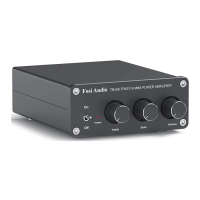
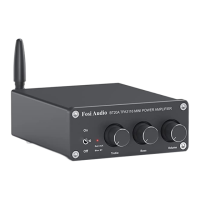
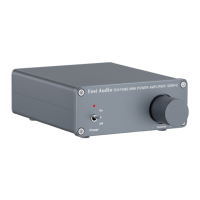
The Fosi Audio TDA7498E is a compact and powerful Hi-Fi stereo 2-channel amplifier designed to enhance your home audio experience. This mini power amplifier delivers a robust 160W x 2 output, making it an ideal choice for driving passive speakers in a home setup. Its design focuses on providing a delicate and clear sound, inviting users to immerse themselves fully in their music.
Function Description
The primary function of the Fosi Audio TDA7498E is to amplify audio signals for passive speakers. It acts as the central hub for your audio system, taking an input signal and boosting it to a level suitable for driving speakers, thereby producing sound. The amplifier is equipped with a 24V power adapter, ensuring stable and efficient operation.
The front panel of the TDA7498E features a straightforward and intuitive control layout. A power indicator light provides visual feedback on the device's operational status. The power switch allows for easy toggling between on and off states. A prominent volume control knob enables precise adjustment of the audio output level, ensuring you can tailor the sound to your preference and environment.
On the back panel, the amplifier offers essential connectivity options. It includes RCA input terminals, which are a standard for connecting various audio sources such as CD players, DACs, or preamplifiers. The speaker output terminals are designed to connect directly to your passive speakers, supporting both bare wire and banana plug connections. Additionally, a DC input is provided for connecting the included 24V power supply.
Usage Features
Setting up the Fosi Audio TDA7498E is designed to be a quick and easy process. Before connecting the power supply, it is crucial to ensure the amplifier's power switch is in the "OFF" position to prevent a "POP" sound from the speakers upon startup. Similarly, the volume control should be turned down to its minimum (fully counterclockwise) before powering on, protecting your hearing from sudden loud noises.
Connecting speakers to the TDA7498E offers flexibility. For bare wire connections, users need to release the horn terminals, insert the speaker wire ends into the amplifier and speaker terminal holes, and then tighten the terminals securely. It is vital to ensure that the positive and negative speaker wires do not touch each other, as this can lead to no sound output or even damage. The speaker connection area is intentionally narrow to facilitate a secure connection, but this also necessitates careful attention to prevent accidental contact between wires.
For those preferring banana plugs, the process involves releasing the banana jacket, loosening the screw, inserting the speaker wire, tightening the screw, and then tightening the banana jacket. Finally, the banana plug is inserted into the horn terminals of both the speaker and the amplifier. Again, vigilance is required to ensure no contact between positive and negative connections.
The TDA7498E is specifically designed for passive speakers and is not compatible with powered speakers or subwoofers. This distinction is important for users to note when configuring their audio system. The amplifier's wide voltage range (AC 110-240V for power input) makes it suitable for use in various countries, requiring only the appropriate power cord adapter for the region.
When connecting audio sources, such as a turntable, it's important to consider whether a phono preamp is needed. Some turntables have built-in preamps, while others require an external one, like Fosi Audio's BOX X1, BOX X2, or BOX X3, to achieve adequate volume.
Maintenance Features
Troubleshooting common issues with the TDA7498E is made straightforward with a dedicated section in the manual. For instance, if the power supply indicator is not illuminated, users are advised to check the AC power cord connection, verify the power outlet's functionality, and ensure the power LED on the power supply is on. If the power supply is suspected to be defective, contacting customer support for an exchange is recommended.
In cases of cracking or electrical noise, several steps can be taken. Ensuring all cables are fully inserted into their respective devices is crucial, as incomplete connections can cause such issues. Removing all inputs to check if the noise disappears can help identify if the problem originates from the audio source or input cables. Using the original factory standard power supply is also advised, as third-party power supplies with high interference coefficients can introduce current noise.
If there is no sound from the amplifier, users should recheck all speaker wire connections, verify that the amplifier and source components are turned on, and confirm the AC wall outlet is working. It's also important to ensure the power supply cable is connected to the amp, the power supply indicator is on, and the volume/power knob on the front panel is turned up and not set to minimum. Additionally, checking that the audio source (e.g., iPad, computer) is on and its volume is not at minimum, and that audio cables are properly connected, can resolve the issue. The Power LED on the amp should be on when switched on.
For issues with sound cutting in and out, reducing the volume of the sound source and trying a different audio source can help. Crucially, ensuring that the positive and negative poles of the speaker output do not touch is paramount, as larger banana plugs can sometimes cause a short circuit.
If only one channel has sound, users should recheck all speaker wire connections on both speakers and the amplifier, and verify proper connection of audio source cables. Swapping the RCA input channels (right and left) can help determine if the issue lies with the audio source or RCA cable. If the problem persists, exchanging the speaker wires from the amplifier's output can further isolate whether the issue is with the speaker, the speaker wires, or the amplifier itself.
For low volume issues, rechecking the volume on the audio source and ensuring the amplifier is turned up is the first step. Confirming if the audio source requires a pre-amp (especially for turntables) is also important.
The TDA7498E is a Class D amplifier, meaning it consumes very low power in standby mode and can be safely left on all the time without significant power consumption. While it comes with a 24V 4.5A power supply sufficient for most bookshelf speakers, users seeking more power can upgrade to a 24V 8A or 24V 10A power supply, as the amplifier supports a DC12-24V voltage range.
Finally, for long-term storage or during electrical storms, unplugging the power cord is recommended to protect the device from potential damage due to lightning strikes. The amplifier cannot be bridged to achieve higher wattage. For any unresolved issues, Fosi Audio provides customer support via email.


 To Next Page
 General