EasyManua.ls Logo

Fostex 280 - Page 19

Fostex 280
28 pages
Print Icon
To Next Page IconTo Next Page
To Previous Page IconTo Previous Page
Loading...
<
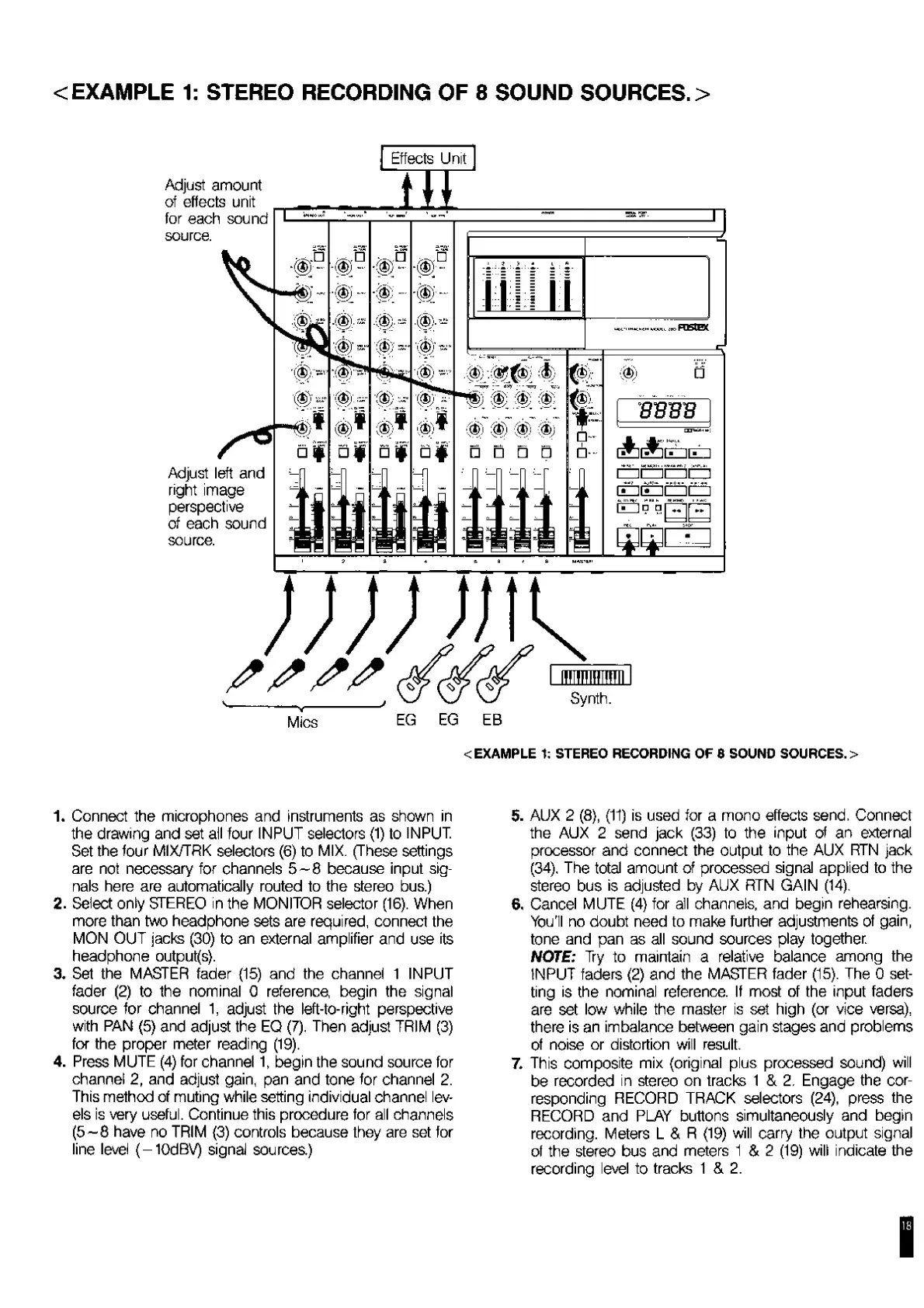
EXAMPLE
1:
STEREO
RECORDING
OF
8
SOUND
SOURCES.
>
Adjust
amount
of
effects
unit
for
each
sound
source.
Adjust
left
and
right
image
perspective
of
each
sound
source.
Mies
Synth.
<
EXAMPLE
1:
STEREO
RECORDING
OF
S
SOUND
SOURCES.
>
1.
Connect
the
microphones
and
instruments
as
shown
in
the
drawing
and
set
all
four
INPUT
selectors
(1)
to
INPUT.
Set
the
four
MIX/TRK
selectors
(6)
to
MIX.
(These
settings
are
not
necessary
for
channels
5-8
because
input
sig¬
nals
here
are
automatically
routed
to
the
stereo
bus.)
2.
Select
only
STEREO
in
the
MONITOR
selector
(16).
When
more
than
two
headphone
sets
are
required,
connect
the
MON
OUT
jacks
(30)
to
an
external
amplifier
and
use
its
headphone
outputs).
3.
Set
the
MASTER
fader
(15)
and
the
channel
1
INPUT
fader
(2)
to
the
nominal
0
reference
begin
the
signal
source
for
channel
1,
adjust
the
left-to-right
perspective
with
PAN
(5)
and
adjust
the
EQ
(7).
Then
adjust
TRIM
(3)
for
the
proper
meter
reading
(19).
4.
Press
MUTE
(4)
for
channel
1,
begin
the
sound
source
for
channel
2,
and
adjust
gain,
pan
and
tone
for
channel
2.
This
method
of
muting
while
setting
individual
channel
lev¬
els
is
very
useful.
Continue
this
procedure
for
all
channels
(5—8
have
no
TRIM
(3)
controls
because
they
are
set
for
line
level
(-10dBV)
signal
sources)
5.
AUX
2
(8),
(11)
is
used
for
a
mono
effects
send.
Connect
the
AUX
2
send
jack
(33)
to
the
input
of
an
external
processor
and
connect
the
output
to
the
AUX
RTN
jack
(34),
The
total
amount
of
processed
signal
applied
to
the
stereo
bus
is
adjusted
by
AUX
RTN
GAIN
(14),
6
.
Cancel
MUTE
(4)
for
all
channels,
and
begin
rehearsing.
You'll
no
doubt
need
to
make
further
adjustments
of
gain,
tone
and
pan
as
all
sound
sources
play
together.
NOTE:
Try
to
maintain
a
relative
balance
among
the
INPUT
faders
(2)
and
the
MASTER
fader
(15).
The
0
set¬
ting
is
the
nominal
reference.
If
most
of
the
input
faders
are
set
low
while
the
master
is
set
high
(or
vice
versa),
there
is
an
imbalance
between
gain
stages
and
problems
of
noise
or
distortion
will
result.
7.
This
composite
mix
(original
plus
processed
sound)
will
be
recorded
in
stereo
on
tracks
1
&
2.
Engage
the
cor¬
responding
RECORD
TRACK
selectors
(24),
press
the
RECORD
and
PLAY
buttons
simultaneously
and
begin
recording.
Meters
L
&
R
(19)
will
carry
the
output
signal
of
the
stereo
bus
and
meters
1
&
2
(19)
will
indicate
the
recording
level
to
tracks
1
&
2.
I

Related product manuals