EasyManua.ls Logo

Fostex 280 - Automatic Operational Features; The Locate Function

Fostex 280
28 pages
Print Icon
To Next Page IconTo Next Page
To Previous Page IconTo Previous Page
Loading...
SECTION
4.
AUTOMATIC
OPERATIONAL
FEATURES
There
are
a
number
of
convenient
automatic
operations
that
your
280
can
perform.
In
this
section
we
will
discuss
hew
you
can
take
full
advantage
of
the
command
keys
in
the
Memory
Auto
Function
Section
(25).
<THE
LOCATE
FUNCTION
>
1.
HOW
TO
ENTER
DATA
IN
THE
MEMORY.
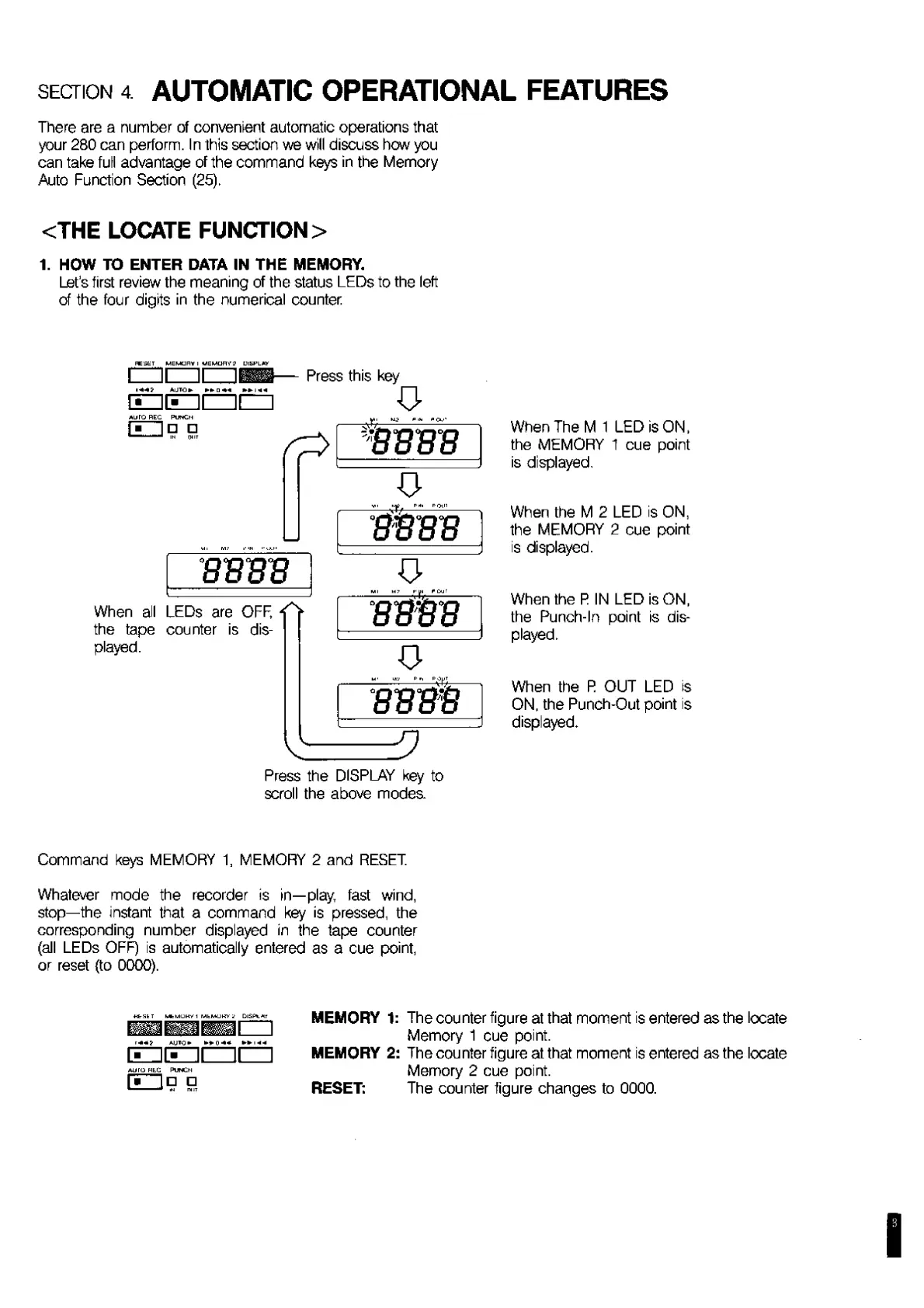
Let’s
first
review
the
meaning
of
the
status
LEDs
to
the
left
of
the
four
digits
in
the
numerical
counter
E5ET
MEMORY
I
MEMORY2
LUKFLWY
Press
this
key
*uTQ
REC
Punch
fi
I
n
1
1
IN
CHIT
BBBB
When
all
LEDs
are
OFF,
O
the
tape
counter
is
dis¬
played.
¥J3
fi
Ih
fi
cV
r^>
JB8BB
O
BBBB
O
BBBB
O
BBBB
3
Press
the
DISPLAY
key
to
scroll
the
above
modes
When
The
M
1
LED
is
ON,
the
MEMORY
1
cue
point
is
displayed.
When
the
M
2
LED
is
ON,
the
MEMORY
2
cue
point
is
displayed.
When
the
R
IN
LED
is
ON,
the
Punch-In
point
is
dis¬
played.
When
the
R
OUT
LED
is
ON.
the
Punch-Out
point
is
displayed.
Command
keys
MEMORY
1.
MEMORY
2
and
RESET.
Whatever
mode
the
recorder
is
in—play,
fast
wind,
stop—the
instant
that
a
command
key
is
pressed,
the
corresponding
number
displayed
in
the
tape
counter
(all
LEDs
OFF)
is
automatically
entered
as
a
cue
point,
or
reset
(to
0000).
HtrSE
T
MiMOKl'
1
MEMORY
?
DlSPlL^T
BMMI
1
AUlQ*
++Q++
auto
heC
Punch
EZlg
H
MEMORY
1:
The
counter
figure
at
that
moment
is
entered
as
the
locate
Memory
1
cue
point.
MEMORY
2:
The
counter
figure
at
that
moment
is
entered
as
the
locate
Memory
2
cue
point.
RESET:
The
counter
figure
changes
to
0000.

Related product manuals