EasyManua.ls Logo

Fostex 280 - Advanced Operating Procedures

Fostex 280
28 pages
Print Icon
To Next Page IconTo Next Page
To Previous Page IconTo Previous Page
Loading...
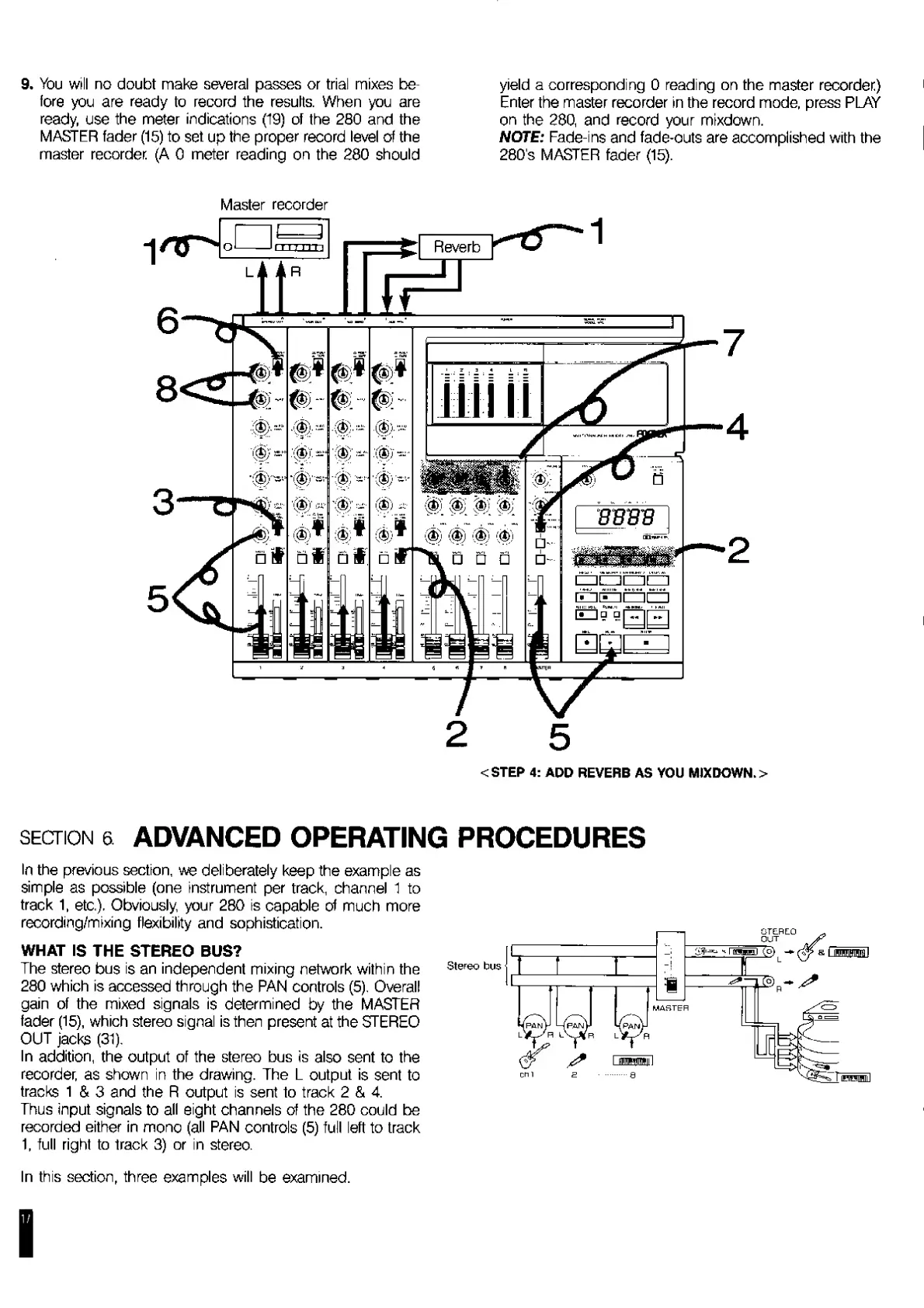
9.
You
will
no
doubt
make
several
passes
or
trial
mixes
be¬
fore
you
are
ready
to
record
the
results.
When
you
are
ready,
use
the
meter
indications
(19)
of
the
280
and
the
MASTER
fader
(15)
to
set
up
the
proper
record
level
of
the
master
recorder
(A
0
meter
reading
on
the
280
should
yield
a
corresponding
0
reading
on
the
master
recorder)
Enter
the
master
recorder
in
the
record
mode,
press
PLAY
on
the
280,
and
record
your
mixdown.
NOTE:
Fade-ins
and
fade-outs
are
accomplished
with
the
280's
MASTER
fader
(15).
Master
recorder
<STEP
4:
ADD
REVERB
AS
YOU
MIXDOWN.
>
section
a
ADVANCED
OPERATING
PROCEDURES
In
the
previous
section,
we
deliberately
keep
the
example
as
simple
as
possible
(one
instrument
per
track,
channel
1
to
track
1,
etc.).
Obviously,
your
280
is
capable
of
much
more
recording/mixing
flexibility
and
sophistication.
WHAT
IS
THE
STEREO
BUS?
The
stereo
bus
is
an
independent
mixing
network
within
the
280
which
is
accessed
through
the
PAN
controls
(5).
Overall
gain
of
the
mixed
signals
is
determined
by
the
MASTER
fader
(15),
which
stereo
signal
is
then
present
at
the
STEREO
OUT
jacks
(31).
In
addition,
the
output
of
the
stereo
bus
is
also
sent
to
the
recorder,
as
shown
in
the
drawing.
The
L
output
is
sent
to
tracks
1
&
3
and
the
R
output
is
sent
to
track
2
&
4.
Thus
input
signals
to
all
eight
channels
of
the
280
could
be
recorded
either
in
mono
(all
PAN
controls
(5)
full
left
to
track
1,
full
right
to
track
3)
or
in
stereo.
In
this
section,
three
examples
will
be
examined.
1
/

Related product manuals