EasyManua.ls Logo

Fostex 280 - Page 24

Fostex 280
28 pages
Print Icon
To Next Page IconTo Next Page
To Previous Page IconTo Previous Page
Loading...
•The
tempo
control
information
is
first
programmed
into
the
sequencer
{do
this
carefully
because
tempo
cannot
be
changed
later).
•Patch
the
sequencer
(directly
or
through
an
FSK
converter)
to
track
4,
and
patch
the
part{s)
which
will
act
as
an
rhythm
guide
for
overdubs
to
track
1
(this
signal
will
be
replaced
by
the
final
overdub,
after
tracks
2
and
3
are
recorded).
Keep
the
Dolby
NR
on.
•Record
the
control
signal
in
one
continuous
pass.
NOTE:
Regarding
the
proper
record
level
of
the
FSK
signal
and
the
required
length
of
the
pilot
tone,
which
indicates
standby
before
start,
refer
to
the
Owner’s
Manual
of
the
MIDI
device
being
used.
•Using
track
1
as
a
monitor
reference
make
the
overdubs
on
tracks
2
&
3.
•Make
the
final
overdub
on
track
1
using
tracks
2
and
3
for
monitor
reference
•Now
patch
the
MIDI
instruments
and
set
the
230
controls
as
shown
on
page
22
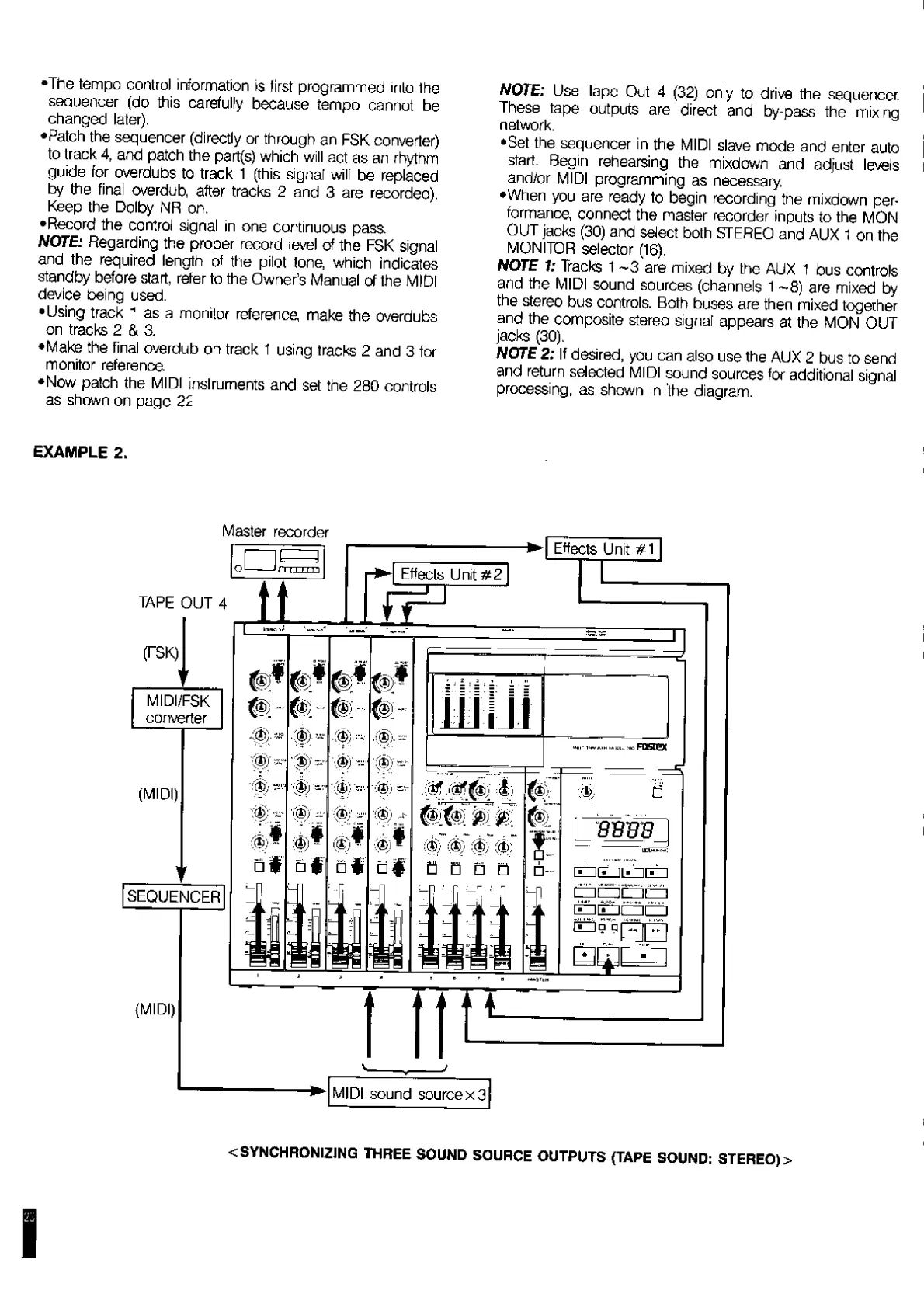
EXAMPLE
2.
NOTE:
Use
Tape
Out
4
(32)
only
to
drive
the
sequencer.
These
tape
outputs
are
direct
and
by-pass
the
mixing
network.
•Set
the
sequencer
in
the
MIDI
slave
mode
and
enter
auto
start.
Begin
rehearsing
the
mixdown
and
adjust
levels
and/or
MIDI
programming
as
necessary.
•When
you
are
ready
to
begin
recording
the
mixdown
per¬
formance,
connect
the
master
recorder
inputs
to
the
MON
OUT
jacks
(30)
and
select
both
STEREO
and
AUX
1
on
the
MONITOR
selector
(16).
NOTE
1:
Tracks
1
-3
are
mixed
by
the
AUX
1
bus
controls
and
the
MIDI
sound
sources
(channels
1
~8)
are
mixed
by
the
stereo
bus
controls.
Both
buses
are
then
mixed
together
and
the
composite
stereo
signal
appears
at
the
MON
OUT
jacks
(30).
NOTE
2:
If
desired,
you
can
also
use
the
AUX
2
bus
to
send
and
return
selected
MIDI
sound
sources
for
additional
signal
processing,
as
shown
in
the
diagram.
<
SYNCHRONIZING
THREE
SOUND
SOURCE
OUTPUTS
(TAPE
SOUND:
STEREO)
>

Related product manuals