EasyManua.ls Logo

Fostex XR-7 - Page 25

Fostex XR-7
43 pages
Print Icon
To Next Page IconTo Next Page
To Previous Page IconTo Previous Page
Loading...
[yi
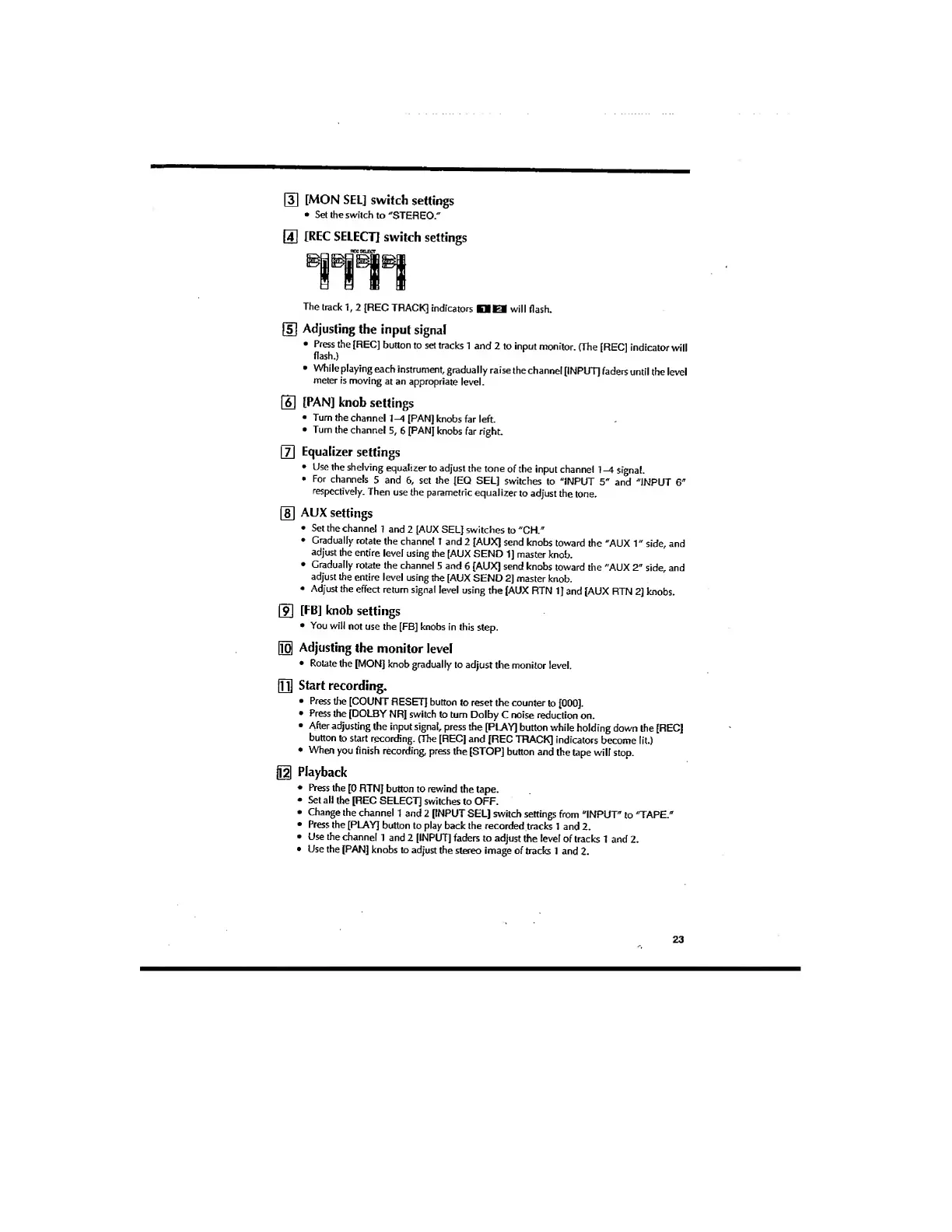
[MON
SEL]
switch
settings
•
Set
the
switch
to
"STEREO."
[
4
]
[REC
SELECT!
switch
settings
The
track
1,
2
[REC
TRACK]
indicators
KUKM
will
flash.
fsl
Adjusting
the
input
signal
•
Press
the
[REC]
button
to
set
tracks
1
and
2
to
input
monitor.
(The
[REC]
indicator
will
flash.)
•
While
playing
each
instrument,
gradually
raise
the
channel
[INPUT]
faders
until
the
level
meter
is
moving
at
an
appropriate
level.
[61
[PAN]
knob
settings
•
Turn
the
channel
1-4
[PAN]
knobs
far
left.
•
Turn
the
channel
5,
6
[PAN]
knobs
far
right.
(3
Equalizer
settings
•
Use
the
shelving
equalizer
to
adjust
the
tone
of
the
input
channel
1
-A
signal.
•
For
channels
5
and
6,
set
the
[EQ
SEL]
switches
to
"INPUT
5"
and
"INPUT
6"
respectively.
Then
use
the
parametric
equalizer
to
adjust
the
tone.
[si
AUX
settings
•
Set
the
channel
1
and
2
[AUX
SEL]
switches
to
"CH."
•
Gradually
rotate
the
channel
I
and
2
[AUX]
send
knobs
toward
the
"AUX
1"
side,
and
adjust
the
entire
level
using
the
[AUX
SEND
1]
master
knob.
•
Gradually
rotate
the
channel
5
and
6
[AUX]
send
knobs
toward
the
"AUX
2"
side,
and
adjust
the
entire
level
using
the
[AUX
SEND
2]
master
knob.
•
Adjust
the
effect
return
signal
level
using
the
(AUX
RTN
1]
and
[AUX
RTN
2]
knobs.
[FB]
knob
settings
•
You
will
not
use
the
[FB]
knobs
in
this
step.
|i^
Adjusting
the
monitor
level
•
Rotate
the
[MON]
knob
gradually
to
adjust
the
monitor
level.
in]
start
recording.
•
Press
the
[COUNT
RESET]
button
to
reset
the
counter
to
[000].
•
Press
the
[DOLBY
NR]
switch
to
turn
Dolby
C
noise
reduction
on.
•
After
adjusting
the
input
signal,
press
the
[PLAY]
button
while
holding
down
the
[REC]
button
to
start
recording.
(The
[REC]
and
[REC
TRACK]
indicators
become
lit.)
•
When
you
finish
recording,
press
the
[STOP]
button
and
the
tape
will
stop.
Playback
•
Press
the
[0
RTN]
button
to
rewind
the
tape.
•
Set
all
the
[REC
SELECT]
switches
to
OFF.
•
Change
the
channel
1
and
2
[INPUT
SEL]
switch
settings
from
"INPUT"
to
'TAPE."
•
Press
the
[PLAY]
button
to
play
back
the
recorded
tracks
1
and
2.
•
Use
the
channel
1
and
2
[INPUT]
faders
to
adjust
the
level
of
tracks
1
and
2.
•
Use
the
[PAN]
knobs
to
adjust
the
stereo
image
of
tracks
1
and
2.
23