EasyManua.ls Logo

Fostex XR-7 - How to use the XR-7; About the [PAN] knobs and the stereo bus; About the [AUX] system; About foldback [FB]

Fostex XR-7
43 pages
Print Icon
To Next Page IconTo Next Page
To Previous Page IconTo Previous Page
Loading...
CHAPTER
How
to
use
the
XR-7
ā˜…
Useful
Tip
1
—
About
the
[PAN]
knobs
and
the
stereo
bus
The
XR-7
contains
a
six
channel
mixer.
This
means
that
you
can
mix
six
sound
sources
to
stereo.
It
is
not
possible
to
see
from
the
outside
how
the
signals
flow.
So,
we
have
included
a
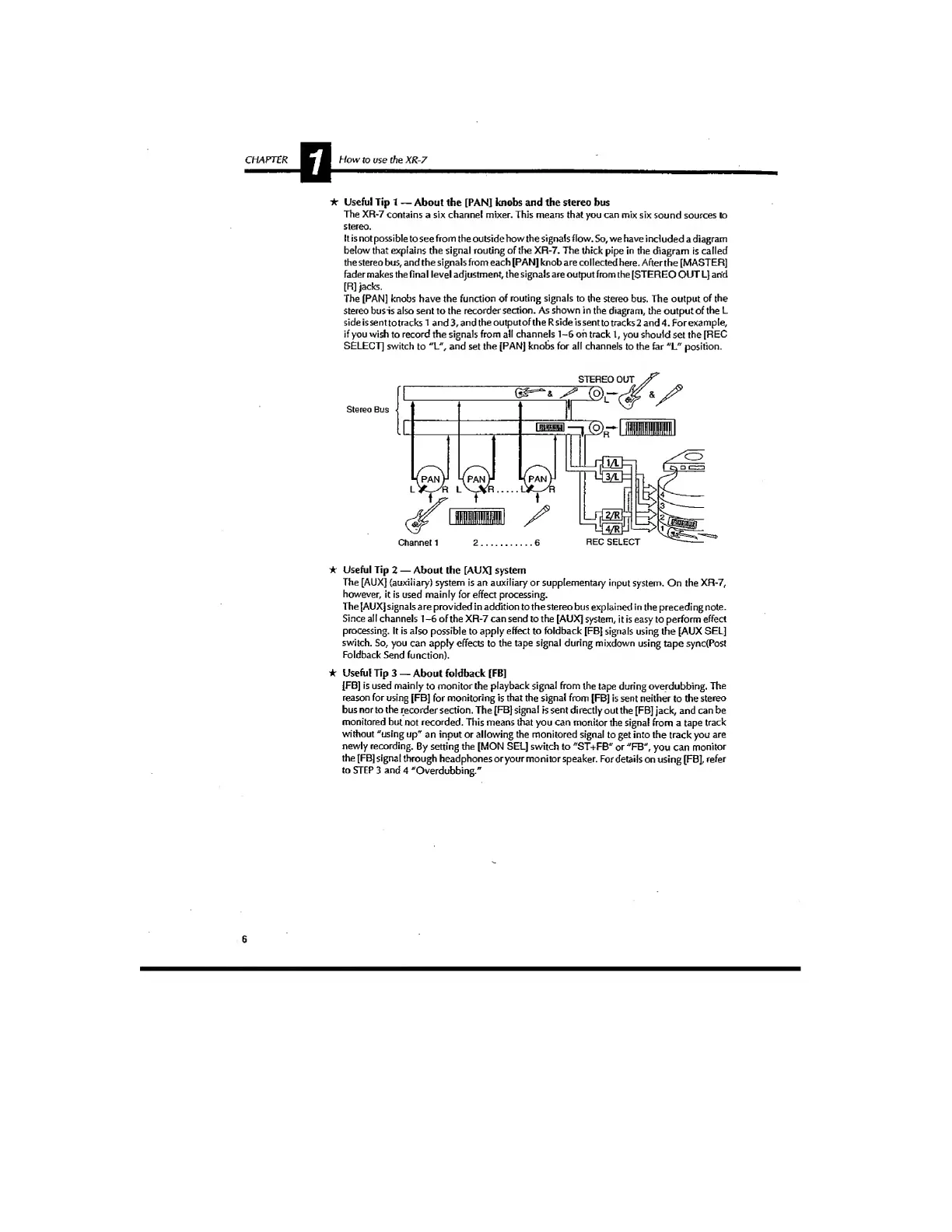
diagram
below
that
explains
the
signal
routing
of
the
XR-7.
The
thick
pipe
in
the
diagram
is
called
the
stereo
bus,
and
the
signals
from
each
[PAN]
knob
are
collected
here.
After
the
[MASTER]
fader
makes
the
final
level
adjustment,
the
signals
are
output
from
the
[STEREO
OUT
L]
an'd
[R]
jacks.
The
[PAN]
knobs
have
the
function
of
routing
signals
to
the
stereo
bus.
The
output
of
the
stereo
busis
also
sent
to
the
recorder
section.
As
shown
in
the
diagram,
the
output
of
the
L
side
is
sent
to
tracks
1
and3,andtheoutputoftheRsideissenttotracks2
and4.
For
example,
if
you
wish
to
record
the
signals
from
all
channels
1-6
oh
track
1,
you
should
set
the
[REC
SELECT]
switch
to
"L",
and
set
the
[PAN]
knobs
for
all
channels
to
the
far
"L"
position.
ā˜…
Useful
Tip
2
—
About
the
[AUX]
system
The
[AUX]
(auxiliary)
system
is
an
auxiliary
or
supplementary
input
system.
On
the
XR-7,
however,
it
is
used
mainly
for
effect
processing.
The
[AUX]
signals
are
provided
in
addition
to
the
stereo
bus
explained
in
the
preceding
note.
Since
all
channels
1-6
of
the
XR-7
can
send
to
the
[AUX]
system,
it
is
easy
to
perform
effect
processing.
It
is
also
possible
to
apply
effect
to
foldback
[FB]
signals
using
the
[AUX
SEL]
switch.
So,
you
can
apply
effects
to
the
tape
signal
during
mixdown
using
tape
sync(Post
Foldback
Send
function),
ā˜…
Useful
Tip
3
—
About
foldback
[FB]
[FB]
is
used
mainly
to
monitor
the
playback
signal
from
the
tape
during
overdubbing.
The
reason
for
using
[FB]
for
monitoring
is
that
the
signal
from
[FB]
is
sent
neither
to
the
stereo
bus
nor
to
the
recorder
section.
The
[FB]
signal
is
sent
directly
out
the
[FB]
jack,
and
can
be
monitored
but
not
recorded.
This
means
that
you
can
monitor
the
signal
from
a
tape
track
without
"using
up"
an
input
or
allowing
the
monitored
signal
to
get
into
the
track
you
are
newly
recording.
By
setting
the
[MON
SEL]
switch
to
"ST+FB"
or
"FB",
you
can
monitor
the
[FB]
signal
through
headphones
oryour
monitor
speaker.
For
details
on
using
[FB],
refer
to
STEP
3
and
4
"Overdubbing."
6

Related product manuals