LCD DI SPLAY
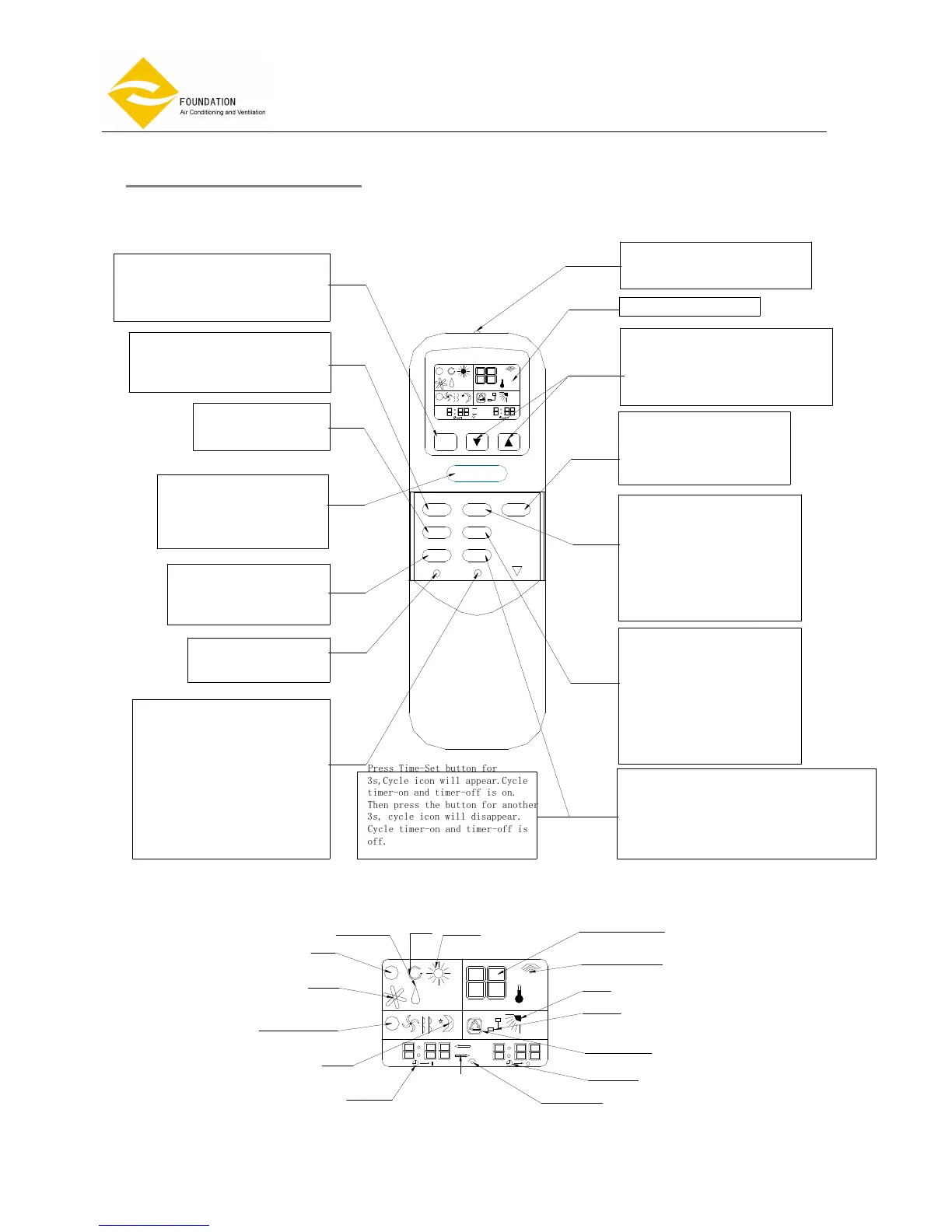
Bett er y
RESET But t on
Pr ess but t on t o r est ar t
r emot e
Cl ock But t on
When you change t he
bat t eri es, you must r eset t he
cl ock t i me. Af t er you i nst al l
t he new bat t er i es , t he cl ock
t i me wi l l bl i nk. Then pr ess t he
cl ock but t on , t he cl ock t i me
wi l l not bl i nk. Pr ess Ti mer - set
but t on t o i ncr ease t he t i me by 1
mi nut e st ep. At l ast pr ess t he
cl ock but t on agai n.
Aut o
Ti mer - on
Fan speed
Aut o Low- Med- Hi gh
Sl eep
Cool i ng
Ar r ow di r ect i on i s shown
f r om t he f i r st f unct i on
t o t he second f unct i on.
AM
PM
A
A
AM
PM
℃
Dehumidify
Heat i ng
Fan
Fan But t on
Pr ess but t on t o sel ect
l ow 、medi um、hi gh or Aut o
speed.
ON/OFF But t on
Pr ess t hi s but t on wi l l t ur n t he
ai r - condi t i oni ng uni t on or of f .
Not e: ON/OFF but t on wi l l not
work when cont i nuous dai l y
oper at i on i s set .
Swi ng But t on
Ai r di st r i but or i n al l
mode.
MODE But t on
Pr ess but t on t o sel ect Aut o mode
、Cool 、Dehumi di f y、 Fan or Heat .
Sl eep But t on
Sl eep mode wi l l aut omat i cal l y
adj ust t emper at ur e and save ener gy
when you ar e sl eepi ng.
Fan speed
Reset
Cl ock
Ti mer - Set
Swi ng
Mode
AM
PM
Ti me- of f
Ti me- on Net wor k
AM
PM
A
A
℃
Ti mer - of f But t on
Pr ess t he but t on once , t he
t i mer - of f i con wi l l bl i nk.
Then you pr ess TI MER but t on
t o set t i mer - of f t i me by 10
mi nut es st ep. Press t he
but t on agai n, t i mer -of f i s
set . Pr ess t he but t on agai n
, t i mer - of f mode i s cancel l ed.
Ti mer - set t i ng But t on
When you set t he t i me cl ock , pr ess
but t on t o i ncr ease i n 1 mi nut e st eps.
When you set t he t i mer - on and
t i mer - of f , pr ess but t on t o i ncr ease by 10
mi nut es st ep.
Ti mer - of f
Cl ock i con
Si gnal sendi ng
Net wor k
Swi ng
Set t emper at ur e
Ti mer - on But t on
Pr ess t he but t on once , t he
t i mer - on i con wi l l bl i nk.
Then pr ess TI MER but t on t o
set t i mer - on t i me by 10
mi nut es st ep. Press t he
but t on agai n, t i mer -on i s set .
Pr ess t he but t on agai n
, t i mer - on mode i s cancel l ed.
Net work But t on
You can set al l par amet er s on
mast er uni t . Then press t he
but t on f or 3s , net wor k i con wi l l
appear . Al l par amet er s have
been sent t o sl ave uni t s.
Up But t on
Press but t on t o i ncr eas t emper at ure 1℃
st ep. ( Max: 30℃)
Down but t on
Press but t on t o decr ease t emper at ur e 1℃
st ep. ( mi n: 16℃)
Tr ansmi ssi on sour ce used f or
sendi ng cont r ol si gnal t o t he
ai r - condi t i oni ng uni t
LCD DI SPLAY
P r e s s T i m e - S e t b u t t o n f o r
3 s , C y c l e i c o n w i l l a p p e a r . C y c l e
t i m e r - o n a n d t i m e r - o f f i s o n .
T h e n p r e s s t h e b u t t o n f o r a n o t h e r
3 s , c y c l e i c o n w i l l d i s a p p e a r .
C y c l e t i m e r - o n a n d t i m e r - o f f i s
o f f .
Cycl e t i mer - on
and t i mer - of f
REMOTE CONTROLLER



 To Next Page