Foxwell F1000B OBDII&Battery Tester User’s Guide_ English Version_V1.00
● Evaporative (EVAP) System
● Secondary Air System
● Oxygen (O2) Sensor
● Oxygen Sensor Heater
● EGR (Exhaust Gas Recirculation) and/or VVT System
Compression ignition vehicles (Diesel)
● NMHC Catalyst
● NOx/SCR After treatment
● Boost Pressure
● Exhaust Gas Sensor
● PM Filter
● EGR and/or VVT System
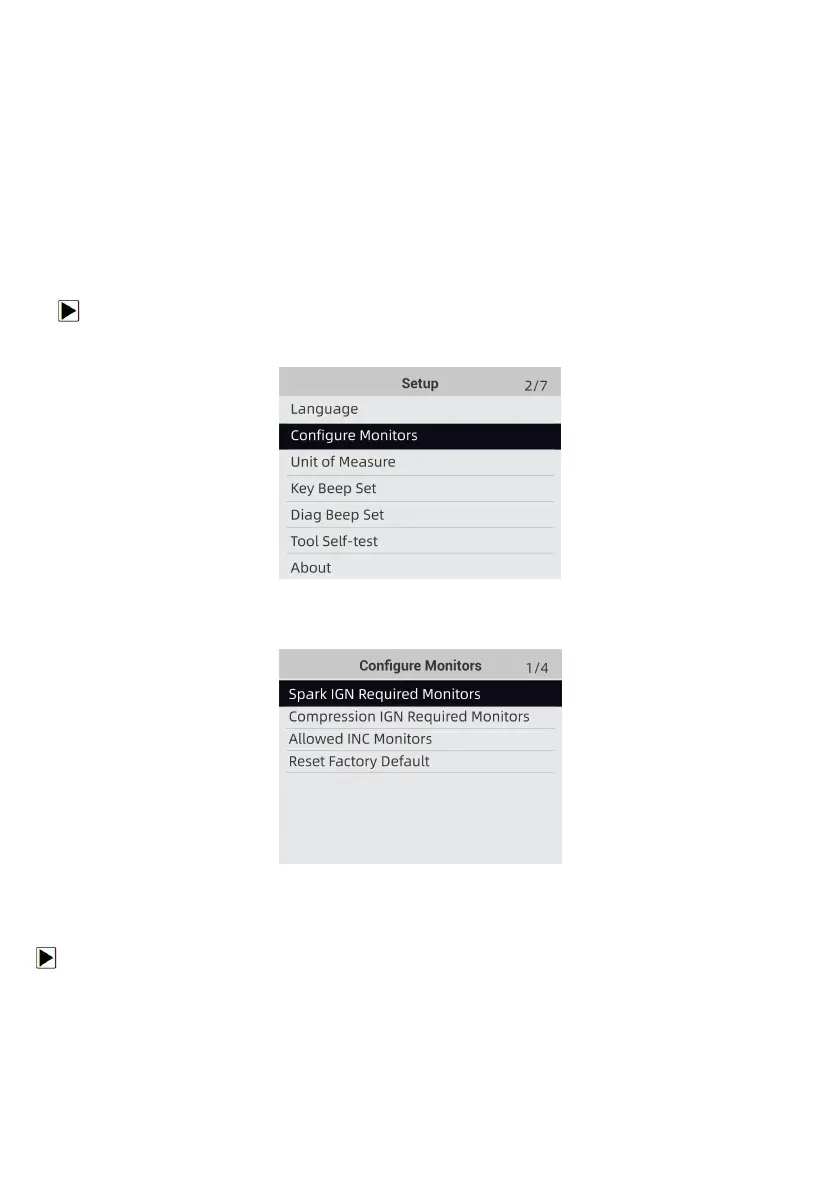
To configure monitors:
1. Use the UP/DOWN key to highlight Configure Monitors from Setup menu and press the
ENTER key to confirm.
Figure 8-4 Sample Setup Screen
2. A screen with the optional monitors to be configured displays.
Figure 8-5 Sample Configure Monitors Display
9.2.1 Spark IGN Required Monitors
In this menu, the operators can configure monitors for spark ignition cars (gasoline engines).
To configure spark IGN required monitors:
1. Use the UP/DOWN key to highlight Spark IGN Required Monitors from menu and press the
ENTER key to confirm.
2. The custom monitors selection screen displays.


 To Next Page