DRAFT v0.3 English, 01 Mar 2012
- 11 -
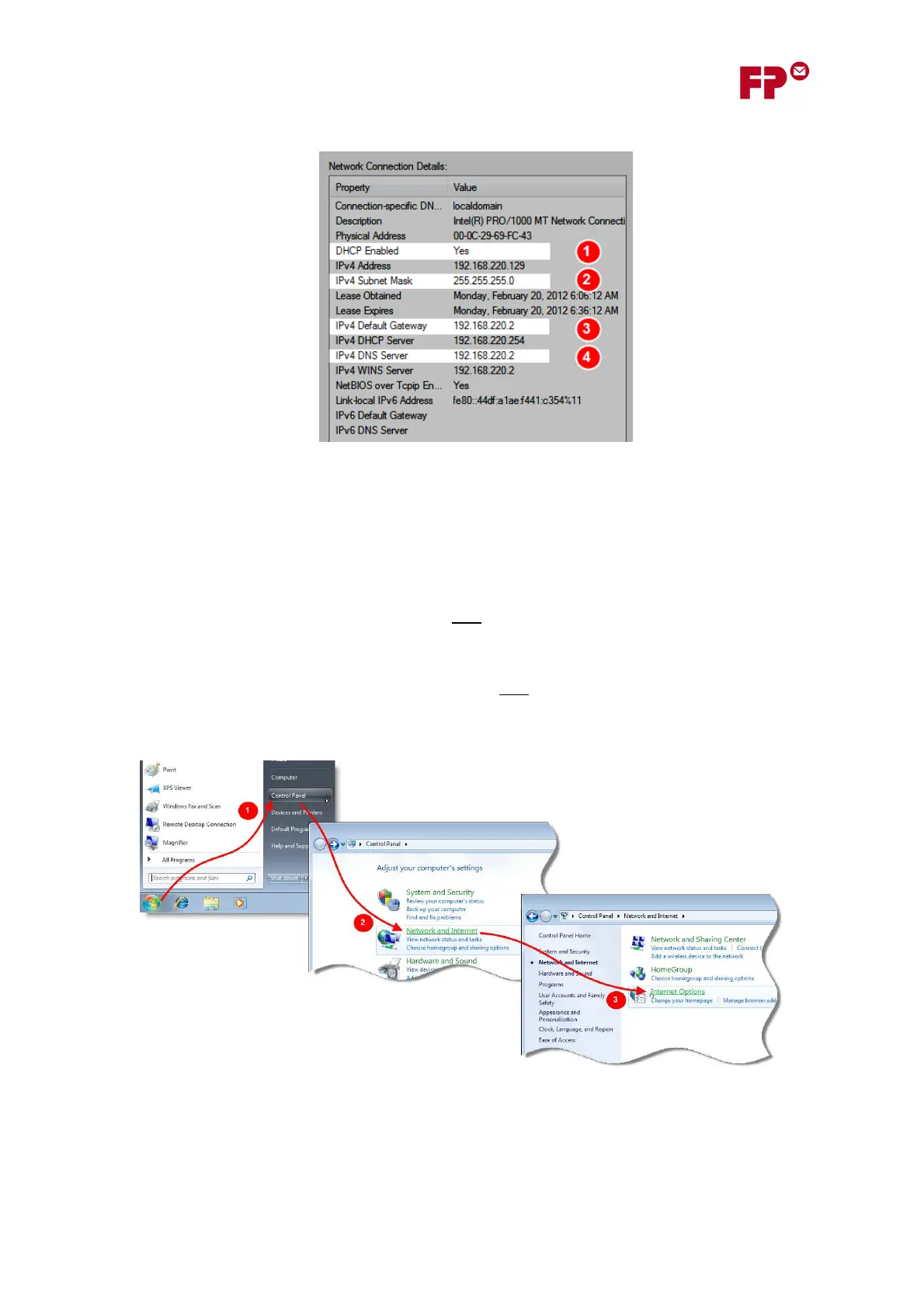
In the Network Connection Details dialog, the following information is available.
1. If DCHP Enabled is shown as “Yes”, then the network supports DHCP, and the automatic
procedure for allocating an IP address in section 4.1 can be used.
2. Here, the Subnet mask is shown. This is needed when you are configuring the IP address
manually in section 6 - it must be entered during step (2) “Enter the meter’s Subnet Mask”.
3. Here, the Default Gateway is shown. This is needed when you are configuring the IP address
manually in section 6. It must be entered during step (3) “Enter the Default Gateway
address”. Note: Make sure you note the “IPv4 Default Gateway”.
4. Here, the DNS Server is shown. This is needed when you are configuring the IP address
manually in section 6. It is the value that must be entered during step (4) “Enter the DNS
server address”. Note: Make sure you note the “IPv4 DNS Server”.
7.1.2 Proxy Server Settings
1. From the task bar, open the Control Panel
2. In the Control Panel, click on “Network and Internet” link.
3. Then click on the “Internet Options” link to open the pop-up dialog “Internet Options”.



 To Next Page