DRAFT v0.3 English, 01 Mar 2012
- 13 -
7.2 Windows XP
7.2.1 Basic Network Settings
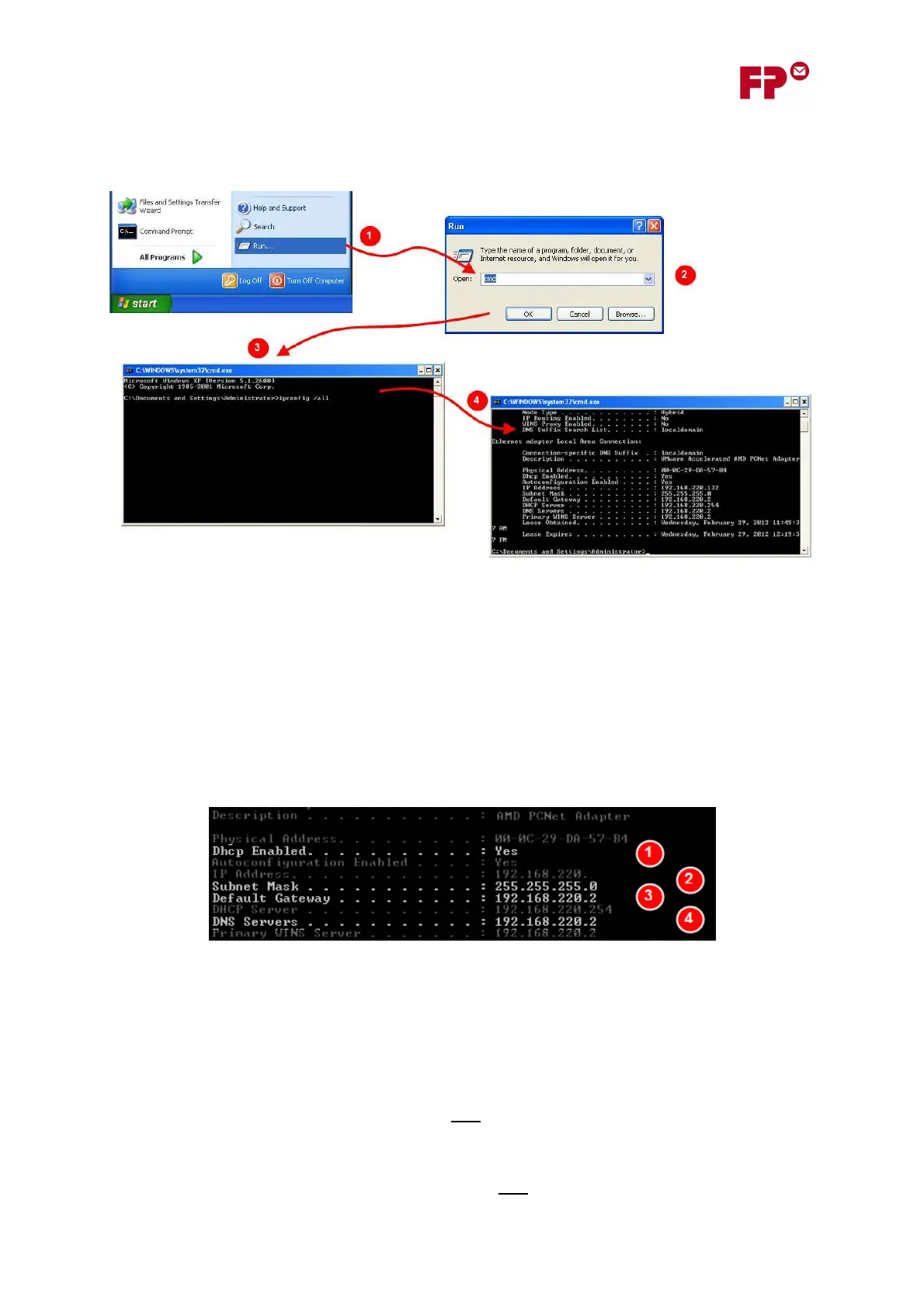
1. From the “Start” button, choose the “Run…” option.
2. The Run dialog box will open. Here, type “cmd”, which will open a command line window in
which you can type commands.
3. Type the following command after the prompt:
ipconfig /all
4. The output if the program will be shown in the command line window. This gives the
information you need, as described below.
The following information is can be determined from the program output.
1. If DCHP Enabled is shown as “Yes”, then the network supports DHCP, and the automatic
procedure for allocating an IP address in section 4.1 can be used.
2. Here, the Subnet mask is shown. This is needed when you are configuring the IP address
manually in section 6 - it must be entered during step (2) “Enter the meter’s Subnet Mask”.
3. Here, the Default Gateway is shown. This is needed when you are configuring the IP address
manually in section 6. It must be entered during step (3) “Enter the Default Gateway
address”. Note: Make sure you note the “IPv4 Default Gateway”.
4. Here, the DNS Server is shown. This is needed when you are configuring the IP address
manually in section 6. It is the value that must be entered during step (4) “Enter the DNS
server address”. Note: Make sure you note the “IPv4
DNS Server”.



 To Next Page