6.0 Software operation
Overview
After installation of the software and configuration of the hardware devices you are ready to
➔ Double-click on FC02.exe (Directory FC02/FC02.exe)
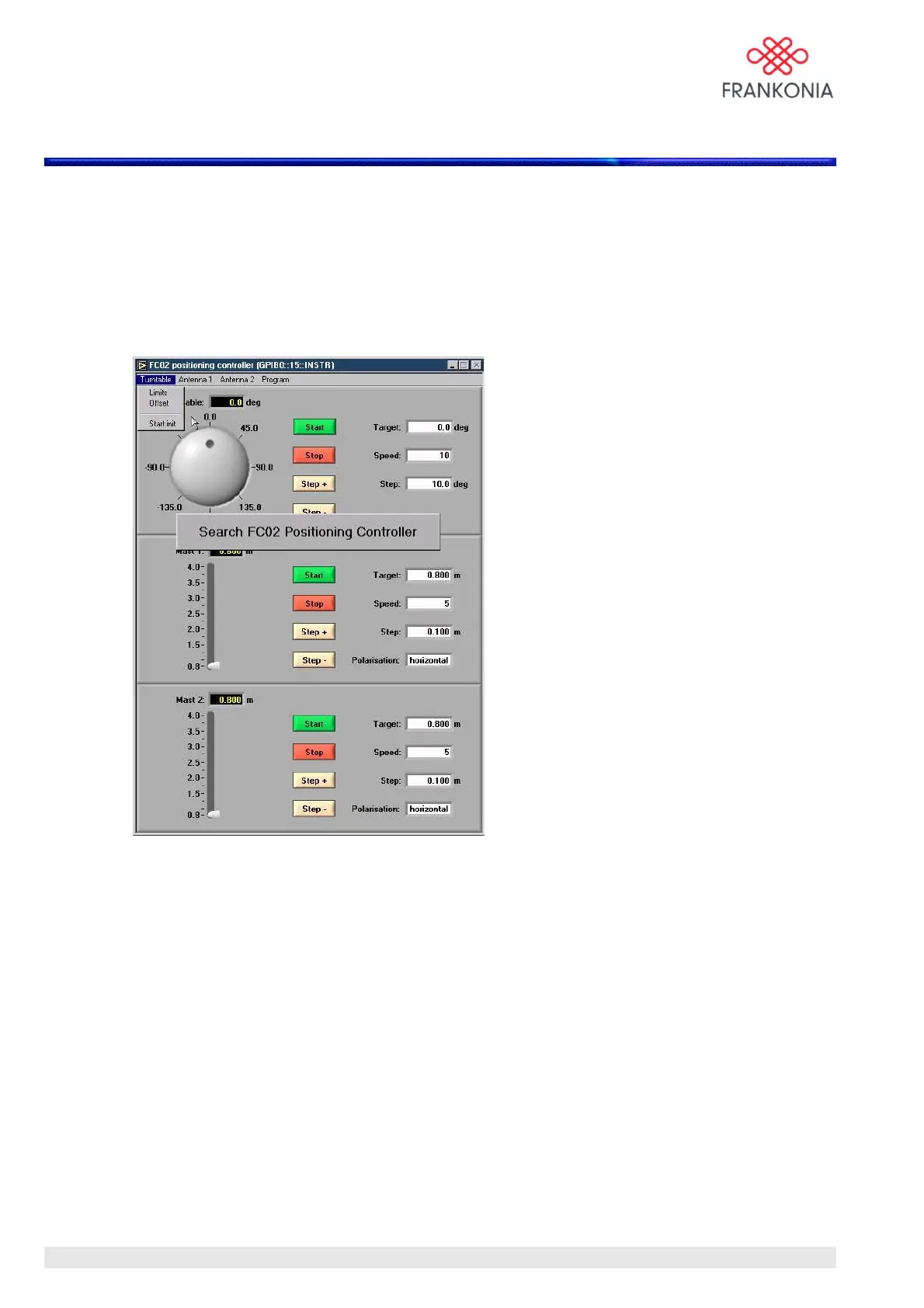
The following main menu is displayed:
The FC 02 software checks automatically the status of the network connected on the optic fiber link, and
shows 2 main parts in its standard version.
The upper part concerns the FTM (Frankonia Turntable), and the lower part concerns the FAM
(Frankonia antenna mast).
When a device is not found, the software indicates it, and the corresponding part is shown in grey.
When you power on the system, it needs to be initialized in order to find its reference point.
The initialisation procedure is performed automatically and described in the FTM and FAM user manuals.
The software indicates automatically if turntable and/or antenna mast have to be initialized.
How to start the initialisation run for turntable and antenna mast is described later in this manual.
MA_FC02_(Rev2_1) - 9/06 / Version 1 / Rev:2.1
10 / 24


 To Next Page