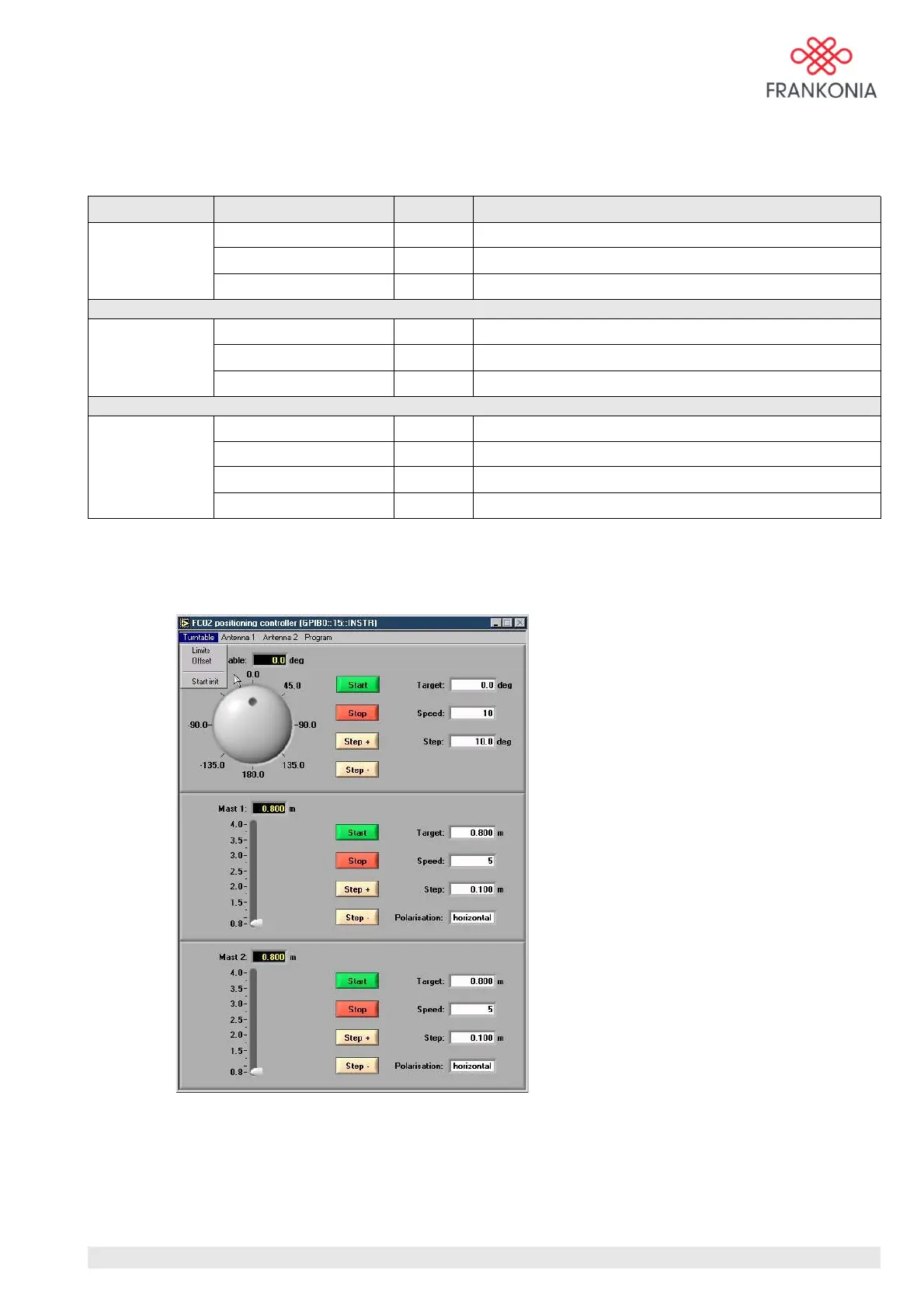
Only when the init is made, all the commands will be available.The menu bar contains the main
commands. The following table explains each menu item on the menu bar in order from left to right:
Menu Item Shortcut Function
Turntable Limits Enter limits of movement of the turntable in degrees
Offset Enter offset of movement of the turntable in degrees
Start init Start an initialisation run of the turntable
Antenna Limits Enter limits of movement of antenna mast in m
Offset Enter offset of movement of antenna mast in m
Start init Start an initialisation run of the antenna mast
Program Load settings Strg+L Load settings
Save settings Strg+S Save current settings
Info Show program version
Quit Strg+Q Exit the application software
Turntable controls
The software limits of the turntable can be lowered if needed. As a factory setting theses values are set to
max. –200° and + 200°. We have defined this value in order to avoid any problems with the cables of the
equipment under test if the turntable makes a complete tour on itself.
MA_FC02_(Rev2_1) - 9/06 / Version 1 / Rev:2.1
11 / 24


 To Next Page