Franke Kaffeemaschinen AG Configuration | 10
User manual SB1200 FM CM 59
10 CONFIGURATION
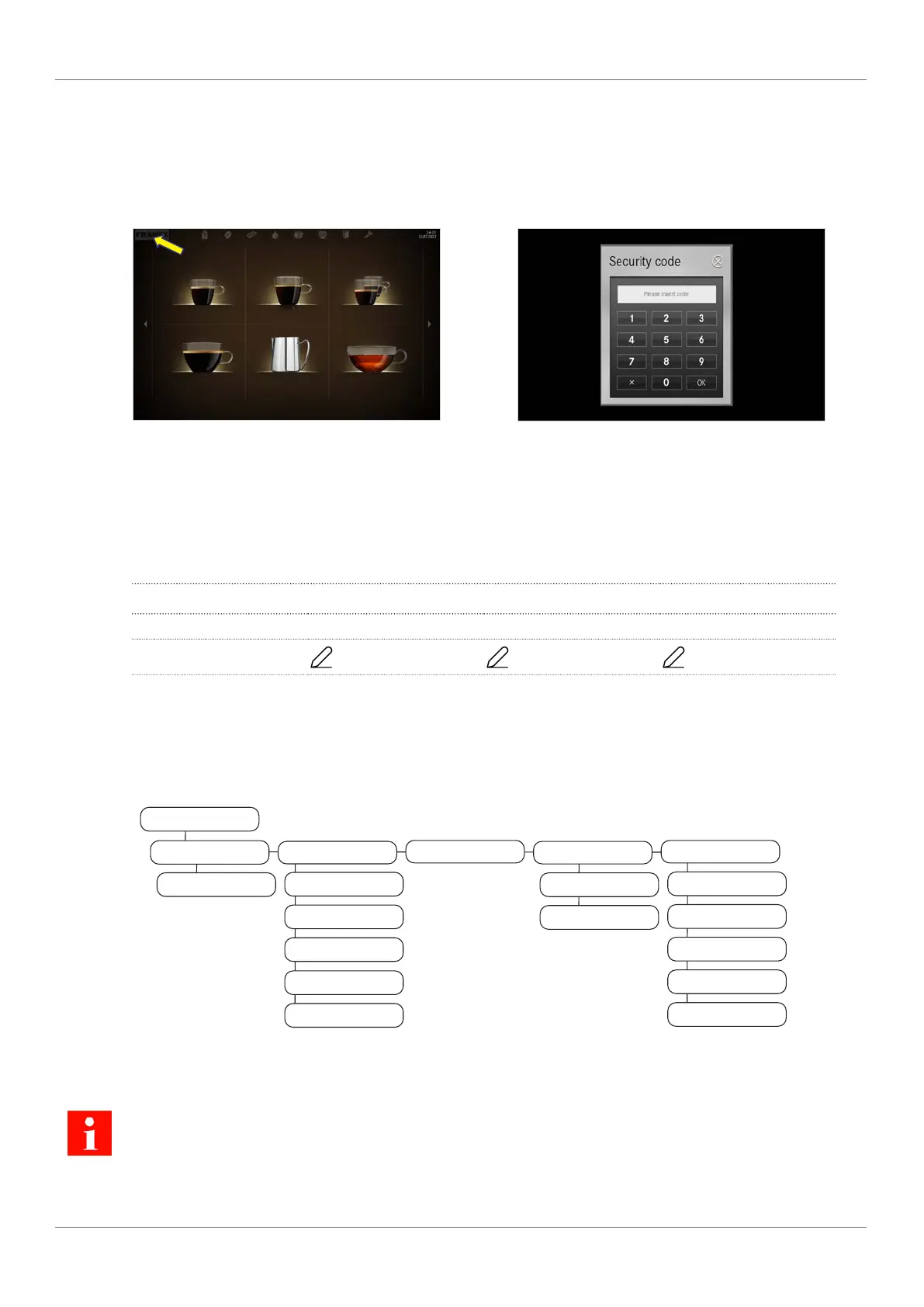
10.1 Call up the maintenance level
Espresso Double Espresso 2 Espressos
Caffè Crema Steam Tea water
1. Tap the Franke logo.
2. Enter the PIN.
PIN codes [
}
59]
3. Press Ok.
10.2 PIN codes
Default PIN codes are assigned at the factory:
Owner Specialist Operator
Default PIN 1111 2222 7777
My PIN
... ... ...
The PINs for key (secured) products and On/Off machine can be viewed and changed with the owner role in the My
settings > Access rights menu.
10.3 My settings menu tree
My settings
0 Commissioning
0.10 System information
1 Set machine
1.1 Language
1.2 Operating mode
1.3 Selection buttons
1.4 Cleaning
1.7 Temperatures
2 Set beverages
3 Date and time
3.2 Date and time
3.3 Timer 1
6 Access rights
6.2 Owner
6.3 Specialist
6.4 Operator
6.6 Key (secured) products
6.7 On/Off machine
Depending on the configuration of your machine, individual menu items may or may not be displayed.



 To Next Page