Franke Kaffeemaschinen AG Description of machine | 5
User manual SB1200 FM CM 31
Pop-Up
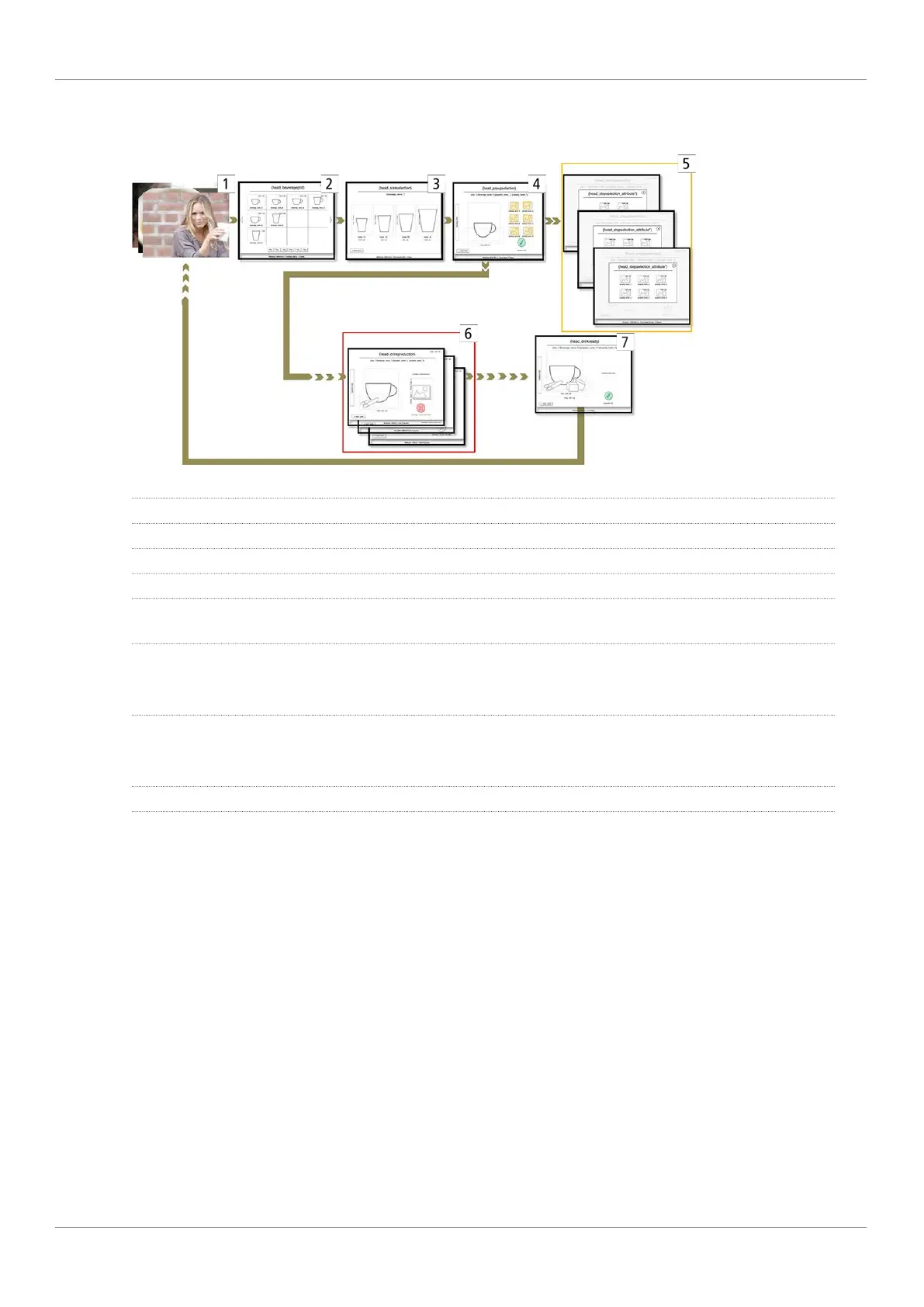
1 Screen saver
2 Select beverage
3 Select cup/mug size
4 Beverage preview
Possible next steps: Select filter attribute values for filter attributes [5] or start beverage preparation without
product selection filter [6]
5 Filter attributes: Flavor, milk type, bean type, etc.
Each filter attribute is shown in a separate Pop-Up window. The Pop-Up window closes after selection. Up to
six filter attributes can be shown.
6 Start beverage preparation: Confirm beverage selection, select payment type
The beverage is being prepared. Advertising media, e.g. images and videos, can be shown while the beverage
is being prepared.
7 Beverage preparation complete
5.4 Franke Digital Services (option)
Developed specially for the Franke coffee machine fleet, our digital services give you control and a clear overview of
all activities and information about the coffee machines. Centrally controlled remote maintenance, such as software
and configuration updates, means that on-site interventions are not required.
You can obtain additional information from your Franke service technician or on the Franke website.



 To Next Page