20
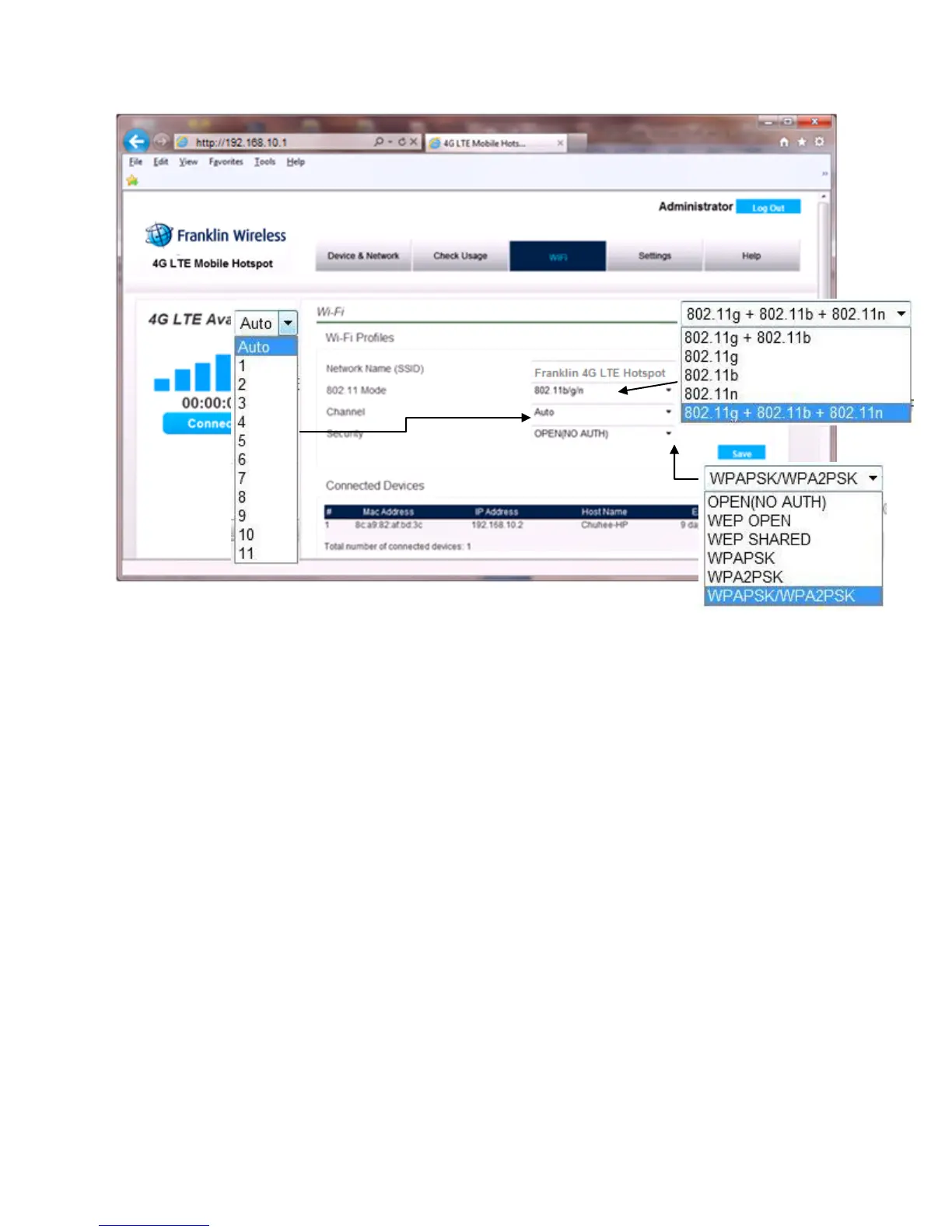
To modify the Wi-Fi Profile:
1. Enter new Network Name (SSID). The default SSID is Franklin 4G LTE Hotspot XXXX,
where XXXX are the last 4 digits of the Wi-Fi MAC ID of the device.
2. Select the proper 802.11 mode. The default mode is 802.11b/g/n.
3. Select the Wi-Fi channel number you want to use. The default setting is “Auto”.
4. Enter your Wi-Fi security level. The default setting is Open (NO AUTH)
5. Enter your Wi-Fi password. The Wi-Fi password requires at least 8 characters. For greater
security, use a mixture of digits, upper case, lower case and other symbols.
6. Click Save.
Connected Devices
When you open the “Connected Devices” you can see the devices currently connected to your 4G LTE
Mobile Hotspot through the Wi-Fi connection. The Connected device section has the following;
MAC Address – Media Access Controller or physical address of your 4G LTE Mobile Hotspot



 To Next Page