錯誤! 使用 [常用] 索引標籤將 Heading 1 套用到您想要在此處顯示的文字。 31
Mobile Network
Mobile Network Settings should only be used as directed by Sprint Customer Service personnel.
Mobile Settings
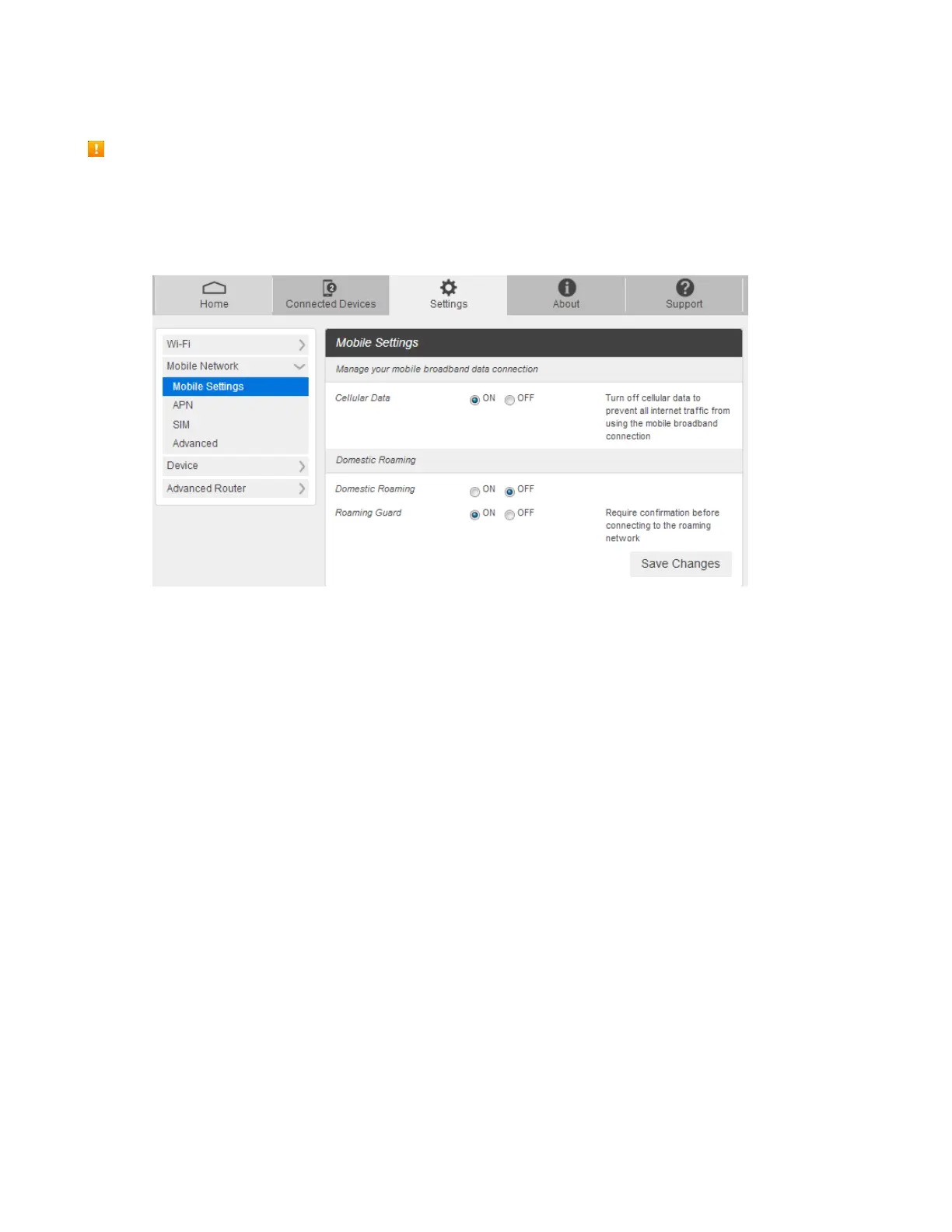
1. From the Web UI, click Settings > Mobile Network > Mobile Settings. The Mobile Settings page is
shown in the following figure.
Cellular data: Turn Cellular data on or off. Turn it OFF to prevent all Internet traffic from using
the mobile broadband connection.
Domestic Roaming: Turn Domestic Roaming on or off. Turn it OFF to prevent your device from
roaming to other service providers' networks. (Caution: allowing roaming could result in
additional service charges.)
Roaming Guard: Turn Roaming Guard on or off. Turn it ON to require confirmation before
connecting to the roaming network.
2. Click Save Changes to save your settings.



 To Next Page