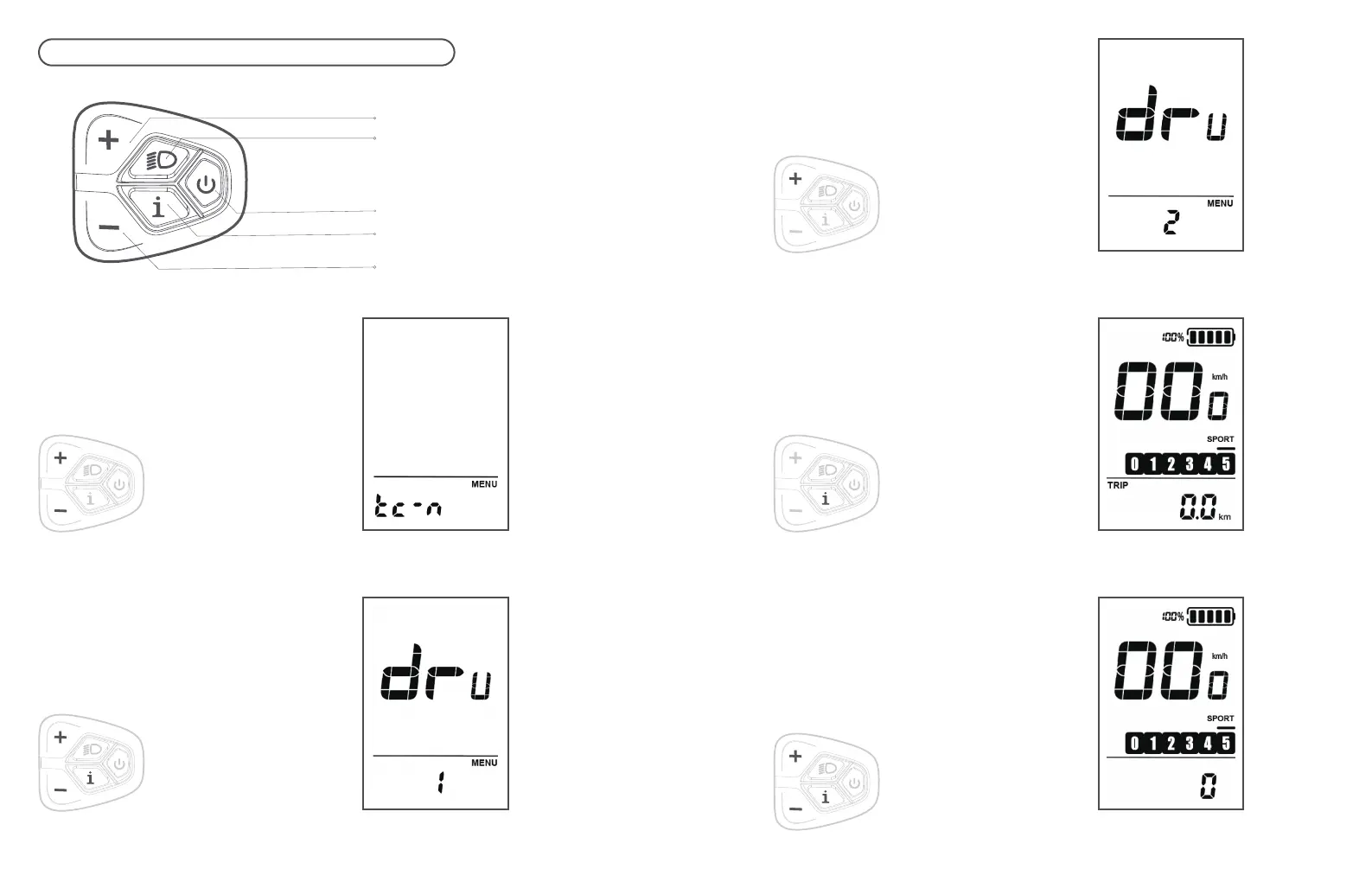
I. INDOOR/OUTDOOR MODE SWITCH
Step 4
Finally, long-press the 'i' button to
return to the main interface.
(When all gears are illuminated, it
indicates the indoor mode.)
Step 5
After entering the indoor mode,
short-press the 'i' button to access the
resistance level. At this point, you can
adjust the resistance level by using
the handlebar '+' and '-' buttons.
Step 3
After entering DRV mode, press the
'+' button to change it to 2. (To switch
to outdoor mode, follow the same
method and switch it to DRV1.)
43 44
Step 1
Press and hold the '+' and '-'
buttons simultaneously for 2
seconds. This will take you to the
desired interface.
Step 2
Press and hold the '+' and '-'
buttons again, then press
the 'i' button to switch to
the DRV mode.
Start Button
Menu Button
Light Button
Minus Button
Plus Button



 To Next Page