EasyManua.ls Logo

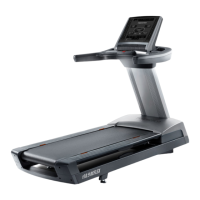
Freemotion 790 Interactive - User Manual

Freemotion 790 Interactive
48 pages
Print Icon
To Next Page IconTo Next Page
Loading...
!!!"#$%&'#(&)**"$%+
!!
"#$%&'!()*+#$
!,#-&'
,%-)./0%"/123456755"5
1)8#9./0%"//////////////////////////////////////
.$%/#!/0#!1#$%&'!2)*+#$!%2!/0#!
13&-#!&+45#!64$!$#6#$#2-#7
////:;<3=>0
?)9-/9../@8)$9A(#%&*/9&-/#&*(8A$B
(#%&*/#&/(C#*/+9&A9./D)'%8)/A*#&E/
(C#*/)FA#@+)&("/19G)/(C#*/+9&A9./
'%8/'A(A8)/8)')8)&$)"
<1H?I1/,;0<;4
;:3=J;3H/K><?/
L;??;03K/
3%/8)E#*()8/M%A8/@8%-A$(/9&-/
9$(#G9()/M%A8/!9889&(M/(%-9MN/E%/(%/
!!!"#$%&*)8G#$)"$%+O8)E#*(89(#%&"
:<13>,H?/:;?H
2%8/*)8G#$)/9(/9&M/(#+)N/E%/(%/
!!!"#$%&*)8G#$)"$%+"
8$!-&''!9:;<<:===:>?@A
B427CD$%7!A!&7*7CA!37*7!BE
"&/7!;!&7*7CF!37*7!BE
P.)9*)/-%/&%(/$%&(9$(/(C)/*(%8)"

Table of Contents

Question and Answer IconNeed help?

Do you have a question about the Freemotion 790 Interactive and is the answer not in the manual?

Summary

IMPORTANT PRECAUTIONS

ASSEMBLY

THE CHEST HEART RATE MONITOR

HOW TO PUT ON THE HEART RATE MONITOR

Instructions for wearing the heart rate monitor correctly.

HOW TO CONNECT THE POWER CORD

CONSOLE OPERATION BASICS

HOW TO TURN ON THE POWER

Steps to safely power on the treadmill console.

HOW TO USE THE TOUCH SCREEN

Guide to interacting with the console's touch screen interface.

CONSOLE SETUP

Connect to your wireless network

Steps to connect the console to a wireless network.

Check for firmware updates

Procedure to check and install console firmware updates.

Calibrate the incline system

Steps to calibrate the treadmill's incline system.

Create an iFit Live account

Guide to creating an iFit Live account for personalized workouts.

MANUAL MODE OPERATION

ONBOARD WORKOUT GUIDE

SET-A-GOAL WORKOUT GUIDE

IFIT LIVE WORKOUT GUIDE

EQUIPMENT SETTINGS

MAINTENANCE MODE

Update the console firmware

Procedure to check and install console firmware updates.

Calibrate the incline system of the treadmill

Steps to calibrate the treadmill's incline system.

WIRELESS NETWORK MODE

Set up and manage a wireless network connection

Steps to connect the console to a wireless network.

DIGITAL TV OPERATION

FOLDING AND MOVING THE TREADMILL

TROUBLESHOOTING

SYMPTOM: The power does not turn on

Steps to resolve power-on issues.

SYMPTOM: The power turns off during use

Troubleshooting steps for unexpected power loss.

SYMPTOM: The displays of the console do not function properly

Steps to fix console display malfunctions.

MORE TROUBLESHOOTING SYMPTOMS

EXERCISE GUIDELINES

REPLACEMENT PARTS AND WARRANTY

LIMITED WARRANTY

Details of the product's warranty coverage and terms.

Freemotion 790 Interactive Specifications

General IconGeneral
Running Surface20" x 60"
Max Speed12 MPH
Weight Capacity350 Lbs
FoldingYes
Incline0 - 15%
Decline-3 - 0%
Console TypeTouchscreen

Related product manuals