175 PB
COMPONENTS TESTING
Field Settings (Indoor Unit Parameter Revision)
1.
Connect wire remote controller with indoor unit
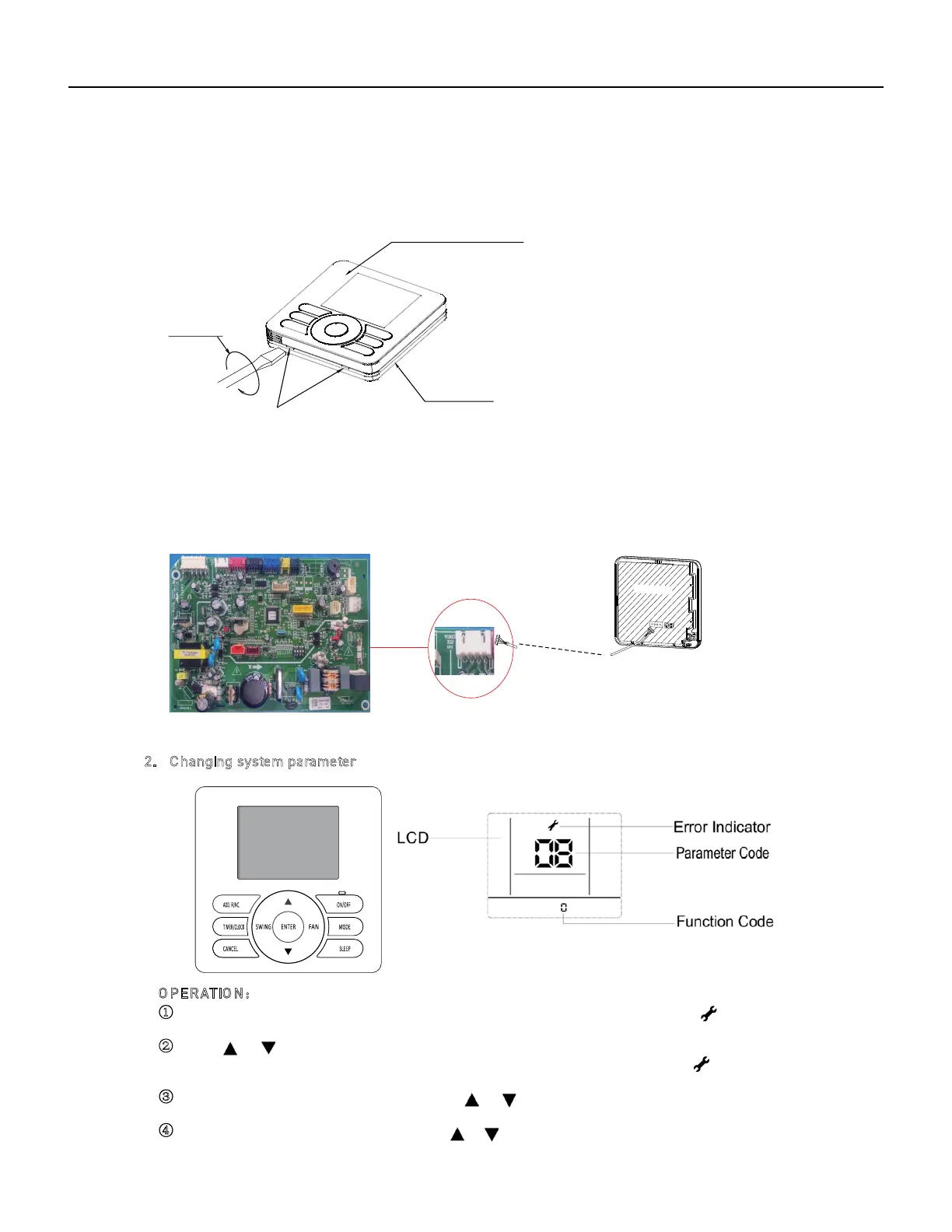
Step 1: Remo ving the upper cover of the wired controller
Wire remote controller
Connection cord of wired
controller
(to indoor unit)
Note:
Control board of the remote controller is placed on upper co ver. Please protect it from being scratc hed
during removal and installation!
Step 2: Conn ecting wired controller with indoor unit
Circuit board of wired controller
Upper cover of the wired controller
Lower cover of the
wired controller
Insert a normal screw driver into the
position, and gently rotate it. In this way,
the upper cover can be easily removed.
Screw driver
Indoor unit control board
marked with:wired
2. C hanging system parameter
①
②
O PE RATIO N:
③ Select desired parameter code by pressing “ ”/ “ ”button following the table below, and press
“ENTER” button to confirm.
④ Select desired function code by pressing “ ”/ “ ”button, and press "ENTER" button to confirm.
确定
Hold down both “MODE” button and “AD D.FUNC .” button for 3 seconds, symbol and
number blinking at the same time.
Press“ ” “ ”button to adjust paramet er numbe r until display “17”.
And press “ENTER”b utton to entering system parameter adaption st
ate
,
symbol
stop blinking,
parameter numbe r blink.



 To Next Page