DRYoperation
Thedrymodewillautomaticallyselect
thedryingoperationbasedonthe
differencebetweentheset
temperatureandtheactualroom
temperature,
Thetemperatureisregulatedwhile
dehumidifyingbyrepeatingturningon
andoffofthecoolingoperationorfan
only,ThefanspeedisLOW.
1.PushtheMODEbuttontoselect
DRY,
2. PushtheTEMPbuttontosetthe
desiredtemperaturefrom21°Cto
28°C.
3. PushtheON/OFFbutton,the
operationlamplightsandtheair
conditionerstarttooperateinthe
DRYmode,FANSPEEDisLow,
PushtheON/OFFbuttonagainto
stopthisunitoperation.
Attention
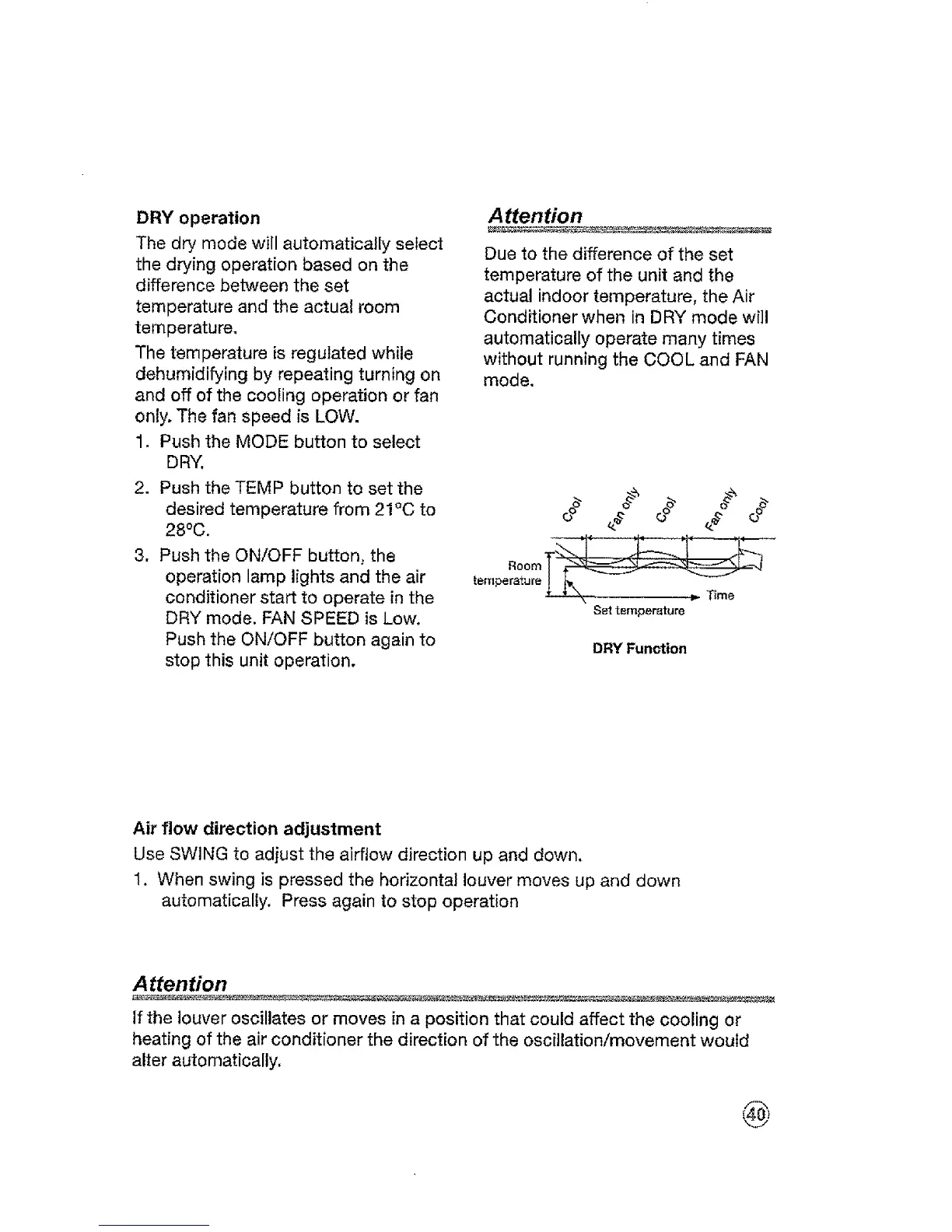
Due to the difference of the set
temperature of the unit and the
actual indoor temperature, the Air
Conditioner when in DRY mode will
automatically operate many times
without running the COOL and FAN
mode.
# # o
Set temperature
DRY Function
Air flow direction adjustment
Use SWING to adjust the airflow direction up and down,
1. When swing is pressed the horizontal louver moves up and down
automatically. Press again to stop operation
Attention
if the louver oscillates or moves in a position that could affect the cooling or
heating ofthe air conditioner the direction of the oscillation/movement would
alter automatically.




 To Next Page