Remote control description
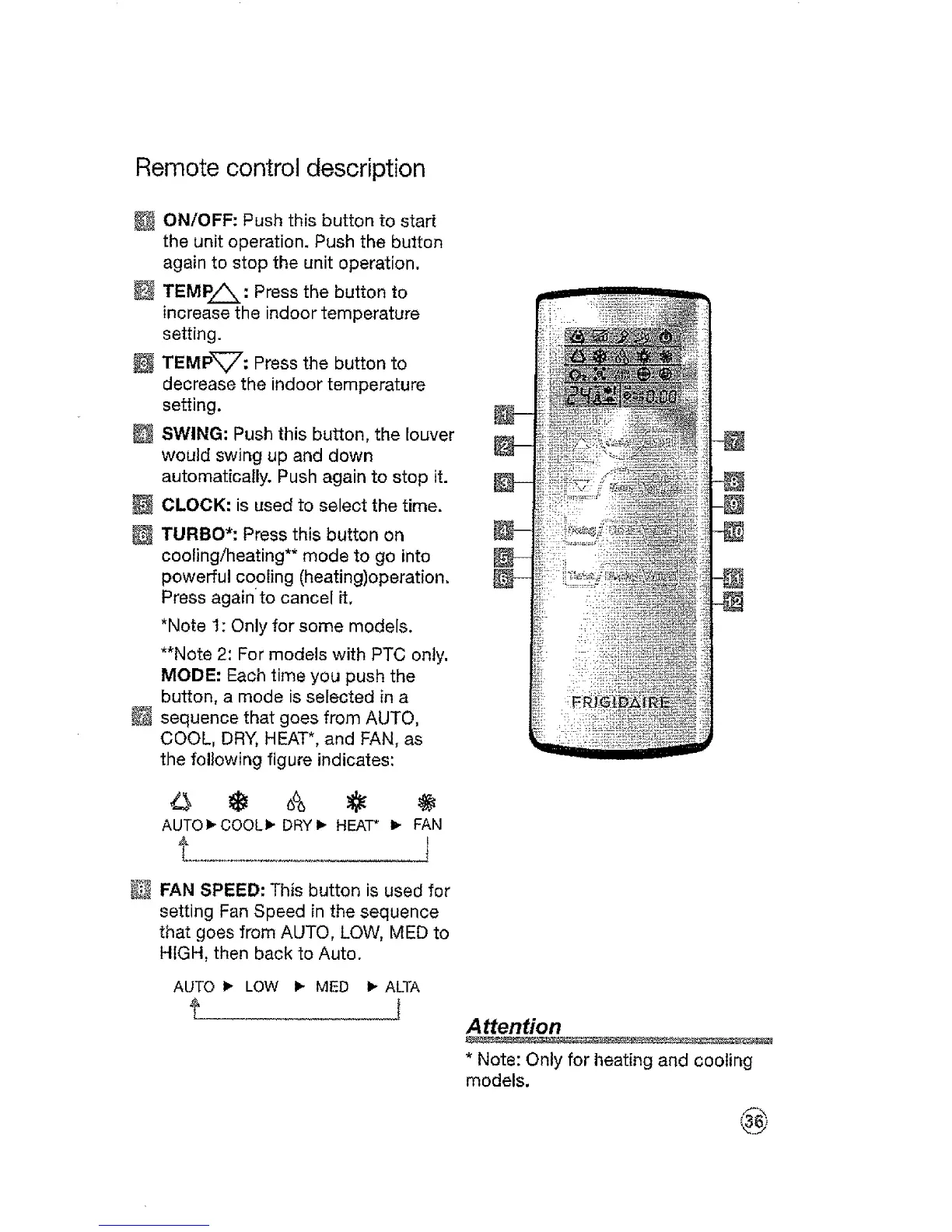
ON/OFF: Push this button to start
the unit operation. Push the button
again to stop the unit operation,
TEMP_: Press the button to
increase the indoor temperature
setting.
TEMPV: Press the button to
decrease the indoor temperature
setting.
SWING: Push this button, the louver
would swing up and down
automatically. Push again to stop it.
CLOCK: is used to select the time.
TURBO*: Press this button on
cooling/heating** mode to go into
powerful cooling (heating)operation.
Press againto cancel it,
*Note 1: Only for some models.
**Note 2: For models with PTC only.
MODE: Each time you push the
button, a mode is selected in a
sequence that goes from AUTO,
COOL, DRY, HEAT*, and FAN, as
the following figure indicates:
AUTO_.COOLi_DRYI_ HEAT* I_ FAN
t J
FAN SPEED: This button is used for
setting Fan Speed in the sequence
that goes from AUTO, LOW, MED to
HIGH, then back to Auto.
AUTO 1_ LOW I_ MED I_ ALTA
Attention
* Note: Only for heating and cooling
models.




 To Next Page