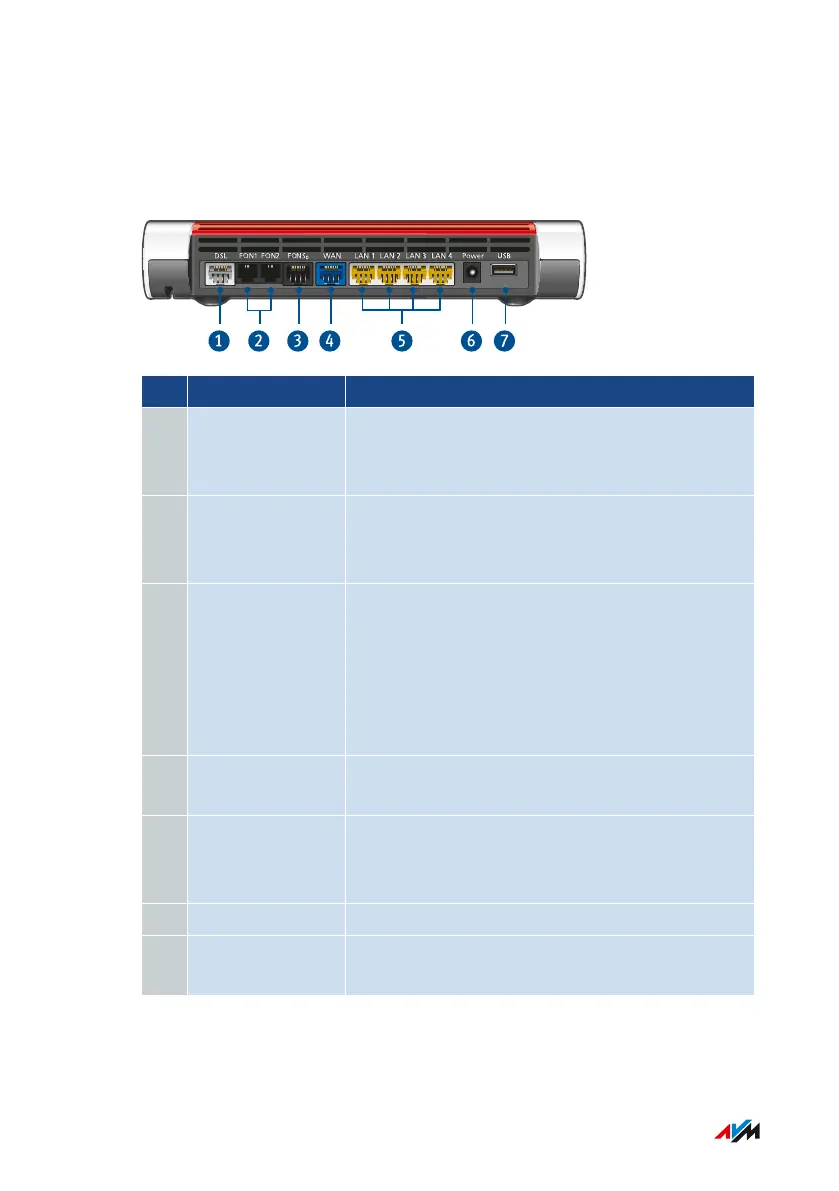
Connection Sockets
Connector Panel
No. Name Function
1 DSL Socket for connecting to DSL (VDSL including
supervectoring/ADSL2+) and to the telephone
network (analog/ISDN).
2 FON 1 and FON 2 RJ11 ports for connecting analog telephones,
fax machines, answering machines or a door
intercom system
3 FONS
0
RJ45 port for connecting to a modem or a
router for internet access. If the port is not
used for the internet connection, then it is an
additional gigabit Ethernet port for connecting
computers and other network-compatible de-
vices.
4 WAN RJ45 socket for connecting ISDN telephones
and telephone systems (PBXs)
5 LAN1 - LAN4 Ports for connecting computers and other net-
work-compatible devices like hubs and game
consoles
6 Power Socket for plugging in the power supply
7 USB USB3.0 port for connecting USB devices like
printers or storage media
FRITZ!Box7590 22
Functions and Structure
• • • • • • • • • • • • • • • • • • • • • • • • • • • • • • • • • • • • • • • • • • • • • • • • • • • • • • • • • • • • • • • • • • • • • • • • • • • • • • • • • • • • • • • • • • • • • • • • • • • • • • • •
• • • • • • • • • • • • • • • • • • • • • • • • • • • • • • • • • • • • • • • • • • • • • • • • • • • • • • • • • • • • • • • • • • • • • • • • • • • • • • • • • • • • • • • • • • • • • • • • • • • • • • • •



 To Next Page