Connecting the FRITZ!Box to an IP-based Connection
Overview
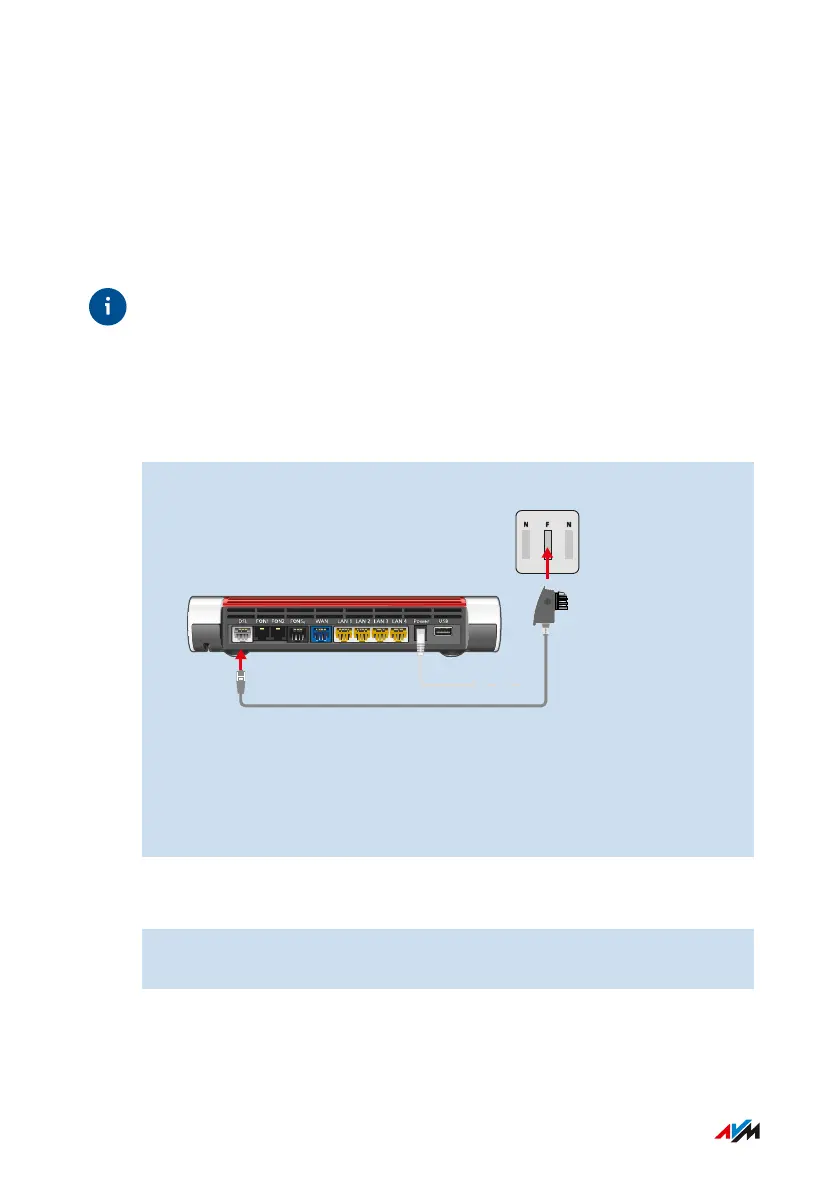
If you have an IP-based DSL connection, then connect the FRITZ!Box di-
rectly to the telephone jack (TAE socket).
In Germany, Austria, Switzerland, and most other countries, the only
lines still available are IP-based. Voice and internet are transmitted in
the same network using the internet protocol (IP). The old telephone
network is not used any more.
Instructions: Connecting to an IP-based Connection in Germany
1. Insert the DSL cable into the DSL socket on the FRITZ!Box.
2. Insert the telephone connector of the DSL cable into the socket
on your telephone jack labeled F.
After a short time the Power/DSL LED on the FRITZ!Box lights up. The
FRITZ!Box is ready to connect to the internet.
Instructions: Connecting to an IP-based Connection in Other Countries
1. Insert the RJ-45 connector of the DSL cable into the DSL port on
the FRITZ!Box.
FRITZ!Box7590 36
Connecting
• • • • • • • • • • • • • • • • • • • • • • • • • • • • • • • • • • • • • • • • • • • • • • • • • • • • • • • • • • • • • • • • • • • • • • • • • • • • • • • • • • • • • • • • • • • • • • • • • • • • • • • •
• • • • • • • • • • • • • • • • • • • • • • • • • • • • • • • • • • • • • • • • • • • • • • • • • • • • • • • • • • • • • • • • • • • • • • • • • • • • • • • • • • • • • • • • • • • • • • • • • • • • • • • •



 To Next Page