4-31
The computer displays start alternating with hi-1.
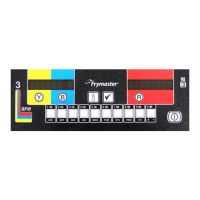
4. Press and hold the (1 yes) button to initiate the first high-limit test
[410°F (210°C)] (see Figure 144).
Figure 144
The vat begins to heat. The computer displays the actual vat temperature during the test. When the
temperature reaches 410°F ± 10° F (210°C ± 12°C), the high-limit should trip. NOTE: In
computers used in the European Union (those with the CE mark), the temperature is 395°F (202°C).
The computer displays hot hi-1 alternating with the actual temperature (ex. 410F).
5. Release the (1) button. The hi-1 test is complete.
The vat stops heating and the computer displays the hot hi-1 alternating with the actual
temperature (ex. 410F) until the temperature cools below 400°F (204°C).
When the temperature cools below 400°F (204°C), the display changes to
start alternating with hI-1.
6. Press the u (INFO) button (see Figure 145).
Figure 145
The computer displays START alternating with HI-2.
7. Press and hold the (1 yes) button to initiate the second high-limit test
(see Figure 146).
Figure 146
The vat begins to heat. The computer displays the actual vat temperature during the test until the
high-limit opens. Generally this happens once the temperature reaches 410°F to 445°F (210°C to
229°C) for non-CE high limits and 392°F to 428°F (200°C to 220°C) for CE high limits. If the
high-limit fails, the computer displays HI 2 BAD. If this happens, turn the fryer off and call for
service immediately.
The computer displays hi-2 alternating with the actual temperature (ex. 430F).
8. Release the (1 yes) button.
The vat stops heating and the computer displays the hi-2 alternating with the actual temperature
(ex. 430F) until the temperature cools below 400°F (204°C).
Once the temperature cools below 400°F (204°C) the display changes to
start alternating with hI-2.
9. Press the (2) button once to exit the high-limit test (see Figure 147).
Figure 147
The computer displays OFF.
10. Follow the procedures on page 4-16 to dispose of the oil.









 To Next Page