Application Note
AN_329 User Guide For LibFT4222
Version 1.5
Document Reference No.: FT_001060 Clearance No.: FTDI#406
32
Product Page
Document Feedback Copyright © Future Technology Devices International Limited
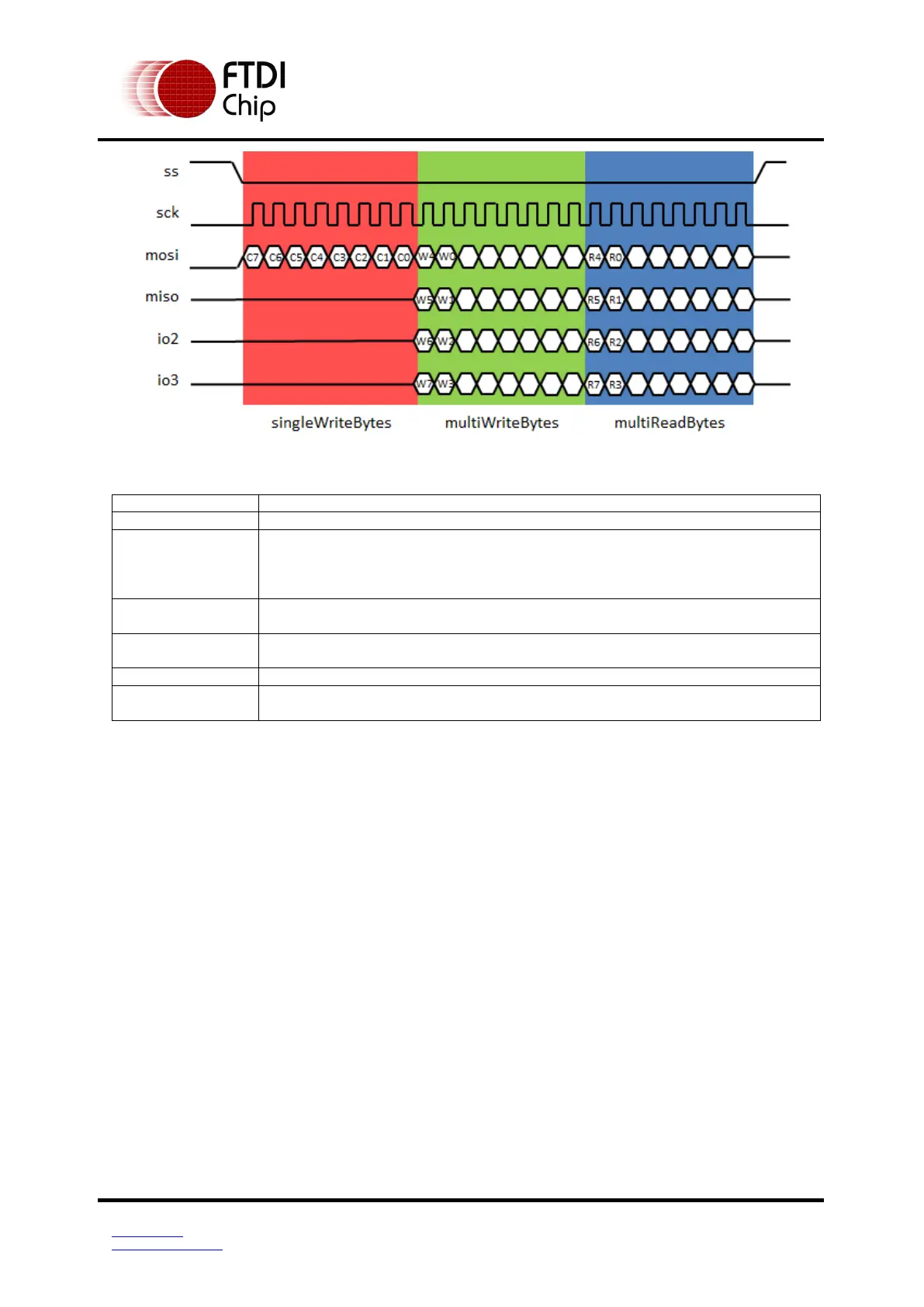
Figure 3.3 Quad SPI communication
Parameters:
Pointer to the buffer that receives the data from the device.
Pointer to the buffer that contains the data to be written to the device. The
data is comprised of both single-write and multi-write parts. It starts with
single-write data, whose length is specified by singleWriteBytes, and
followed by multi-write data, whose length is specified by multiWriteBytes.
Number of bytes in writeBuffer will be written on single-line. Maximum size
is 15.
Number of bytes in writeBuffer will be written on multi-line. Maximum size is
65535.
Number of bytes to read on multi-line. Maximum size is 65535.
Pointer to a variable of type uint16 which receives the number of bytes read
from the device.
Return Value:
FT4222_OK if successful, otherwise the return value is an FT error code.
Error code:
FT4222_DEVICE_NOT_OPENED: The initialization API is not called
FT4222_INVALID_POINTER: Parameter readBuffer or sizeOfRead is NULL while multiReadBytes is
not equal to zero. Parameter writeBuffer is NULL while
(singleWriteBytes+ multiWriteBytes) is not equal to zero.
FT4222_FAILED_TO_WRITE_DEVICE: Write data timeout or failed. FT_SetTimeouts can be called
to extend timeout.
FT4222_FAILED_TO_READ_DEVICE: Failed to read data.
Prerequisite:
FT4222_SPIMaster_init
Example:
// This example it to read 4 IO line mxic flash
FT_HANDLE ftHandle = NULL;
FT_STATUS ftStatus;
FT4222_STATUS ft4222Status;
uint32 _addr = 0x0;
ftStatus = FT_Open(0, &ftHandle);



 To Next Page