PAG.
18
rev 1.0
ENGLISH
4.INSTALLATION
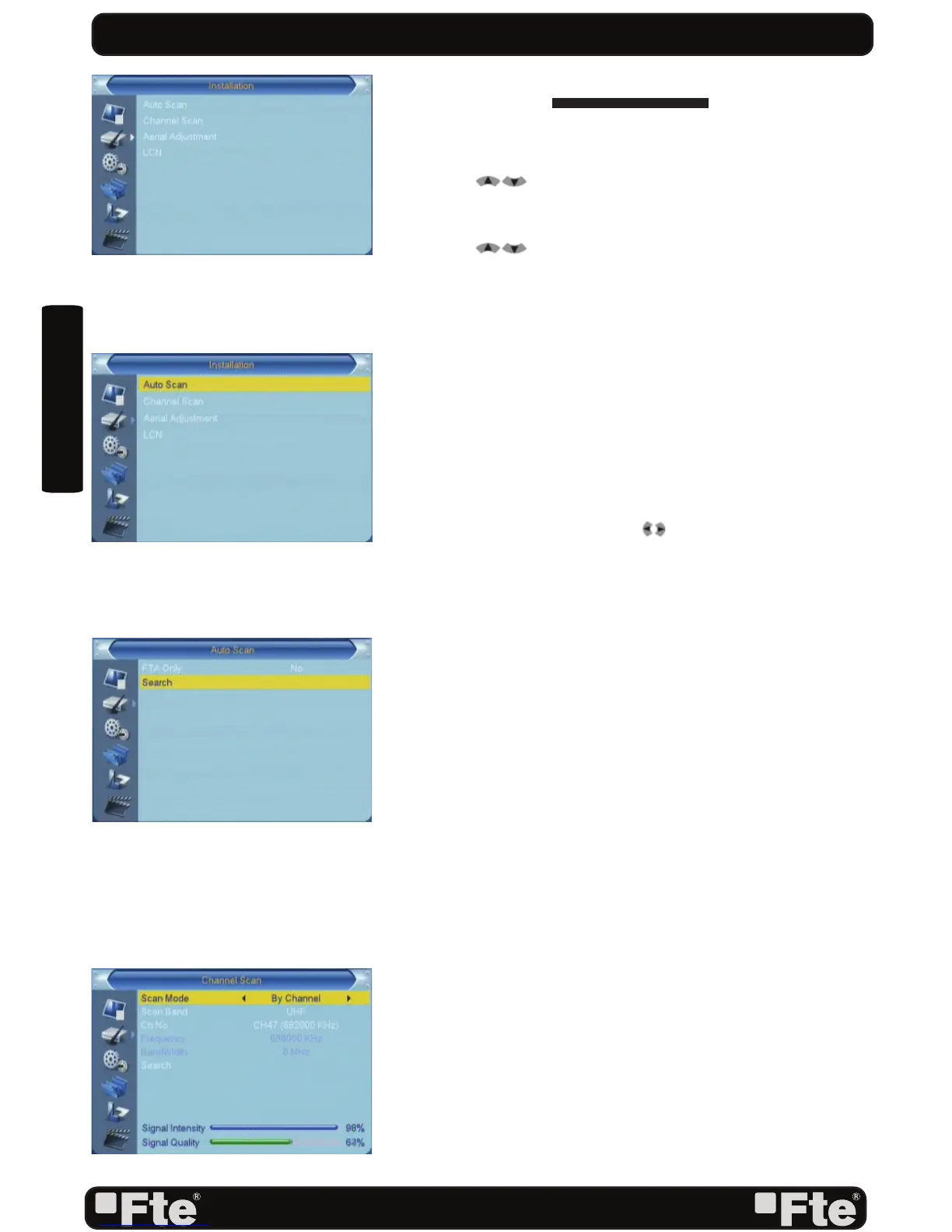
Press [Menu] in the TV mode to enter the main menu (OSD
22).
1. Press [ ] to select the Installation item.
2. Press [OK] to enter the selected item.
In the Installation menu (OSD 23):
3. Press [
] to select the wanted menu item.
4. Press [OK] to enter the selected item among.
- Auto Scan
- Channel Scan
- Aerial adjustment
- LCN
4.1.AUTO SCAN
When you enter to “Auto Scan” menu, there will display the
screen like below (OSD 24):
1. Firstly please select the country in System Setup Menu /
Local Time Settings / Region
2. In “FTA Only” item, press [ ] key to select scans all
channels or just scans free channels.
3. Moving the highlight to “Search” item and press [OK] key to
start scanning. 4 In the “Auto Scan” menu, press [Exit] key
to draw back from the scanning.
4.2 CHANNEL SCAN
When you enter to “Channel Scan” menu, there will display
the screen like below (OSD 25):
1. There is two mode. You can scan channel by channel or
by frequency” .
2. When scan band is UHF, the range of Ch No. is from 21
to 69.
3. When you complete your modifi cation,move highlight to
“Search” item and press [OK] key, then it will begin to
scan.
4. In the “Channel Scan” item, press [Exit] key to exit the
scanning and save the current parameters.
4.3 AERIAL ADJUSTMENT
1. When you enter to “Tuner setting” menu, there will display
the screen like below (OSD 26): In Aerial Adjustment
mode:
Tuner Power: On / Off.
2. Select a channel with signal to verify that reception is
correct to turn on the supply of 5Vdc.
INSTALLATION
OSD 23
OSD 24
OSD 25
OSD 22


 To Next Page