PAG.
27
rev 1.0
ENGLISH
REC & MEDIA
8. REC & MEDIA
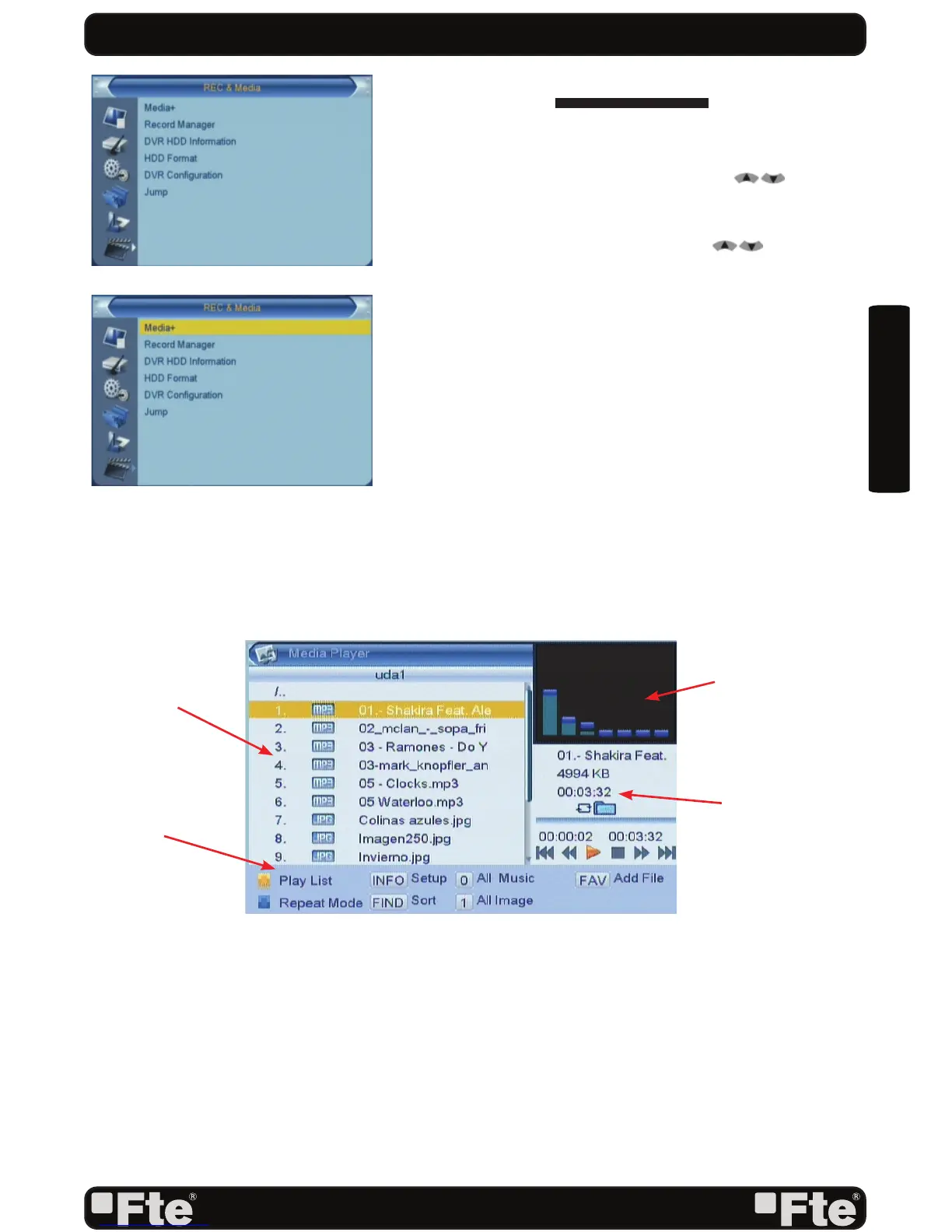
Press the key [Menu] on the remote control to go to the main
menu (OSD 49).
1. Press the arrows on the remote control [ ] to select
the option REC & MEDIA.
2. Press [Ok] to enter the submenu REC & MEDIA.
3. Press the keys on the remote control[
] to move to
the different options on the menu (OSD 50)
4. Press [Ok] to go to the selected option on the submenu.
- Media Player
- Record Manager
- Disk Information
- HDD Format
- DVR Confi guration
- Jump
8.1. MEDIA PLAYER
In this menu option you can accede and manage the contents
of the HDD previously copied from your computer.
You also can create playlists of music or pictures (OSD 51).
Press [Menu] button to Exit.
- PLAYLIST
These lists are created adding the fi les you want to the
previous lists. You can create 2 lists:
- Picture List
- Music List
OSD 49
OSD 50
Recorded fi les
Options
Information about
the selected fi le.
Preview window of
the selected fi le
OSD 51


 To Next Page